Acceptance Testing Examples for Web Application Workflows
Learn how to test whether users actually get into their apps, not just whether the code works.

Acceptance testing is the last checkpoint before a web application goes live, and it answers a different question than every testing phase that came before it. Unit tests and integration tests ask whether the code was built correctly; acceptance testing asks whether the team built the correct thing in the first place. This piece walks through that distinction using the workflows you'd actually find in a production web app: logging in, registering an account, checking out, submitting a form, receiving a notification, and hitting (or correctly failing to hit) a permission wall.
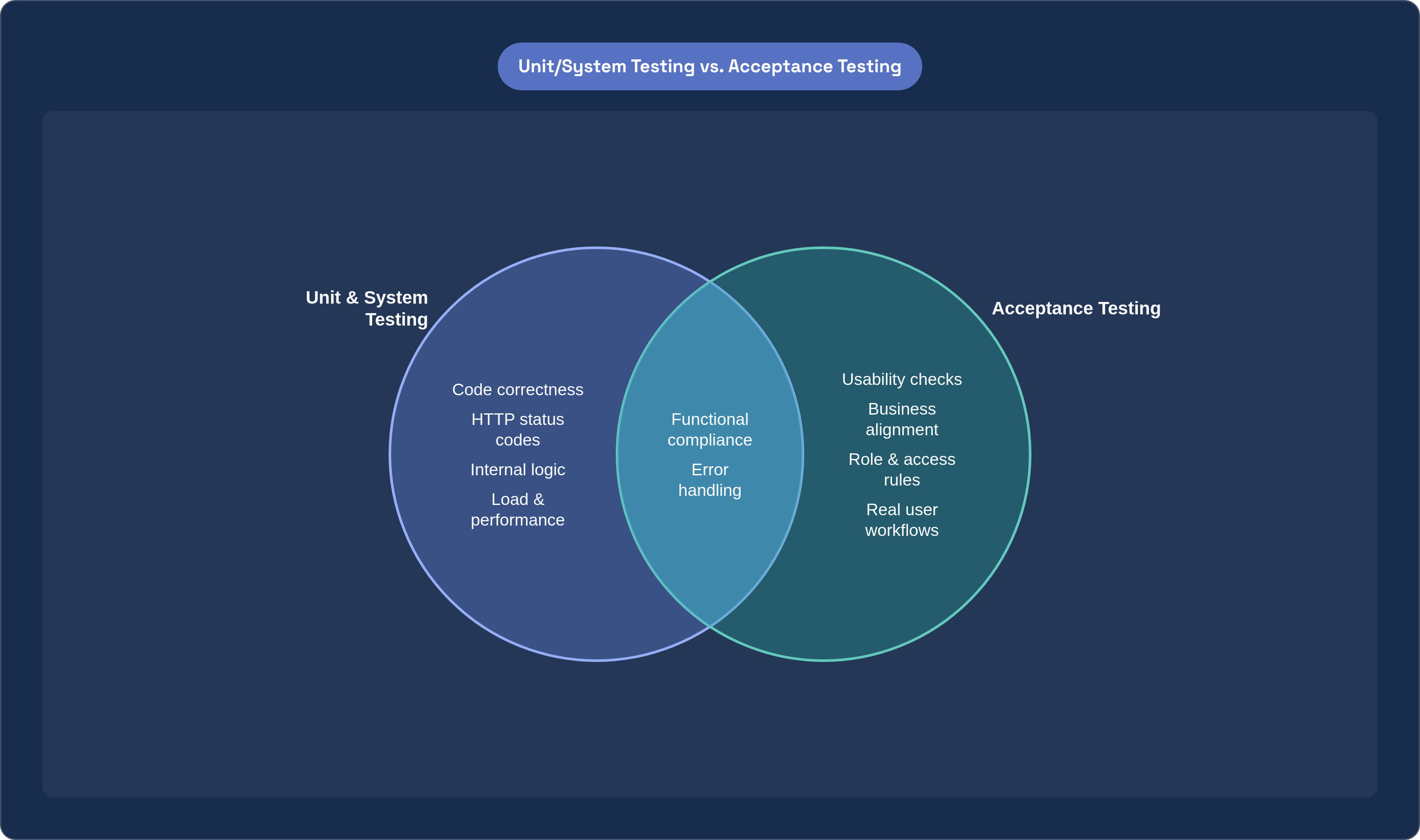
Verification versus validation sounds like a semantic distinction until you watch a project fail because nobody drew the line. A system test can confirm that a login endpoint returns a 200 status code and sets a session token exactly as the technical spec describes. Acceptance testing asks something else entirely: does a real user, sitting at their laptop with their actual email and password, get into their dashboard without confusion or friction? Those are not the same question, and a codebase can pass one while failing the other completely.
Three things define the scope of acceptance testing for a web application, and they're worth naming before diving into examples. Functional compliance checks whether the app does what the business requirement says it should do. Usability checks whether the workflow feels coherent to someone who didn't write the code and doesn't care how it works. Business alignment is the broadest of the three: it asks whether a passing test suite means the organization can actually ship with confidence, not just technical confidence but the kind that survives a support ticket surge or a legal review.
End-to-end, in this context, means something specific. A test traces the full arc of a user action, say, logging in, through the system's response, say, landing on a dashboard, without stopping to check isolated function calls along the way. That's different from a unit test that verifies a password-hashing function returns the expected hash. Acceptance testing doesn't care how the password was hashed. It cares whether the user got in.
Environment fidelity matters more here than in earlier testing stages. Acceptance tests run against production-like data and interfaces, not stubs or mocked services. A staging environment with a fake payment gateway that always returns success will pass every checkout test and still let a broken integration ship, because it never actually contacted a real (or realistically simulated) payment processor's failure modes. If your acceptance environment isn't close enough to production to catch that, you haven't reduced risk, you've just moved it downstream to your actual customers.
It's also worth being honest about what acceptance testing doesn't catch. It has nothing to say about internal code quality, nothing to say about how the app behaves under a synthetic load of ten thousand concurrent users, and nothing to say about security vulnerabilities in the traditional penetration-testing sense. Those live in earlier or parallel testing disciplines. Acceptance testing is narrower and more human-facing than any of them, which is exactly why the workflow examples in this piece are structured around what to verify, the business condition, rather than how the code implements it underneath.
How a test case is structured before writing a single scenario
Before anyone writes a single "Given/When/Then" line, there's a stack of source documents that a well-run acceptance testing effort pulls from: Software Requirement Specifications, Business Requirement Documents, use cases, workflow diagrams, and a data matrix that spells out valid and invalid input combinations. Skip this step and you end up testing what the QA engineer assumes the app should do, not what the business actually asked for. That gap is where most acceptance failures originate, not in the code.
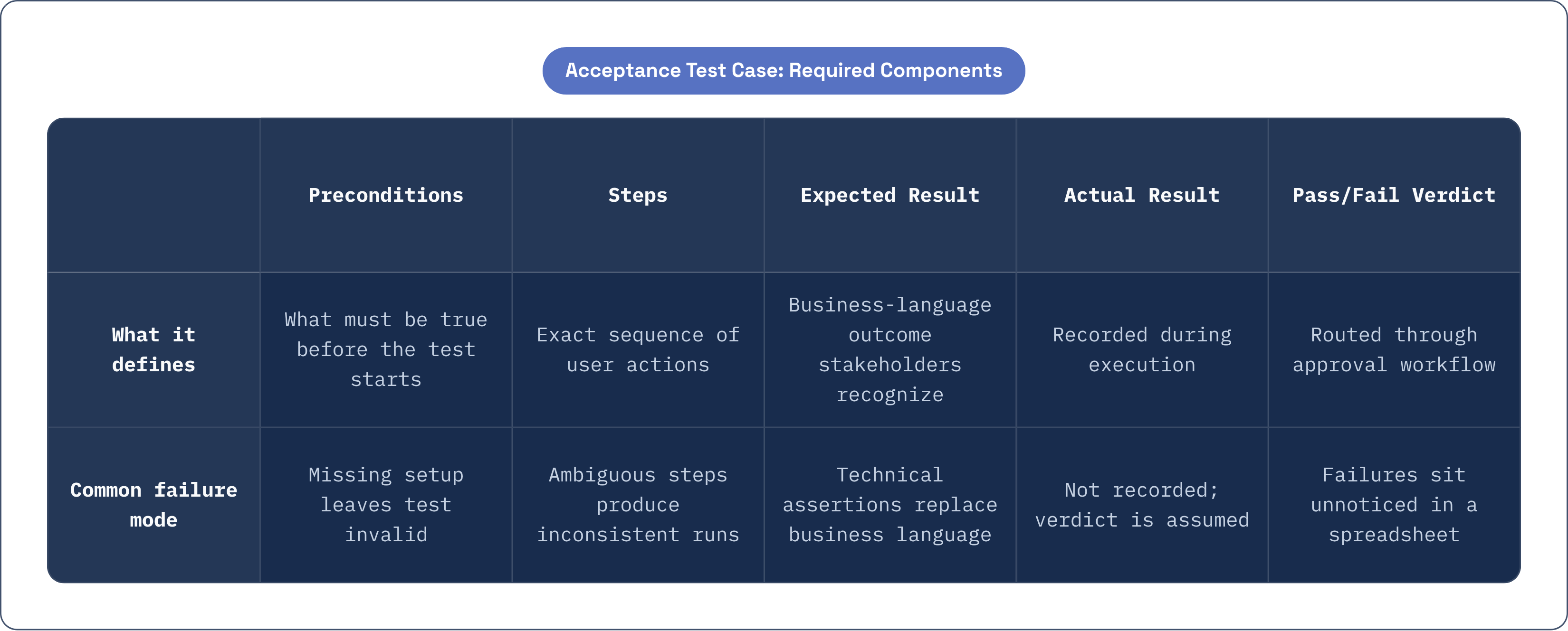
A well-formed acceptance test case has five parts, and each one earns its place. Preconditions establish what has to be true before the test even starts: a user account exists, a cart is populated, an email service is live and reachable. Steps lay out the exact sequence of user actions, no ambiguity, no "and so on." Expected result defines what a business stakeholder would recognize as a pass, written in plain language. Actual result gets recorded during execution. And the pass/fail verdict, in tools like TestRail or Zephyr, often routes through an approval workflow so a failed test doesn't just sit in a spreadsheet unnoticed.
There's an alternative structure worth mentioning: Behavior-Driven Development, using Cucumber-style Gherkin syntax. Given, When, Then. It reads almost like plain English, which is the entire point, because it lets a product manager or a client stakeholder read and sign off on a scenario without needing to parse a line of code. A retailer's product owner can look at "Given a logged-in user with an empty cart, When they add an out-of-stock item, Then they should see an unavailability message" and immediately know whether that's the behavior they asked for.
Here's the part teams get wrong constantly: the expected result has to be written in business language, not technical assertions. "HTTP 200 returned" tells you the server responded. It tells you nothing about whether the order confirmation email arrived within two minutes, which is the actual thing the business cares about. If your expected result reads like a server log, you've written a system test and mislabeled it.
This isn't a hypothetical concern. During UAT on a financial client's portal, built for a construction company managing project documentation and payments, testers found a login error message that was technically accurate but legally ambiguous: the wording implied a user's account might have been compromised when the real issue was a simple password mismatch. Every earlier testing stage had passed. Unit tests confirmed the error-handling logic fired correctly. Integration tests confirmed the message rendered on screen. Nobody had written an acceptance criterion that specified exact wording, because "steps" had been documented without "expected results" tight enough to catch ambiguous language. That gap created real legal exposure for a financial services client, and it never would have surfaced without an acceptance tester reading the message the way an anxious end user would.
One more piece matters here and gets skipped more often than it should: traceability. Every test case ought to map back to a specific requirement, so when something fails, the failure immediately implicates a business rule, not just "something broke." Without that link, a failed test becomes a scavenger hunt. With it, everyone in the room knows exactly which requirement is at risk.
Login and authentication flow: the starting workflow for almost every web application
Login is the right place to start any acceptance suite because it's the gateway to everything else. If a user can't authenticate, no other workflow can be validated at all; the checkout flow, the profile page, the notification settings, none of it matters if the front door doesn't open.
The happy path looks almost too simple to write down: a registered user account exists, the application is reachable, the user navigates to the login page, enters valid credentials, clicks "Sign In." The expected result is that they land on their personalized dashboard, a session cookie gets set, and no error message appears anywhere on screen. Straightforward, yes, but this is the scenario that runs before every release, because a regression here breaks the entire application for every single user, not just one workflow.
The failure case matters just as much. When a user enters an unregistered email and submits, the expected result isn't a generic 401 or, worse, a stack trace leaking implementation details onto the screen. It's a specific, readable message: "Incorrect email or password." That phrasing choice is itself part of the acceptance criterion, not an afterthought. Say "email not found" instead, and you've just told an attacker which addresses are registered in your system, a small leak with real security and even legal consequences depending on your jurisdiction's data protection rules.
Account lockout after repeated failed attempts is its own scenario, distinct from a single failed login. Submit wrong credentials a defined number of times in a row, and the expected result is a temporary lock, a notification to the user explaining what happened, and a login block for the specified lockout window. Skip this test and you might ship an app with no brute-force protection at all, or worse, one that locks legitimate users out too aggressively and generates a support queue nobody budgeted for.
Password reset closes out the core login suite. Click "Forgot password," enter a registered email, submit. The reset email needs to arrive, the link needs to be valid only for its specified window (not indefinitely, which is a security problem many teams overlook), and the new password needs to actually work at the login screen afterward. A passing suite across these four scenarios tells the business something specific and valuable: the authentication boundary works, and no end user will find themselves locked out or, worse, improperly admitted, on launch day.
Selenium remains the standard tool for automating this particular suite, since it can simulate the full click-and-type sequence across Chrome, Firefox, and other browsers without a human repeating the same four scenarios by hand before every deploy. Login tests are usually the first candidates for automation precisely because they're stable, they run constantly, and they gate everything downstream.
User registration and profile creation: validating data entry, error handling, and confirmation
Registration is where an application first asks a stranger to trust it with information, and the acceptance criteria here are less about flashy functionality and more about whether the system handles that trust carefully. Successful account creation is the obvious first scenario: an email not already in the system, all required fields completed with valid data, submission goes through. The expected result is an account that actually exists, a welcome or confirmation email that arrives, and either an automatic login or a clear path to one.
Duplicate email handling is where a lot of registration flows quietly fail their users. Attempt to register with an address already in the system, and a silent failure or a generic server error is not an acceptable outcome, even if it's technically "handled" in the sense that the app didn't crash. The expected result is an inline message that clearly states the address is taken and offers the user somewhere to go next: a login link, a password reset option. Anything less just strands the user, and they'll assume the app is broken rather than realize they already have an account.
Required field validation and format validation are close cousins but worth testing separately. Leave a required field blank, and each missing field should get flagged individually, the form shouldn't submit, and the user shouldn't get bounced to some unrelated error page that loses their progress. Enter a malformed email address or a password that doesn't meet the strength policy, and the feedback needs to explain, at the field level, what's wrong and how to fix it. "Invalid input" is not acceptance-quality feedback. "Password must include at least one number and one symbol" is.
What a passing suite here actually confirms is narrower than it sounds but genuinely important: the system enforces its data contract before anything gets written to the database, and the user gets enough information to fix their own mistakes without opening a support ticket. That second part, self-service correction, is where usability and functional compliance overlap most directly.
E-commerce checkout sequence: the highest-stakes workflow in most consumer web applications
Checkout carries more financial risk than any other workflow in a typical consumer web app, because a silent failure here doesn't just annoy a user, it costs the business a transaction. That's why it gets treated as the canonical high-stakes example in almost every acceptance testing discussion, and why the scenario list runs longer here than anywhere else in this piece.
The happy path needs a logged-in user with at least one item in the cart and a test payment method available in staging. The steps: proceed to checkout, confirm shipping address, select a shipping method, enter payment details, review the order summary, place the order. The expected result stacks up across several systems at once: a confirmation page with an order number, a confirmation email that actually arrives, inventory that decrements correctly, and the order showing up in the user's order history. Miss any one of those and the "successful" checkout wasn't actually successful from the business's perspective, even if the confirmation page rendered fine.
Declined payment is the scenario teams sometimes underweight, maybe because it feels like the "unhappy" case and gets less attention than the flow that generates revenue. But how the app handles a decline says a lot about whether it can be trusted with real money. Enter a card configured to decline in the test environment, and the expected result is a clear, actionable message: "Your payment was declined, please try a different card." No order should get created, and critically, the cart needs to be preserved. Nothing drives an abandoned cart faster than a declined payment that also wipes out everything the user had selected.
Out-of-stock timing is a genuinely tricky scenario to test well, because it depends on a race condition: an item goes out of stock between the moment it's added to the cart and the moment checkout completes. The expected result is that the user gets notified before or during checkout, the order doesn't complete for the unavailable item, and some alternative action gets offered, a backorder option, a substitute, a removal with adjusted total. Getting this wrong means selling something you don't have, which creates a fulfillment problem far more expensive than a failed test case.
Coupon and discount code application deserves its own scenario because the math has to be right, not approximately right. Enter a valid promo code, and the discount should apply to the correct line items, the total should recalculate and display before the user submits, and an invalid code should produce a clear error without derailing the rest of the checkout flow. And guest checkout versus logged-in checkout both need to pass independently; a guest completing an order shouldn't accidentally spawn a duplicate account, and their order history needs to stay accessible even without a saved login.
One requirement threads through all five checkout scenarios: cross-browser validation. Checkout flows are among the most browser-sensitive workflows in any web application, largely because payment forms, autofill behavior, and third-party payment widgets render and behave differently across Chrome, Firefox, Safari, and Edge. Testing checkout in a single browser and calling it done is a gap, not a shortcut.
Form submission workflows beyond checkout: contact forms, search, and data-entry screens
Not every form on a web app carries checkout-level stakes, but that doesn't mean the acceptance bar drops. A contact form looks trivial until you consider everything that has to work correctly for a single inquiry to actually reach a human. Submit the form, and the acceptance criteria include an on-screen acknowledgment, a copy landing in the user's inbox, the entry appearing in the admin inbox or CRM, and no duplicate submissions if the user double-clicks the button out of impatience. That last one trips up more forms than you'd expect.
There's a failure mode worth naming specifically here: spam-filter integration. A legitimate submission can get silently swallowed by an overly aggressive spam filter on the receiving end, and from the user's perspective, everything looked fine. The form said "Thank you," but the message never arrived. Acceptance testing needs to verify actual delivery, not just the on-screen confirmation, because the confirmation and the delivery are two separate systems that can fail independently.
Search and filtering workflows split into three scenarios that build on each other. A keyword that matches existing records should return relevant results in the correct order with an accurate count. A term with no matches should produce a genuinely useful empty state, not a blank page that leaves the user wondering if the search even ran. And applying multiple filters simultaneously should return the intersection of all of them, with the filter state preserved if the user navigates away and comes back. That last check matters more than it sounds: losing filter state on back-navigation is a small thing that generates outsized user frustration.
Multi-step wizards, the kind you see in onboarding flows or complex data-entry screens, need acceptance coverage at each individual step and then again for the final submission as a whole. The key check that often gets missed: does partial progress survive if a user drops off mid-wizard and comes back later? And if an error surfaces on step three, does it wipe out the data the user carefully entered on steps one and two? A wizard that punishes users for a validation error three steps in by discarding their earlier work will generate abandonment, and abandonment on a multi-step form is expensive to diagnose after the fact.
File upload forms round out this section, with scenarios covering a valid file type and size, an oversized file (rejected, with the size limit clearly stated), and an unsupported format (rejected, with the allowed types listed explicitly). On success, the file should appear where it's supposed to, in a document library, or trigger whatever downstream action depends on it. Across every form type in this section, the acceptance criterion always comes back to the same thing: the user's observable experience and the business record created, never the HTTP response code sitting underneath it.
Notification and email trigger workflows: verifying the system communicates what it should, when it should
Notification testing gets shortchanged more often than any other category in this piece, and it's worth asking why. Notifications are asynchronous, they depend on third-party delivery infrastructure the team doesn't fully control, and they produce no immediate visible change on screen for a tester to observe. It's easy to test what you can see. It's much easier to skip what you can't.
Transactional emails carry the heaviest business weight here. An order confirmation should fire within a defined window after purchase and contain the order number, an itemized summary, and an estimated delivery date. A password reset link needs to be single-use and expire after its specified interval, not linger indefinitely as an open door into someone's account. Account verification emails need to arrive promptly after registration, the link needs to activate the account when clicked, and an expired link should offer a clear re-send option rather than a dead end. Shipping updates should fire the moment the fulfillment system changes an order's status, and the tracking link inside that email needs to actually resolve to the right carrier page.
In-app notifications carry their own scenario set. A notification has to land in the correct user's feed, not someone else's, which sounds obvious until you're debugging a multi-tenant system where user IDs get crossed. The unread count needs to increment on arrival and decrement once the user actually views it. And if the action that triggers a notification gets retried, whether by a user double-clicking or a backend retry mechanism, the notification shouldn't fire twice.
Negative cases matter as much as positive ones in this category, maybe more. A failed checkout should never trigger an order confirmation email; that's not a minor bug, it's a direct source of customer confusion and support tickets. A form submission that fails validation shouldn't quietly fire a server-side notification either, since that creates a mismatch between what the system recorded and what actually happened.
Here's a practical detail worth calling out: testing notifications against real email addresses in a UAT environment introduces delay and unpredictability from actual SMTP queues. Using a dedicated test inbox, something like Mailhog or Mailtrap, makes delivery immediately observable and removes that variable entirely. It's a small environmental choice that makes the difference between a deterministic test and one that occasionally fails for reasons that have nothing to do with the application itself.
The acceptance criterion for every single notification scenario comes down to three things that all have to be true together: correct recipient, correct content, correct timing. A notification that arrives to the right person with the right information but three hours late has still failed the test, even though, technically, it got delivered.
Role-based access and permissions: testing that the right users see the right things
Access control belongs in acceptance testing, not just security testing, because business requirements explicitly specify which roles get to see which features, and acceptance testing exists to confirm those rules hold up from the user's actual vantage point. This is where functional compliance and business alignment overlap most tightly.
A typical scenario set covers three tiers. An admin should be able to reach the user management dashboard, approve submissions, delete records. A standard user should be able to edit their own profile and view their own order history, and nothing beyond that; they shouldn't be able to reach another user's data through any path in the interface. A guest, unauthenticated entirely, should be able to browse public content freely but get redirected to login the moment they attempt to reach any authenticated route.
The key acceptance criterion across all three tiers is how gracefully the system handles a wrong-role attempt. Trying to access a restricted resource as the wrong user should produce something defined and useful: a redirect to login, a 403 page with a clear next step. A blank page or a raw server error is a failed test, full stop, even if the access itself was correctly denied on a technical level. Denying access correctly but confusingly is only half the job.
Data isolation deserves its own dedicated test, separate from the role scenarios above. Log in as User A, note a private record somewhere in the app. Log out, log in as User B, and attempt to reach that same record through direct URL manipulation, typing the record's ID straight into the address bar. If User B can reach it, the role-based access control has a hole in it that no amount of hiding the link in the UI actually fixes, because the UI was never the real barrier to begin with.
One more scenario closes out this section, and it's the one most often skipped: permission change propagation. An admin revokes a user's elevated access mid-session. Does that change take effect within the defined session-refresh window, or does the demoted user keep their old permissions until they happen to log out and back in? Real applications need to define that window explicitly and test against it, because "at next login" is a very different guarantee than "within five minutes," and the business requirement should say which one it actually promised.
A passing suite across all of these scenarios confirms something that's easy to state and hard to actually deliver: the access policy the business defined on paper is the access policy the application enforces in practice, for every role, at every boundary, without exception.