How Selenium Automation Testing Actually Works
Understanding the four-layer architecture that powers browser automation.
Selenium keeps getting declared dead, and yet the numbers say otherwise: the project holds 23.06% market share in the testing and QA category, with more than 49,358 companies actively running it in production. That gap between the discourse and the download counts says something on its own. If a tool were actually fading, job boards would thin out first, since nobody staffs up for a framework on its way out. Instead, thousands of active US postings on LinkedIn are asking for Selenium skills right now, and the project itself shipped a new stable release, 4.49.0, on September 9, 2026, meaning active development, not maintenance-mode limbo.
Where does the retention concentrate? Enterprise environments concentrate retention in regulated industries, legacy UI stacks, Java-based tooling, and broad browser matrices. None of that is glamorous. Selenium is an open-source umbrella project for browser automation tools and libraries, most recently at stable release 4.49.0 (published September 9, 2026).
Understanding why Selenium persists means understanding how it actually works. The rest of this piece traces that mechanism: the architecture that produces it, the path a single command takes through it, and where the tool's design draws firm boundaries around what it should and shouldn't attempt.
The four-layer architecture that makes browser automation possible
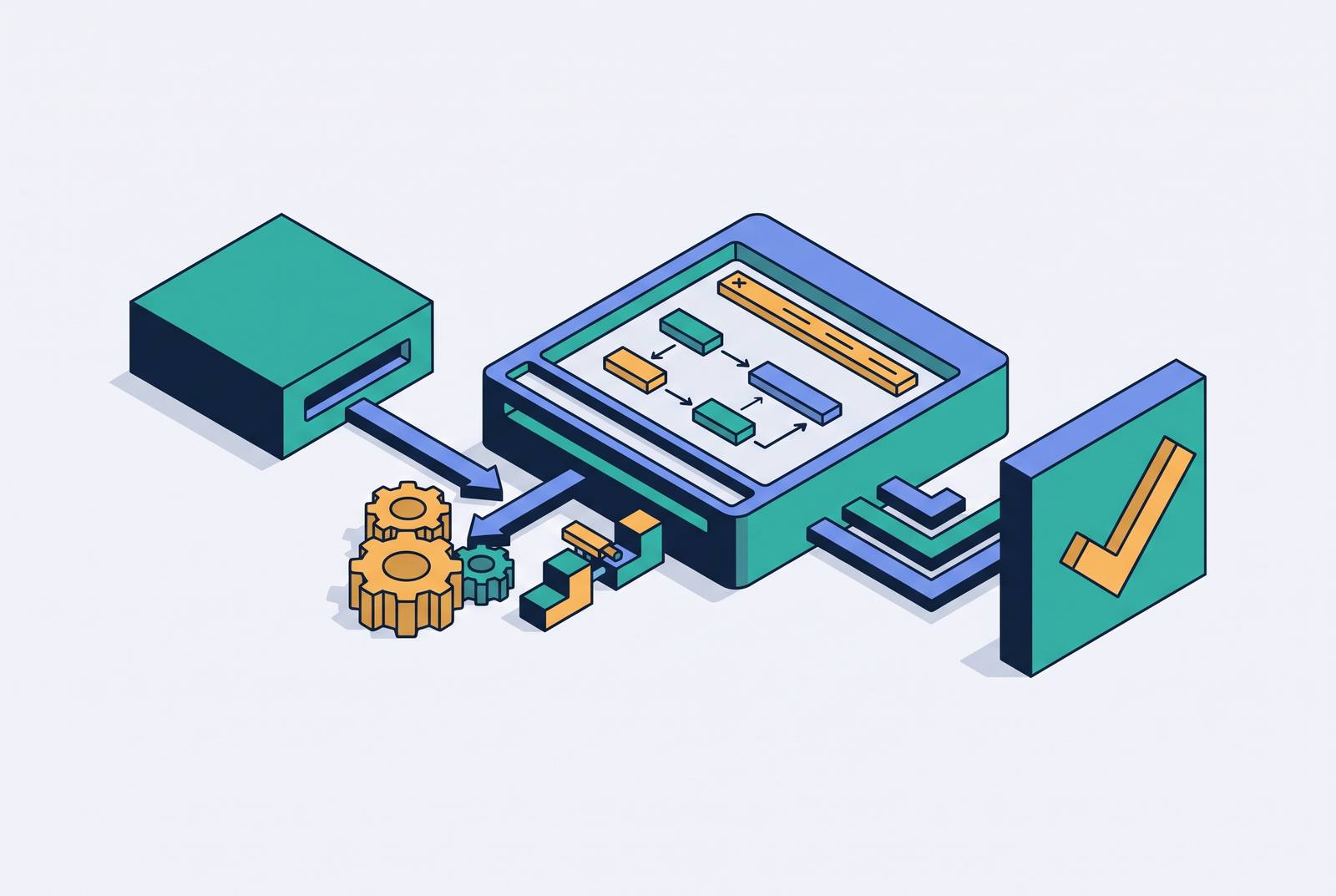
First, the Selenium Client Libraries, the language bindings in Java, Python, Ruby,.NET, or JavaScript where the actual test code gets written. Second, the WebDriver Protocol, the communication standard that structures and transmits commands from that client code to whatever's controlling the browser. Third, the Browser Drivers themselves: ChromeDriver, GeckoDriver, Edge WebDriver, SafariDriver, and (for the legacy holdouts) InternetExplorerDriver, each one a browser-specific executable that translates protocol commands into actions the browser can actually perform. Fourth, the browser itself, where the interaction physically executes against a real rendering engine.
Picture it as a straight line: test script, then WebDriver API, then browser driver, then browser, then the response traveling back up that same path. One detail trips people up when they move to remote or distributed setups: the driver runs on the same machine as the browser it's controlling, but that machine may or may not be the same one running the test code. That distinction becomes load-bearing once Grid and cloud execution enter the picture later in this piece.
Selenium's ecosystem includes more than the WebDriver piece, but the WebDriver component is what runs production suites. Selenium IDE, the record-and-playback browser plugin, is useful for learning the tool or throwing together a quick prototype, but it isn't built for the kind of durable, maintainable test suite that survives a codebase's evolution. What Selenium should not be used for: file downloads, CAPTCHAs, 2FA flows, link crawling, and performance benchmarking, which either exceed what the DOM-interaction model supports or require purpose-built tooling.
How a test command travels from script to browser
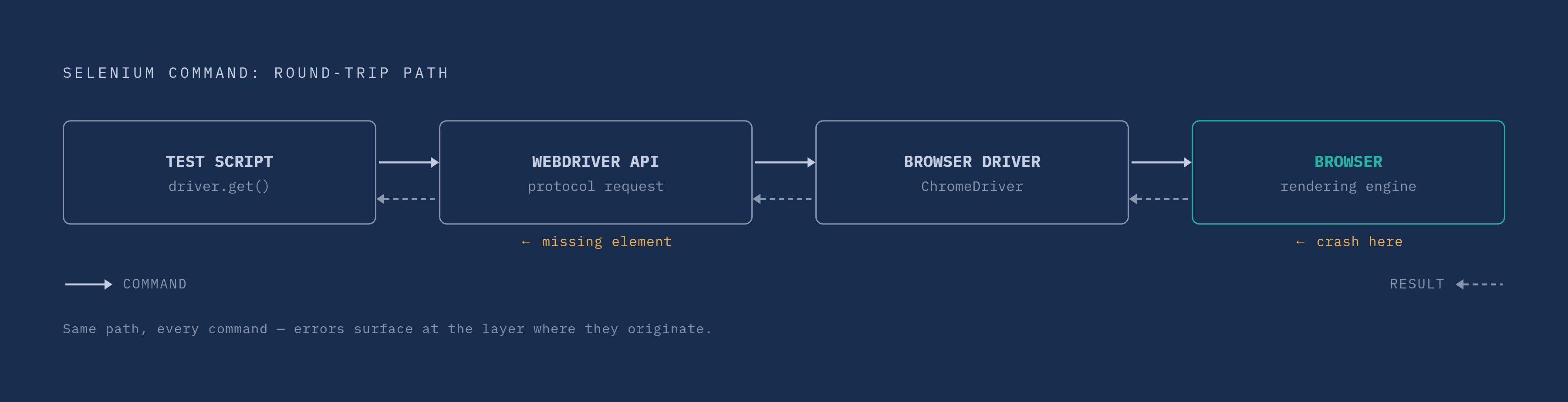
Take the simplest possible command: driver.get("). Tracing what happens after that line executes is the single most useful mental model for understanding Selenium, because every other interaction, clicking a button, typing into a field, reading an element's visible text, follows the identical round trip.
The test script issues the command in whatever language it's written in. The Selenium WebDriver API then converts that command into a protocol-formatted request, packaging it in the shape the browser driver expects. The browser driver, ChromeDriver in this example, receives that request and translates it into a native instruction the browser actually understands. The browser then loads the page and performs the requested action against its own rendering engine.
That's the whole loop. Every click, every keystroke simulation, every assertion on visible text runs through this exact same five-hop journey, down through the layers and back up.
Why does this matter beyond academic interest? Errors occur at different points along that chain, and knowing where helps triage failures faster instead of guessing. A missing element throws its exception at the WebDriver layer, before the command even reaches the browser. A browser crash, by contrast, occurs at the browser layer itself, further down the chain. A tester who understands the path can look at a stack trace and immediately narrow down whether the problem is a bad selector, a timing issue, or an actual browser-level failure, rather than treating every red test the same way. The browser sends the result back to the driver, the driver forwards it to the WebDriver API, and the WebDriver returns control to the script.
Selenium 4's move to the W3C WebDriver standard
Selenium 3 ran on the JSON Wire Protocol. Selenium 4 runs on the W3C WebDriver Recommendation, ratified June 5, 2018. That sounds like a minor plumbing swap, but it changes the reliability story in a way that's easy to underrate.
Under the old protocol, browser vendors implemented their own interpretations of how commands should behave, which produced subtle inconsistencies between Chrome, Firefox, and whatever else a test suite targeted. That's a structural fix, not a feature addition: it removes an entire category of cross-browser bugs that testers used to just accept as the cost of doing business.
Selenium 4 also opened a door that didn't exist before: access to the Chrome DevTools Protocol, or CDP, directly from within test scripts. Selenium 4 also introduced access to the Chrome DevTools Protocol (CDP), enabling network monitoring, performance testing, and browser debugging from within test scripts, capabilities that required external tooling in Selenium 3.
And then there's the setup friction that quietly ate hours of everyone's time for years: version mismatches between the installed browser and its driver. Selenium Manager, introduced in Selenium 4.6 and now a prominent, mature part of the 2026 release line, automatically downloads and configures the correct driver version for whatever browser is installed. It sounds like a small convenience. Selenium 4 also adds improved support for parallelization and cloud-based execution.
What Selenium tests do (and what they deliberately don't)
This mechanism is well suited to functional, regression, end-to-end, cross-browser UI, and smoke testing.
In practice that covers a familiar catalog of everyday QA work: validating a login screen rejects a wrong password, walking a shopping flow from product selection through checkout to a confirmation screen, submitting a form and checking the resulting database or UI state, confirming a dashboard renders the right numbers after a user action, tracing a new user through a registration path.
But the architecture that makes all of this possible also draws a hard boundary around what it shouldn't be asked to do. File downloads, CAPTCHAs, two-factor authentication flows, link crawling, and performance benchmarking all sit outside what the DOM-interaction model was built for, and each either exceeds what that model supports or genuinely needs purpose-built tooling instead. That's not a flaw in Selenium so much as a reminder that it was designed to answer one question well (does the UI behave the way a user expects?) rather than every question a QA team might have. Recognizing that boundary early saves a lot of wasted engineering effort later, particularly once execution moves to scale. The next section picks up at that point. Cross-browser verification covers Chrome, Firefox, Edge, and Safari, testing that behavior is consistent across rendering environments.
Running tests in parallel with Selenium Grid
Running one test against one browser is straightforward. Grid works on a hub-node architecture: the hub acts as the central controller, and nodes are the actual browser environments where tests execute. Selenium Grid 4 isn't a patch on the old design either. It's a full redesign built around containerization, Kubernetes, and the kind of distributed infrastructure that modern engineering teams already run everything else on.
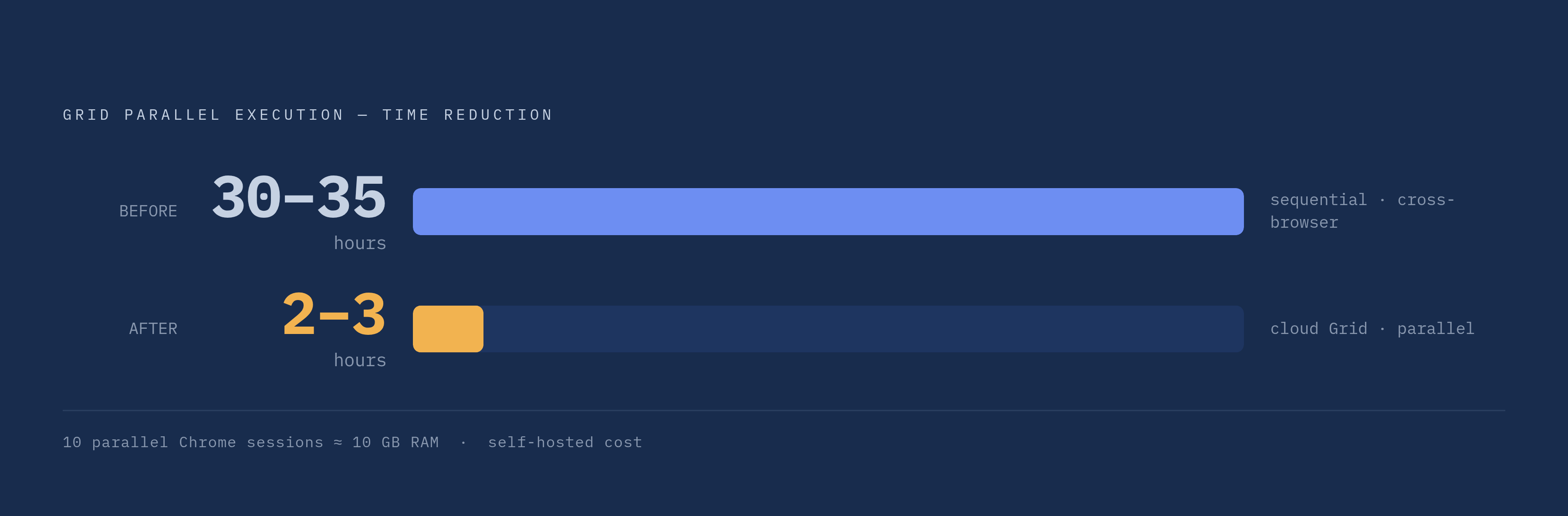
What does parallelization actually buy a team? Cross-browser sessions run at the same time instead of one after another, and cross-platform coverage, Windows, Linux, macOS nodes, can all be triggered from a single command. One team's reported outcome puts a number on what that means in practice: adopting cloud Grid cut execution time from 30 to 35 hours down to 2 to 3 hours. That's a dramatic speedup. That's the difference between a test suite that blocks a release overnight and one that finishes before a coffee break ends.
Self-hosting that infrastructure isn't free, though. Every browser instance in a Grid needs its own container running a full browser installation, and running 10 parallel Chrome sessions requires something in the neighborhood of 10 GB of RAM. Scaling that up to the parallelism a large release actually demands makes the hardware bill become real. Cloud Grid providers, Sauce Labs, BrowserStack, and LambdaTest among them, exist specifically to take that infrastructure question off a team's plate, letting parallel sessions scale up during a critical release window and back down once it passes, without anyone provisioning permanent hardware that sits idle the rest of the year.
Fitting Selenium into a CI/CD pipeline
Grid solves execution scale. CI/CD solves when that execution happens, and increasingly the answer is: constantly, automatically, on every code change. The ThinkSys QA Trends Report for 2026 found that CI/CD adoption among QA teams has reached a large majority, which puts pressure on any automation framework that doesn't slot cleanly into a pipeline. A framework that needs a human to manually kick off a test run is fighting the direction the whole industry has already moved.
In the typical trigger sequence, the CI system detects a push or a merge, builds the application, deploys that build to a test or staging environment, and only then dispatches the Selenium suite against it. Jenkins, GitHub Actions, and GitLab CI are the common integration points, and according to the JetBrains State of CI/CD survey, GitHub Actions leads adoption both among individual developers and inside organizations. That matters for where Selenium Grid setups actually need to live: increasingly inside the same container-based environments those CI systems already orchestrate.
Headless browser execution on Linux containers has matured to the point where it's genuinely production-grade now. Splitting test jobs efficiently can bring average build durations under 4 minutes.
Flaky tests and the practices that prevent them
Go back to the signal path from earlier in this piece: a script sends a command, a driver translates it, a browser executes it, a result travels back. Nowhere in that chain is there a guarantee about when the browser finishes rendering. That timing gap is exactly why flaky tests exist, and fixed-duration waits, the old Thread.sleep() call, are the leading cause of Selenium failures precisely because they guess at a number instead of checking reality. Guess too short and the page hasn't loaded when the test tries to interact with it. Selenium 3 used the JSON Wire Protocol; Selenium 4 uses the W3C WebDriver Recommendation, ratified June 5, 2018.
The fix built directly into Selenium's own API is the explicit wait: instead of waiting a fixed duration, it polls the DOM and proceeds the instant a condition is actually met. That single substitution eliminates most of the timing-based flakiness that gives Selenium its brittle reputation in the first place.
Locator choice matters just as much. The stability hierarchy runs ID, then Name, then data-testid, then CSS Selector, then XPath last, and that ordering isn't arbitrary. XPath is the slowest expression to evaluate and the most likely to break the moment the DOM structure shifts even slightly, so it belongs in a script only when nothing more stable is available.
Then there's the maintenance problem of selectors breaking as an application changes, which the Page Object Model exists to answer. Represent each screen or component as its own class, with locators stored as fields and user actions expressed as methods. When a selector changes, and in any actively developed application it eventually will, one class file gets updated and every test depending on it inherits the fix automatically. That's a maintenance-cost argument first, an elegance argument a distant second.
Test isolation closes the loop: each test should own its own setup and teardown and share no state with any other test, and parallel execution specifically requires unique test data per thread, since shared database records or shared test accounts start colliding the moment concurrency goes up. And the boundary from the earlier section holds here too: file downloads, CAPTCHAs, two-factor flows, and performance benchmarks aren't things Selenium was built to handle, and forcing them produces tests that are unreliable.
AI capabilities layered onto the Selenium foundation
The World Quality Report by Capgemini found that nearly 90% of organizations are actively pursuing Gen AI in their quality engineering practices, though only 15% have achieved enterprise-scale deployment, reflecting recognition that traditional Selenium alone struggles to keep pace with modern development velocity.
Five AI capabilities are being added to Selenium. Self-healing locators use machine learning to monitor how elements shift over time and auto-update selectors using multi-attribute analysis, text, position, DOM hierarchy, visual context, directly addressing brittle locators, the problem the previous section spent real time on. Auto test case generation analyzes session recordings and logs to build test cases that mirror how users actually move through an application, rather than how a tester imagines they might. Smart element recognition brings in computer vision and natural language processing to locate elements by their visual position and the text sitting near them, cutting down on the StaleElementReferenceException failures that plague long-running suites. Predictive test selection evaluates code changes against historical failure data to run only the tests actually affected, trimming full-suite execution time inside CI. And intelligent wait and timing logic analyzes page-load behavior as it happens and adjusts waits dynamically, directly addressing the timing uncertainty that causes most flaky tests.
These capabilities are implemented either as libraries layered onto existing Selenium scripts or as full platforms, such as Testsigma, that abstract the scripting layer entirely for teams without deep engineering bandwidth to spare. Of the five, self-healing locators are the clearest place to start. They cut the maintenance overhead that eats the largest share of QA time, and they do it without demanding a full framework migration.
None of this replaces the four-layer chain traced at the start of this piece. It sits on top of it, refining how commands get chosen and how long a script waits for a result, while the same WebDriver protocol, the same browser drivers, and the same real rendering engines underneath still do the actual work. That's arguably the more durable story here: not that AI is replacing Selenium's architecture, but that the architecture was sound enough to build a new generation of tooling on top of, rather than around.
Sources
- The Ultimate Guide to Selenium AI in 2026 - Testsigma
- Selenium
- Architecture of Selenium WebDriver | BrowserStack
- Selenium Market Share in 2026: Usage Stats & Enterprise Adoption | TestDino
- Selenium Grid 4 Tutorial: Setup, Features, and Components | BrowserStack
- Selenium components | Selenium
- What's new in Selenium 4: Key Features | BrowserStack