Playwright in Docker for Serverless Deployments
Docker packages browser dependencies reliably for serverless environments.
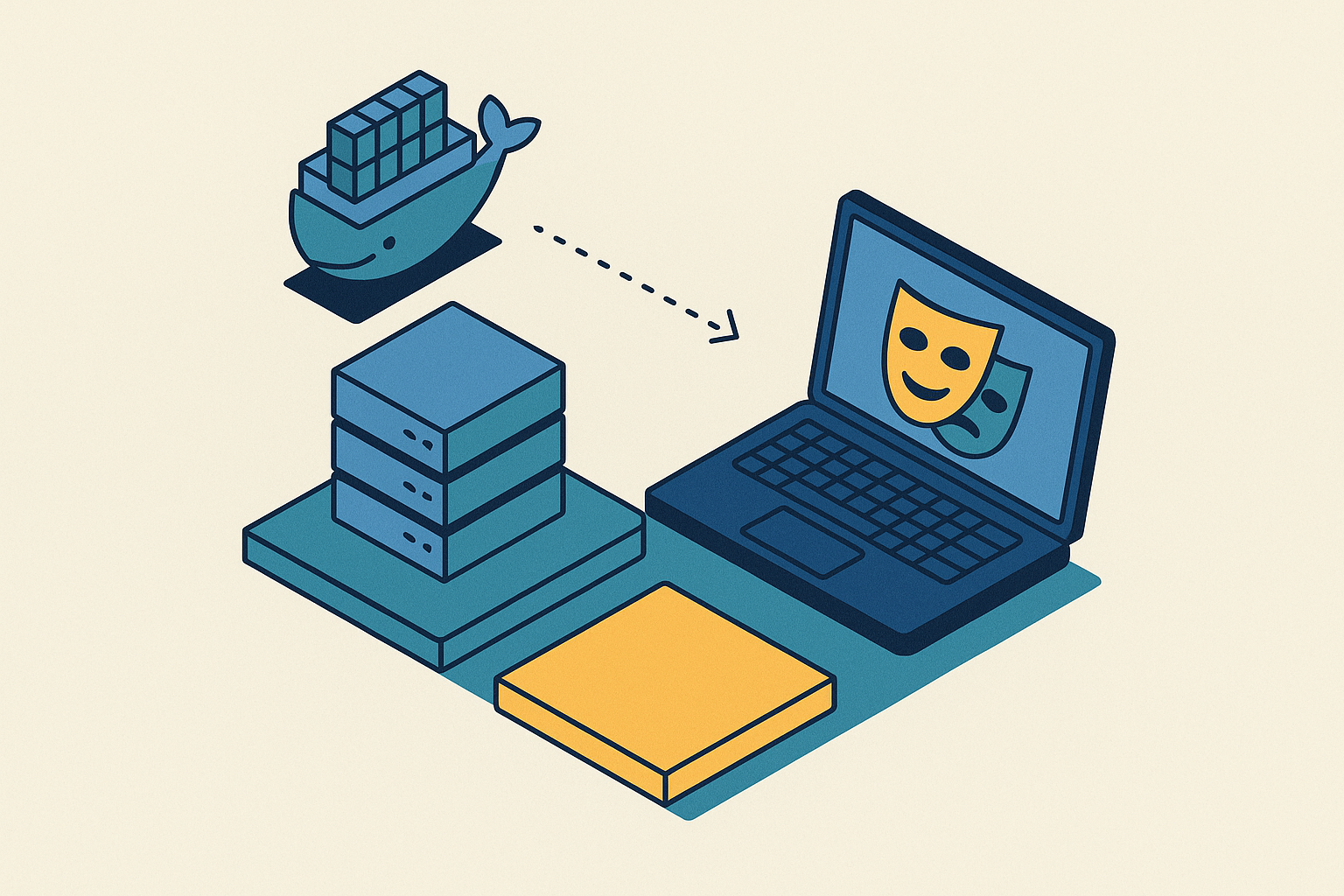
Playwright is a browser automation library, and getting it to run inside a serverless function is one of those problems that looks like a config issue and turns out to be a packaging issue. This piece walks through why bare-bones runtimes break Playwright, how Docker fixes that, and what it actually takes to run a headless browser reliably on AWS Lambda, Azure Container Apps, or a managed edge runtime, all the way down to launch flags and token costs when an AI agent is driving the browser instead of a test script.
Playwright doesn't just need Node or Python installed. It needs a specific build of Chromium (or Firefox, or WebKit), a set of shared system libraries those browsers link against at runtime, font packages so pages render text correctly, and the driver binaries that let Playwright talk to the browser process over a debugging protocol. That's a lot more surface area than a typical function dependency, and it's why a script that runs fine on a laptop can fall over in CI or in production with no clear explanation. The library that's missing on the CI box often isn't missing on the dev machine, because the dev machine picked up some system package years ago during an unrelated install.
Serverless runtimes make this worse by design. Amazon Linux on Lambda, and the host OS behind Azure Functions, are deliberately stripped down. Fewer packages, smaller attack surface, faster cold boots. Fine goals in general, terrible news for a headless browser that expects a fairly complete Linux userland underneath it. When the Playwright installer fetches browser binaries built for a standard desktop-style Linux environment, those binaries just don't line up with what Lambda's slim environment provides. The result is binary incompatibility, not a missing feature.
And the failure mode is rarely helpful. Instead of "Chromium not found," a broken Lambda deployment tends to throw a cryptic native library error, something about a shared object file that can't be loaded, with no obvious link back to Playwright at all. Debugging that eats hours. This isn't a problem an environment variable fixes. It's a dependency isolation problem, and it needs a different way of packaging the app entirely.
What Docker actually solves here and what it doesn't
Docker's real contribution is boring in the best sense: it ships the entire filesystem the browser needs, binaries, shared libraries, fonts, all of it, packaged alongside the application code. The runtime environment becomes identical everywhere the image runs, whether that's a laptop, a CI runner, or a Lambda container. That one property kills off an entire category of failure. No more "works on my machine." No more missing system libraries discovered in production. No more subtle font-rendering differences between environments that make screenshots look slightly different depending on where the test ran. No more browser version drift, where the Chromium build on one server quietly differs from another.
But Docker doesn't make the problem disappear so much as relocate it. Image size is now a design decision, not an afterthought: a container carrying a full browser stack is large by default, and staying lean takes deliberate work (covered in the multi-stage section below). Cold start latency is still real. A containerized browser still has to initialize on a cold invocation, and that initialization takes time no matter how well the image is built. Ephemeral storage is still a problem: Lambda wipes /tmp between invocations, so anything written there, a screenshot, a downloaded PDF, session cookies, vanishes unless it's explicitly persisted somewhere durable. And cost doesn't go away either. Infrastructure bills scale roughly linearly with parallelism, so running a hundred concurrent browser containers is a genuine line item, not a rounding error.
So Docker's job, stated plainly, is to give a reliable, portable browser environment. Everything past that, how to package it efficiently, where to run it, how to pay for it, is a separate set of decisions. That's the rest of this piece.
Three deployment targets and which packaging path each one demands
The deployment target picked at the start of a project quietly decides almost everything downstream: how the container gets built, how big it can be, and how it gets billed.
AWS Lambda via container images. Lambda's traditional ZIP/Layers path caps out at 50 MB zipped, 250 MB uncompressed. Browser binaries alone blow past that before any application code is even added. The container image path, by contrast, supports images up to 10 GB, which makes it the only practical route for Playwright on Lambda. The deployment pattern is straightforward in outline even if fiddly in practice: build the image locally, push it to Elastic Container Registry (ECR), then point a Lambda function at that image.
Azure Container Apps. Azure Functions can technically run Playwright, but it's fragile, requiring very specific setup steps around dependencies that tend to break with platform updates. Azure Container Apps is the steadier path: full control over the container, scale-to-zero when idle, and consumption-based billing. The workflow mirrors the AWS pattern closely, tag the image, push it to Azure Container Registry, then connect it to a Function App. Because the full image is under direct control here, browser choice is not constrained by the platform in the same way it is with Lambda Layers.
Managed or edge browser runtimes. Services such as Cloudflare, which runs browsers at the edge via its global serverless compute network, Browserless, Browserbase, Apify, Hyperbrowser, and Steel take the container out of the picture entirely, running the browser infrastructure on their side and exposing it as an API. Whether that's cheaper than self-managing containers isn't obvious anymore at real workload volumes, and that comparison gets its own treatment further down.
As a rule of thumb: Layers only make sense for small scripts where binaries get reused across many functions. For anything involving a real Playwright browser, container images are the practical default.
Choosing the right base image and what the size trade-offs actually look like
Microsoft publishes an official Playwright image at mcr.microsoft.com/playwright, hosted on Microsoft's own container registry (MCR), not Docker Hub. The tag has to match the installed Playwright version exactly, down to the point release, or things break in ways that look unrelated to versioning at all.
The official image ships Chromium, Firefox, and WebKit, plus every system dependency those three browsers need, all pre-installed. That makes it the safest starting point. It's also the largest by a wide margin.
Some numbers make the trade-off concrete. The official Microsoft Playwright image for Python runs around 3.5 GB. Trim it down to a Chromium-only custom build and that drops to roughly 2 GB. Go further, and an ARM-native community image built specifically for Lambda (sjw7444/lambda-playwright-python) comes in at 649.01 MB for the linux/arm64 variant, which is a useful data point for what targeted optimization can achieve when a project doesn't need Firefox or WebKit at all.
Size isn't just a storage line item. Larger images take longer to pull from ECR, which stretches out cold starts on a function's first invocation after a deploy, and at scale, data transfer costs add up too. If a project only ever launches Chromium, there's no reason to carry Firefox and WebKit along for the ride, the savings from dropping them are not marginal.
Language matters for the base image choice too: mcr.microsoft.com/playwright for Node.js projects, mcr.microsoft.com/playwright/python for Python, and mcr.microsoft.com/playwright/dotnet for.NET.
Multi-stage Dockerfiles and layer caching as the primary tools for keeping images lean
Multi-stage builds exist for exactly this kind of problem. An intermediate build stage can install compilers, package managers, and other build-time tools, and none of that has to survive into the final image. Only what's copied forward makes it into the artifact that actually deploys.
For a Playwright container, that pattern usually looks like two stages. Stage one starts from the official Playwright base image and installs only the browser or browsers the project actually uses. Stage two copies over just the application code and the runtime dependencies into a clean final image, leaving behind the package managers, build tools, and any browser binaries that didn't get used. The final image ends up carrying only what runs in production.
A reasonable target for that final image is under 800 MB, and that's achievable with a Chromium-only build plus disciplined multi-stage separation.
Layer caching is the other half of this. Docker caches each instruction as a layer, and reuses cached layers when nothing upstream of them has changed. Copying package.json (or requirements.txt) before copying the rest of the application code means the dependency install step gets cached and skipped on every build where those dependency files haven't changed. Browser binary installation is the most expensive layer in the whole build, so it belongs early, and it should change rarely. Application code, which changes constantly, goes last, so a routine code edit only invalidates the final layer or two instead of triggering a full rebuild from scratch.
A.dockerignore file matters more than it sounds like it should: excluding node_modules, test fixtures, and local config from the build context keeps builds fast and, just as important, keeps stray credentials from accidentally ending up baked into an image layer.
The Azure Container Apps pattern gives a concrete shape for what this looks like in practice: start FROM mcr.microsoft.com/playwright:v[version]-jammy, set a WORKDIR, copy over the dependency files, run npm install --production, copy the application code, EXPOSE the right port, and set the CMD. Nothing exotic, just ordered correctly.
Runtime flags and Lambda-specific configuration that make the browser actually launch
Getting the image built and deployed is only half the job. Lambda's Amazon Linux-based execution environment imposes constraints a standard headless Chromium launch simply doesn't anticipate, and without the right flags, the browser process fails to start even inside a correctly built container.
Three launch flags come up consistently for Lambda: --single-process, because Chromium's normal multi-process architecture (a separate process per tab, per renderer) doesn't work inside Lambda's constrained execution environment. --no-sandbox and --disable-setuid-sandbox, because Chromium's sandboxing depends on kernel capabilities that Lambda doesn't grant to the container. And --disable-gpu, because GPU acceleration isn't available on Lambda, along with related flags to disable hardware rendering paths that won't work in that environment.
Memory allocation needs to be set with the actual browser workload in mind, not guessed at. A single Playwright container running one browser context typically sits somewhere between 500 MB and 1 GB at idle. Under load, running multiple contexts at once, that climbs to 2 GB or more, and Lambda's memory allocation should be sized around that rather than around the base application's needs.
Lambda's /tmp directory, 512 MB by default, gets wiped between invocations. Anything a browser writes there during a run, screenshots, downloaded files, session storage, doesn't survive to the next invocation. Anything that needs to persist has to go somewhere durable, S3 being the obvious choice on AWS.
Cold starts deserve generous timeout settings. Spawning a full browser process adds real latency on the first invocation after a period of inactivity, and a function timeout tuned for warm invocations will fail cold ones.
In the handler itself, closing the browser in a finally block isn't optional. A leaked browser process that never gets closed accumulates memory across invocations within the same container and eventually exhausts what's available.
And version drift deserves its own mention because it's so easy to introduce by accident: the Playwright package version (whatever's pinned in package.json or requirements.txt) has to match the Chromium binary version installed in the image, precisely. Mismatch is one of the most common sources of silent, hard-to-diagnose failure in these deployments.
The cost picture for self-managed containers at real workload scale
Paying only for execution time is a genuinely good deal for sporadic, event-driven browser tasks, a scraper that runs twice a day, a PDF generator triggered by user action. No idle server sitting around burning money between invocations.
That model strains once parallelism enters the picture. Ten browsers running in parallel during a CI test suite is a routine workload. A production scraping fleet running a few hundred browser instances simultaneously is a different animal entirely, and the bill scales close to linearly with that concurrency.
Memory is the main lever, and it cuts both ways. More memory raises the per-GB-second cost Lambda charges, so the allocation has to be sized carefully against actual browser workload needs. Tuning that balance isn't a nice-to-have at scale, it's the difference between a reasonable bill and a surprising one. ECR storage costs and data transfer costs are smaller line items by comparison, but they add up for teams pushing large images frequently through a CI/CD pipeline.
That's what makes the make-vs-buy question worth asking seriously rather than dismissing. Managed browser services, Browserless, Browserbase, Apify, Hyperbrowser, Steel among them, have reached price points where the total cost of ownership isn't obviously worse than self-managed infrastructure, particularly once engineering time gets counted. And that engineering time is real: maintaining Dockerfile hygiene, managing ECR repositories, tuning Lambda memory allocations, and chasing down version drift bugs all take ongoing attention that a managed service absorbs on its end instead.
Running Playwright at the edge without managing containers at all
One edge browser rendering approach represents a different answer to the whole problem: skip the container entirely.
Architecturally, that changes quite a bit. No Dockerfile to maintain. No ECR repository to push images to. No Lambda memory settings to tune by trial and error. Session state, cookies, local storage, persists through Durable Objects, which sidesteps the ephemeral storage problem that forces Lambda deployments into S3 workarounds in the first place.
The timeline here is recent. In May 2025, the Playwright MCP server became compatible with Browser Rendering. In August 2025, billing for Browser Rendering went generally available. Pricing is consumption-based: pay for browser time actually used, with a free tier included, and no charge for idle containers or warm servers sitting unused in the background.
Worth noting too: Browser Rendering identifies itself using cryptographic signatures, which matters for anyone thinking about compliant scraping that doesn't try to sneak past bot protections under a false identity.
None of that makes the Docker path obsolete, though. It still makes sense for teams with existing Lambda or Azure infrastructure already built out, for workloads that specifically need Firefox or WebKit rather than Chromium, or for compute profiles that fit Lambda's execution model more naturally than an edge Workers model.
Playwright MCP and AI agents running on browser infrastructure, and what it costs in tokens
March 2025 saw the arrival of Playwright MCP, built on the Model Context Protocol, an open standard originally created by Anthropic and since adopted by Microsoft for Playwright. MCP exposes browser automation as a set of structured tools an LLM can call directly, rather than requiring the model to write and execute raw automation code from scratch.
The architectural choice underneath MCP is what makes it interesting. Instead of feeding an LLM screenshots or raw HTML, both of which are token-expensive and noisy, the MCP server sends the browser's accessibility tree: a semantic, text-based representation of the page where a button shows up as Role: button, Name: Submit, regardless of what CSS class or DOM structure sits underneath it. A typical snapshot runs 2 to 5 KB.
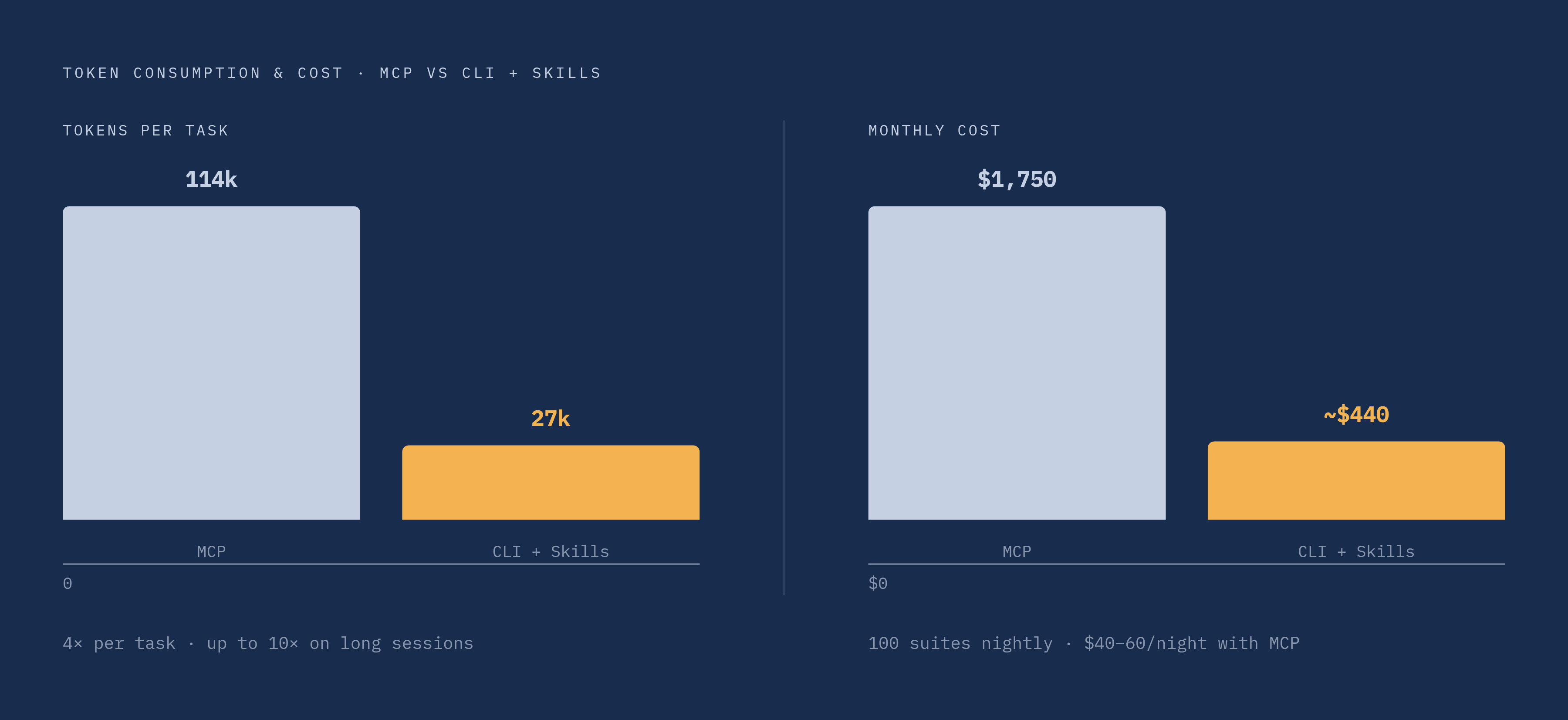
Why should token efficiency matter to anyone besides the model itself? Because it's a line item. Microsoft's own benchmarking found the same browser automation task consumed approximately 114,000 tokens using MCP, versus approximately 27,000 tokens using a CLI-plus-Skills approach, roughly a 4x difference. On longer, multi-step sessions, that gap widens further, to something closer to 10x. Scaled up, a nightly CI pipeline running across 100 test suites at MCP's token rate lands somewhere around $40 to $60 a night, roughly $1,500 to $2,000 a month. The CLI approach, on the same workload, runs at roughly a quarter of that cost, a roughly 4x reduction in token consumption.
Production AI agents driving browsers run into failure patterns worth naming directly. Over-confident clicking: an agent picks the first button that seems to match its goal when several similar buttons exist on the page, and picks wrong more often than anyone would like. Silent step-skipping: steps that depend on transient page state, cookie banners, feature flags, content that hasn't finished loading, get quietly dropped without the agent flagging that anything went wrong. Authentication at scale creates its own headache: re-authenticating on every single run trips rate limits and triggers security alerts on the target site, which means session persistence isn't a nice feature but the actual dividing line between a demo and something that survives contact with production traffic. And shadow DOM is becoming a structural problem going into 2026: modern component libraries (Shoelace, Lit, and various corporate design systems) hide markup inside shadow roots that the accessibility tree frequently can't see into at all.
The mitigations aren't exotic: stricter, more specific goal phrasing when prompting the agent, a human reviewing runs rather than trusting them blind, and session state persistence, Workers KV on the edge path, S3 on the Lambda path, so authentication doesn't have to happen fresh on every single invocation.
A checklist for production-ready Playwright container deployments
Pull the threads above together, and a production deployment should be able to answer yes to each of these before it ships.
Is the base image matched precisely to the Playwright version pinned in the project, and does it carry only the browsers actually in use, not the full Chromium-plus-Firefox-plus-WebKit set by default? Does the Dockerfile use a multi-stage build, with build tools and unused binaries left out of the final image entirely? Is the final image size under roughly 800 MB, or is there a clear reason it needs to be larger? Does the dependency-install layer sit ahead of the application-code layer in the Dockerfile, so routine code changes don't trigger a full rebuild? Is there a.dockerignore file excluding node_modules, test fixtures, and local secrets from the build context?
On the runtime side: are --single-process, --no-sandbox, --disable-setuid-sandbox, and --use-angle=swiftshader all set for Lambda deployments? Is memory allocated with real headroom, 500 MB to 1 GB at idle, more like 2 GB under multi-context load, rather than guessed at? Does anything written to /tmp get shipped to durable storage (S3 or equivalent) before the invocation ends? Is the function timeout generous enough to absorb a cold start's browser initialization time? Does the handler close the browser in a finally block on every code path, including the failure ones?
And for teams weighing whether to run any of this at all: has the cost comparison against managed services (Browserless, Browserbase, Apify, Hyperbrowser, Steel) or an edge browser runtime actually been modeled against current workload volume, rather than assumed? If AI agents are in the loop, is token cost being tracked per run, and does session state persist across invocations rather than forcing re-authentication every time?
Getting Playwright to run in a serverless environment was never really about fighting Docker. It was about recognizing that a headless browser carries an unusually heavy, unusually particular set of dependencies, and that serverless runtimes are built, on purpose, to carry as little as possible. Docker resolves that tension by shipping the dependencies alongside the code. Everything past that, image size, cold starts, memory tuning, cost at scale, is a set of engineering trade-offs, and the right answer depends on how much control a team actually needs over the browser layer versus how much of that complexity is worth handing off to someone else's infrastructure instead.