Pyppeteer Setup and Limitations for Python Automation
Pyppeteer excels at Chrome automation but stumbles on maintenance and deployment.
The comparison that actually matters in 2026 is not Pyppeteer against Puppeteer. Those live in different language ecosystems, and no Python developer seriously evaluating automation libraries is weighing a full switch to Node.js as part of that conversation. The real comparison is Pyppeteer against Playwright for Python and against Selenium, and that comparison is less symmetrical than most surveys of the space suggest.
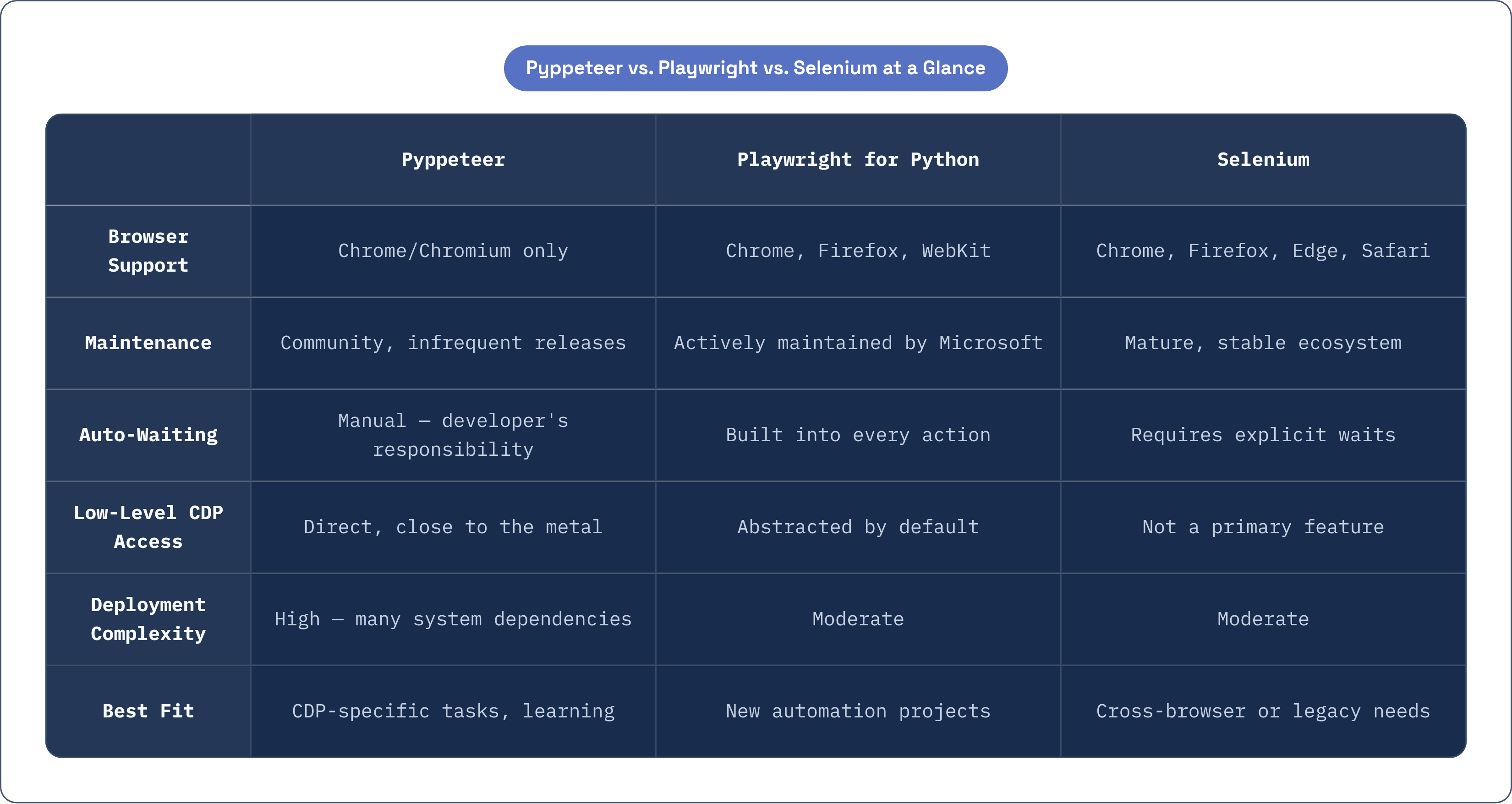
Browser coverage is the starkest cut. Pyppeteer controls Chrome and Chromium; experimental Firefox support exists, but working practitioners do not treat it as reliable. Selenium covers Chrome, Firefox, Edge, and Safari through their respective drivers. Playwright for Python, actively maintained by Microsoft, supports Chrome, Firefox, and WebKit from a single API. If cross-browser validation is a requirement, Pyppeteer removes itself from consideration before any other criterion applies.
Where Pyppeteer still earns its keep is low-level access to the Chrome DevTools Protocol. Network interception, fetch mocking, performance tracing, granular CDP event subscription: these are areas where Pyppeteer operates closer to the metal than Playwright's higher-level abstractions allow by default. That proximity is not incidental. It is the reason experienced engineers occasionally reach for Pyppeteer on specific tasks even when they know the maintenance story and find it uncomfortable. It is also worth asking whether that low-level access is something your use case genuinely requires, or whether you are optimizing for a capability before knowing you need it.
Where it loses ground decisively is maintenance cadence against Chromium's release pace. Pyppeteer's current release, version 2.0.0, was published in February 2024. The previous dominant release, 1.0.2, dated from January 2022. Puppeteer, the upstream project Pyppeteer tracks, ships continuously. The gap widens with every Chromium release, and nobody is actively closing it.
Installing Pyppeteer and getting through the first Chromium launch
Installation is straightforward on a clean machine, which is precisely what makes the subsequent friction so disorienting. Work inside a virtual environment; the isolation matters more as dependencies accumulate. The install command is pip install pyppeteer, and the most common error at this stage, a failure to resolve the package, is nearly always a Python version mismatch. Pyppeteer requires Python 3.8 or higher and below 4.0.
On first run, Pyppeteer downloads a Chromium binary, roughly 100 megabytes. This happens automatically and silently unless you front-run it with pyppeteer-install, which is worth doing when you want control over when and where that download occurs. Platform behavior diverges in a way that surprises people: on Windows, Pyppeteer downloads and uses its own Chromium binary regardless of what is installed on the system; on other platforms, it looks for an existing Chrome or Chromium installation on the system path first.
The minimal working script follows a consistent pattern: import asyncio and pyppeteer, define an async function that launches a browser, opens a page, navigates, and closes, then run it with asyncio.geteventloop().rununtilcomplete(). The structure is approachable. What actually matters surfaces later, sometimes quietly.
What containerized and serverless deployments require beyond a simple pip install
The install story that works cleanly on a local machine fragments sharply in containerized and serverless environments. This is one of the least-discussed costs of Pyppeteer adoption, and it is where the library's limitations stop being theoretical.
Docker deployments require manually installing a substantial list of system-level shared libraries before Chromium will launch at all: libgtk-3-0, libnss3, libx11-6, libxcb1, libxss1, libxtst6, and more than a dozen others depending on the base image. Memory allocation is a separate problem. Containers running Pyppeteer workloads need at least 4GB of RAM for anything resembling realistic load. "Page Crash" errors in container environments are nearly always a memory ceiling problem, not a code defect, and they present in ways that look like application bugs until you check the container's resource limits.
AWS Lambda is harder still. The Pyppeteer-bundled Chromium binary is missing shared libraries required by Lambda's Amazon Linux environment. Lambda's deployment size constraints make bundling a full Chromium binary directly impractical; installing dependencies manually on Amazon Linux 2 can push image sizes to over 1.5GB on ECR, well beyond practical limits for most teams. The workable approach is a slim headless Chromium binary stored in S3 and fetched at cold-start time, a pattern that introduces its own operational complexity and its own failure modes.
What this adds up to is a custom integration effort at every deployment context beyond a local machine. The effort is real, it scales with team size and deployment frequency, and it is time spent on plumbing rather than on the problem you actually wanted to solve.
The API differences from Puppeteer that catch Python developers off guard
Pyppeteer's stated goal is to mirror the Puppeteer API, but fundamental differences between Python and JavaScript make a precise replica structurally impossible. Developers who come to Pyppeteer from Puppeteer often assume equivalence and encounter subtle failures rather than clean errors, which is a worse situation than encountering obvious ones.
The selector methods are the most visible divergence. The $ character is not a valid Python method name, so Pyppeteer substitutes Page.querySelector(), Page.querySelectorAll(), and Page.xpath(), along with shorthand aliases Page.J(), Page.JJ(), and Page.Jx(), where Puppeteer uses Page.$(), Page.$$(), and Page.$x(). The mapping is logical once you know it. Nothing in the error message tells you this when you attempt the Puppeteer syntax and it fails.
The evaluate() method diverges more consequentially. Puppeteer accepts a raw JavaScript function or an expression string. Pyppeteer accepts only a string and attempts to auto-detect whether it represents a function or an expression. That detection sometimes fails, producing subtle behavioral bugs rather than clear exceptions. This is the kind of error that costs hours the first time you meet it, because you spend that time looking for the problem everywhere except in the method's detection logic.
The async model is the deepest structural difference. Puppeteer's async patterns are built on JavaScript Promises. Pyppeteer uses Python's asyncio. Developers migrating from Puppeteer must mentally reframe every async pattern as a coroutine; the concepts are analogous, the mechanics are distinct. Managing the asyncio event loop in nested or multi-threaded contexts is a persistent friction point, particularly when integrating Pyppeteer into larger applications or frameworks that manage their own event loops.
Timing and selector waits as the primary source of flaky automation
The most common cause of automation that passes locally and fails in CI is fixed-time waits substituted for condition-based waits. This is not unique to Pyppeteer, but the failure mode deserves plain examination because it is insidious in a specific way: it produces intermittent failures that are genuinely hard to reproduce, because the failure rate depends on environmental timing factors invisible in the test output.
The correct pattern is await page.waitForSelector('#element'), which waits until the element is actually present in the DOM before proceeding. The anti-pattern is await page.waitFor(5000), a hard sleep that is simultaneously too slow for fast pages and too short for slow ones. Fixed sleeps encode assumptions about page load time that are violated by network variance, server load, and the resource contention typical of CI environments. Every user interaction should be preceded by a waitForSelector call or an equivalent condition check; skipping even one creates failures that arrive unpredictably and are expensive to diagnose.
Playwright's auto-waiting model, where actions automatically wait for elements to be actionable before proceeding, addresses this at the framework level. Pyppeteer does not. The developer carries that responsibility explicitly, on every interaction, with no enforcement mechanism when they forget. Whether that tradeoff is acceptable depends entirely on the discipline of whoever maintains the code, and discipline, in my experience, is the first thing that erodes under deadline pressure.
How bot detection systems identify Pyppeteer-controlled browsers and what evasion actually achieves
Vanilla Pyppeteer leaks multiple automation signals that modern anti-bot systems are specifically trained to identify. Understanding which signals are exposed, and what mitigation actually achieves, matters before deploying Pyppeteer against any site with meaningful bot protection.
The default signals include navigator.webdriver set to true, the HeadlessChrome string in the User-Agent, missing browser plugins, irregular rendering behaviors, predictable canvas and WebGL fingerprint hashes produced in headless mode, TLS stack characteristics with identifiable JA3 hashes that diverge from real browser traffic, and near-zero interaction latency with no natural human delays in typing, scrolling, or hovering. DOM events triggered via scripts, using .click() or .type() rather than real pointer events, are detectable by behavioral challenges and honeypots. Fingerprint analysis benchmarks have shown that base Puppeteer, and by extension Pyppeteer, registers as headless at a meaningful detection rate before behavioral analysis even begins.
The pyppeteer_stealth library patches the most visible of these signals. It changes the User-Agent from HeadlessChrome to a standard Chrome identifier, sets navigator.webdriver to false, and modifies the Chrome runtime to present as a GUI browser session. This moves the needle on surface-level fingerprint tests.
It does not bypass enterprise-grade bot protection. Systems using machine learning heuristics score requests in milliseconds and operate well beyond the surface signals that stealth patches address. They evaluate behavioral trajectories, request timing distributions, mouse movement physics, and session-level patterns that no JavaScript patch can convincingly manufacture. Any given evasion technique also degrades over time as detection systems adapt. For automation against sites with sophisticated bot management, stealth is a starting point; treating it as a conclusion is how you discover it was insufficient.
Where Pyppeteer's alpha status and maintenance gap create compounding risk over time
The "Development Status: 3 – Alpha" classification on PyPI is not a formality. It signals that the API can change without notice, that behavior in edge cases carries no guarantee, and that the project has not made the commitments production-grade software typically entails. For many tools, alpha status is a temporary condition on the path to stability. For Pyppeteer, it has become a persistent description of where the project actually sits.
The maintenance gap compounds because Chromium releases frequently, and each release can break Pyppeteer's CDP bindings. With no active maintainer absorbing those breaks, they may remain broken indefinitely, or until a community contributor addresses them on an unpredictable schedule. Puppeteer continues to ship adaptations to new Chromium behavior; Pyppeteer drifts further behind with each cycle. Reading the GitHub issue tracker before adopting Pyppeteer reveals a pattern: unresolved Chromium compatibility problems accumulate without resolution, some of them long enough to indicate that resolution is coming from no one.
The maintenance risk is not distributed evenly. It hits hardest in containerized deployments, in CI pipelines that pin Chromium versions, and in any context where Chromium must be updated for security reasons. A security-driven Chromium update in a production environment can silently break Pyppeteer in ways that take time to diagnose precisely because the application code has not changed. You are looking for what the world changed underneath you, rather than what you changed yourself.
For agentic workflow use cases, community-built Pyppeteer MCP servers exist and can integrate the library into LLM orchestration pipelines. The risk profile in that context is specific: an autonomous agent that relies on an unmaintained library for browser interaction is exposed to a class of breakage that may not surface until the agent is running against a real task in production, at which point remediation is determined by community response rather than by anyone with a support obligation.
The scenarios where Pyppeteer is still the right choice in 2026
Pyppeteer's limitations are real, but they are not uniformly disqualifying. The question is whether your context is one where those limitations are actually manageable, not whether the limitations exist.
Learning browser automation is one such context. Pyppeteer's CDP-level transparency makes it a useful teaching tool. Developers working through it encounter the underlying protocol more directly than Playwright's higher-level abstractions expose, and that proximity builds intuitions that transfer to other tools.
Internal tooling against controlled environments is another. If the target is a known, stable internal web application with no anti-bot layer and a pinned Chromium version, the maintenance risk is structurally lower than in adversarial public web contexts. The failure modes that make Pyppeteer uncomfortable in production scraping simply do not apply.
For prototyping and personal projects, Pyppeteer is functional. The Chromium version pin is an acceptable constraint when the work is non-critical and the audience is yourself.
Python shops with existing Pyppeteer investment face a different calculation. Migration has a cost, and that cost is not always justified by marginal risk reduction. A clear-eyed accounting of the limitations is often more useful than an immediate rewrite, particularly when existing code is working and the team has already absorbed the library's quirks.
What tips toward migration is a specific cluster of conditions: cross-browser requirements, adversarial scraping targets with sophisticated bot protection, teams that cannot absorb unplanned Chromium compatibility breaks, or any environment where long-term maintenance support is a contractual or operational requirement.
Practical alternatives to evaluate when Pyppeteer's limitations are a blocking constraint
Playwright for Python is the most direct path forward for developers who have concluded that Pyppeteer is blocking them. Microsoft maintains it actively; it supports Chrome, Firefox, and WebKit from a single coherent API; its auto-waiting model removes the class of timing failures that Pyppeteer leaves to the developer. The async API is comparable in structure, and migration from Pyppeteer is less disruptive than it appears from the outside. Playwright has become the community default for new Python browser automation projects, and the documentation, integrations, and community tooling reflect that.
Selenium with undetected-chromedriver covers cross-browser requirements and brings a larger ecosystem of Python integrations alongside community stealth tooling. It suits environments where Firefox or Edge coverage is a hard requirement and Playwright is not under consideration for other reasons.
Puppeteer running in Node.js is worth evaluating for teams that can absorb JavaScript in their stack. The original project tracks Chromium faithfully, ships updates on a real maintenance cadence, and removes the porting lag that is Pyppeteer's structural disadvantage. The language switch has a cost; so does the maintenance gap, compounded annually.
For production scraping against targets with serious bot protection, managed browser and scraping services handle fingerprinting, proxy rotation, and evasion infrastructure as a service, transferring the maintenance burden away from the engineering team. The cost tradeoff is worth calculating per use case. Building against enterprise-grade bot management in-house is a significant ongoing investment, not a weekend project, and the detection systems on the other side are always advancing.