Running Puppeteer on AWS Lambda
Solving the binary size, system library, and timeout obstacles that block Puppeteer on Lambda.

Puppeteer works beautifully on a developer's laptop. Then you deploy it to Lambda, and the wheels come off in ways that never surfaced locally. The binary is too large. System libraries are missing. The function times out before Chrome finishes launching. Each failure points at a different constraint, and none of them announce themselves until you have already collided with them.
Lambda's appeal for this workload is genuine. Event-driven, no idle servers, automatic horizontal scaling, pay-per-execution billing: for bursty tasks like screenshot APIs, scheduled scraping, or on-demand PDF generation, the economics are difficult to argue with. Datadog's 2025 State of Containers and Serverless report found that a large majority of AWS customers use Lambda. The friction lies in the gap between Puppeteer's runtime requirements and Lambda's execution environment, and closing that gap requires understanding each constraint before choosing a deployment pattern.
Lambda's ZIP-based deployment model imposes a 50MB ceiling on direct uploads and 250MB unzipped when staged through S3. The standard puppeteer package downloads a full Chrome for Testing binary at install time; on Linux, that binary alone consumes the overwhelming majority of the 250MB budget, leaving almost nothing for application code or runtime dependencies. A naive npm install puppeteer, zip, and deploy workflow breaches the limit before a single line of business logic exists.
Clearing the size limit does not guarantee a working function. Lambda's execution environment is a stripped-down Linux container, and Chromium expects shared libraries, including libnss3.so and related system packages, plus font data, none of which are present by default. A correctly sized package can still fail at launch with cryptic missing-library errors that look, at first glance, like application bugs.
The default Lambda timeout of three seconds is a less obvious but equally punishing constraint. A single Chromium launch on a cold container can exceed that ceiling before the browser is ready to accept commands. The function times out, the error message fails to implicate the timeout configuration, and you spend real time debugging the wrong thing. I have watched engineers spend the better part of an afternoon chasing what looked like a Node.js module resolution error before someone thought to check the configured timeout.
Two additional environmental facts matter. Lambda provides no display server, so Chromium must be launched explicitly in headless mode. The community-standard @sparticuz/chromium package and its public Lambda layers are compiled for x86\_64. Running them on an arm64 Graviton Lambda produces silent failures, which constitute their own category of debugging misery.
The package choice made at the start determines much that follows. The standard puppeteer package bundles Chrome for Testing automatically, which is convenient locally and unusable on Lambda as deployed. puppeteer-core installs no browser; the developer supplies the binary path at runtime. For Lambda, puppeteer-core is the correct starting point, and recognizing that distinction early saves considerable pain.
The Chromium dependency problem and how @sparticuz/chromium solves it
A standard Linux Chromium build exceeds Lambda's 250MB unzipped limit. That single fact is what makes the dependency problem hard. You cannot simply install Chrome and ship it; you need a build that has been stripped, compressed, and sized to fit while remaining functional enough to render real pages.
@sparticuz/chromium is the community-maintained npm package that addresses this directly. It ships a compressed, stripped-down Chromium build engineered for Lambda's environment, and bundles the missing shared libraries that Lambda's minimal Linux container omits, which resolves the class of launch failures that persist even after the size problem is solved. It pairs with puppeteer-core: the package exposes the binary executable path that puppeteer-core requires at launch, so the two fit together without additional configuration.
The package's own documentation recommends a minimum of 512MB RAM allocated to the Lambda function. In practice, 2048MB is the more defensible starting point. Lambda allocates CPU proportionally to memory, so more memory means faster Chromium initialization, which matters both for cold start behavior and for per-invocation performance on heavier pages. The RAM cost is real, but the alternative is a browser that initializes sluggishly and times out unpredictably.
Timeout configuration requires the same attention. The three-second default is inadequate for any realistic use case here. Thirty seconds is a reasonable floor for development and simple tasks; production scraping pipelines or multi-step browser workflows may legitimately need several minutes.
Two implementation details are non-negotiable regardless of deployment strategy. Pass headless: true explicitly and supply the executable path from the package rather than relying on any system Chrome binary. Wrap browser.close() in a finally block. An unclosed browser instance wastes memory and can destabilize subsequent warm invocations in ways that are difficult to reproduce and maddening to diagnose.
@sparticuz/chromium is the prerequisite for both deployment strategies discussed below. The choice between Lambda Layers and container images concerns how the binary is delivered to the runtime, not whether to use this package.
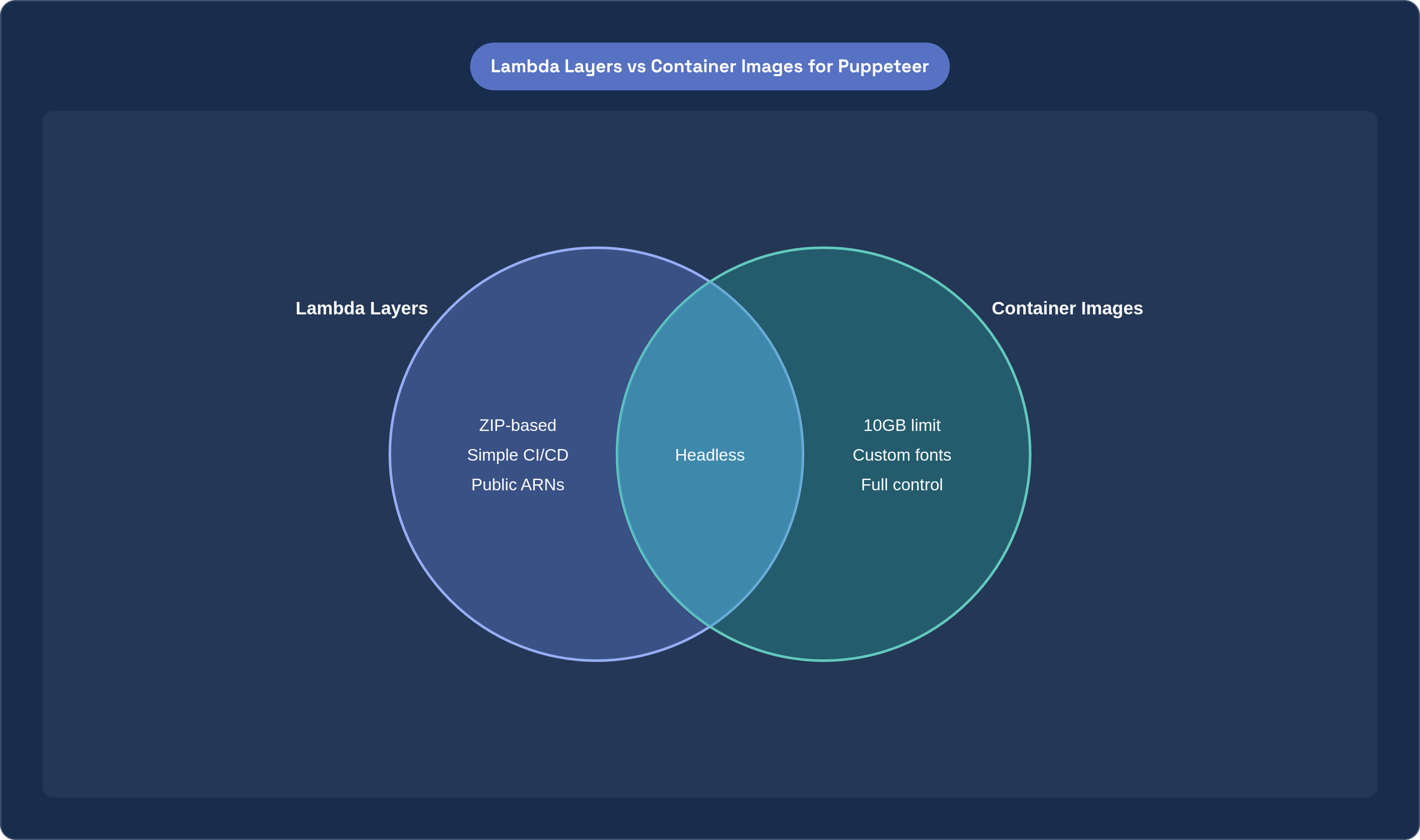
Deployment strategy A: Lambda Layers for teams that want ZIP-based simplicity
Lambda Layers extend a function's runtime environment with additional libraries, binaries, or custom runtimes without bundling them into the main deployment package. For Puppeteer, this means publishing or consuming a layer that contains the @sparticuz/chromium binary, keeping it entirely out of the application ZIP.
Community-maintained public layer ARNs are available for this pattern. A working 2025 configuration uses SAM templates with a public ARN targeting Node.js 22.x on x86\64. Application code references the layer-mounted binary path at runtime through the path @sparticuz/chromium exposes. The architecture setting on the Lambda function must be x86\64; the community layer binaries are compiled only for x86\_64, and the mismatch produces failures that take real time to diagnose, partly because the error messages rarely implicate the architecture.
One operationally important detail: timeout configuration must live in the SAM or CloudFormation template, not only in the console. A console-only change will be silently overwritten on the next deployment.
This pattern suits simpler automation tasks: screenshots, single-page PDFs, lightweight scraping. It works well for teams that prefer ZIP-based CI/CD pipelines and do not want to introduce container build infrastructure. The dependencies are modest and predictable.
The limits of the Layers approach become apparent quickly under certain conditions. Teams that require custom system dependencies beyond what the community layer ships, or that need precise control over the Chromium version or build configuration, will find the pattern constraining. There is also a combined size ceiling for layers and the deployment package together; workloads that push against that boundary have outgrown the ZIP-based model.
Deployment strategy B: container images for production workloads that need the full 10GB
Container image support for Lambda removes the 250MB ceiling entirely. The practical limit becomes 10GB, which is enough to install Chromium and all its system dependencies without size engineering. The dependency problem transforms from an optimization exercise into a standard Dockerfile authoring problem, which is considerably more tractable.
The practical advantages extend beyond raw size. A container image gives you full control over the operating system, system libraries, font packages, locale data, and Chromium version. This eliminates the class of missing-dependency failures that afflict ZIP-based deployments and removes reliance on third-party public layer ARNs that can be deprecated or go unmaintained. Your dependency chain is entirely under your control, which matters more at scale than it might seem in early development.
Chromium is pre-installed in the image rather than extracted at runtime. For warm invocations, this reduces per-invocation startup overhead. Node packages install directly into the container, eliminating the need to manage separate layer artifacts.
One architectural detail about Lambda's handling of container images is frequently misunderstood. Lambda does not pull the entire Docker image at cold start. It fetches needed chunks from ECR on demand, which means large images do not add cold start time proportionally. Accessing large files from the image for the first time does involve a network fetch from ECR, but this is categorically different from loading a multi-gigabyte image serially before the function can run.
The recommended base image pattern starts from AWS's official Lambda Node.js base images, adds Chromium and its system dependencies via the package manager, then copies application code and puppeteer-core. This keeps the image well-structured and ensures the Lambda runtime interface initializes correctly.
Container images are appropriate for production scraping or PDF pipelines where dependency control matters, for teams already running containerized Lambda functions elsewhere, and for any workload requiring custom fonts, locale data, or non-standard system libraries. The tradeoff is higher cold start latency and more startup variability compared to ZIP-based functions, and that tradeoff has measurable cost implications.
Cold starts with Puppeteer: why the first invocation is the expensive one
A standard Node.js Lambda cold start moves through resource allocation, code download and extraction, runtime initialization, and user initialization. For a typical function, the combined overhead runs from a few hundred milliseconds to roughly a second. Puppeteer breaks this model.
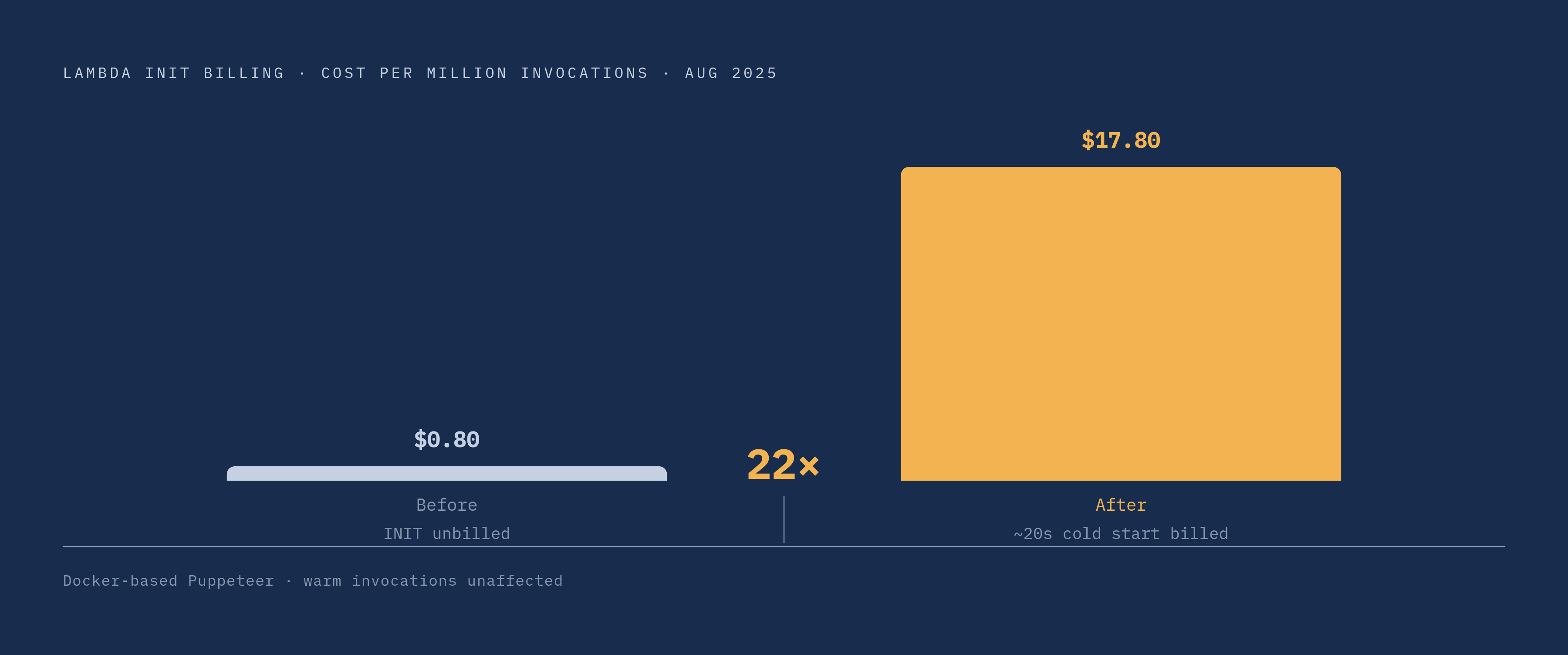
The first invocation on a fresh container launches Chromium and opens a browser tab. Observed first-launch time for a Docker-based Puppeteer function runs around 20 seconds. Warm invocations, where the container is reused and Chromium is already running, are dramatically faster. That gap is the difference between a user-facing latency problem and a non-issue, depending entirely on traffic pattern.
AWS began billing for the Lambda INIT phase in August 2025. For functions with heavy startup logic, the cost implications are significant: the change raised cold start costs from $0.80 to $17.80 per million invocations for affected workloads, a 22x increase. This hits hardest on low or unpredictable traffic patterns, where cold starts occur frequently relative to warm invocations. Chromium's initialization substantially extends the INIT phase, making the billing impact worse than for a typical Node.js function. Teams running screenshot APIs at low request volumes should model this cost explicitly before committing to an architecture, because the numbers can surprise you.
Lambda SnapStart delivers meaningful cold start improvements for supported runtimes, but does not currently apply to Chromium's startup behavior, limiting its direct benefit for Puppeteer functions. Graviton2-based arm64 Lambdas show 13 to 24% faster cold start initialization, but @sparticuz/chromium layers are incompatible with arm64. Capturing Graviton's cold start advantage requires building arm64-compatible container images, which is achievable but represents genuine additional engineering investment.
Practical cold start mitigations that work for Chromium-heavy functions
The highest-impact optimization available requires no infrastructure changes. Initialize the browser outside the handler function. Declare the browser variable in module scope; have the handler check whether an instance is already running before launching a new one. A warm Lambda container with an already-running Chromium instance responds in seconds rather than 20. Combined with browser.close() in a finally block, this pattern is safe across warm invocations. It is the single change most likely to improve observed latency, and it costs nothing to implement. Most teams I have seen skip this step initially, treat cold start as an infrastructure problem, and spend time on provisioned concurrency before trying the simpler fix.
Provisioned Concurrency pre-initializes a specified number of Lambda instances so they remain warm and ready, eliminating cold starts for those instances. The cost is real and ongoing, making it appropriate for latency-sensitive, high-frequency workloads like screenshot APIs embedded in user-facing flows. For scheduled batch jobs that can tolerate initialization latency, that cost is harder to justify.
Memory allocation affects Chromium launch speed directly, because Lambda allocates CPU proportionally to memory. Starting at 2048MB is sensible; after real invocations produce CloudWatch metrics, adjust based on actual usage rather than assumption.
Page-loading strategy affects per-invocation time as much as cold start does, and it is frequently overlooked. The networkidle2 wait condition suits most pages with background activity. domcontentloaded is appropriate for fast scraping where waiting for full resource loading is unnecessary overhead. networkidle0 applies to heavy single-page applications that must fully settle before interaction. The wrong wait condition can add several seconds to every invocation, silently, without any obvious error.
VPC placement historically added significant cold start overhead, enough to warrant avoiding it for latency-sensitive functions. As of 2025, properly configured VPC functions typically add under 100 milliseconds to cold start time. The historical concern is no longer a compelling reason to restructure an architecture that otherwise needs VPC membership for database or internal service access.
CloudWatch logs expose actual memory usage and duration per invocation. Use that data to tune timeout values and memory allocation rather than setting them at deployment and revisiting only when something breaks.
IAM, security, and operational hygiene that production Puppeteer functions need
The Lambda execution role should permit only the specific actions the function requires on the specific resources it uses. A scraping function that writes output to S3 needs write access to one bucket and nothing else. Overly permissive roles are common in rapid Lambda deployments and become a real liability when a function is exposed through API Gateway or an event trigger. Scope the policy tightly and document what it grants.
The security consideration specific to Puppeteer deserves plain treatment. A Puppeteer function that visits untrusted URLs is executing arbitrary web content inside your AWS account. The browser is rendering pages you did not write, running JavaScript you did not review, and following redirects you did not anticipate. Each invocation's browser session should be treated as untrusted: disable unnecessary Chrome features, including GPU acceleration and extensions, through launch arguments. Avoid persisting cookies or local storage between invocations unless the use case explicitly requires it.
Treating each session as isolated is not excessive caution; it reflects what the function is actually doing. The combination of least-privilege IAM, strict browser configuration, and per-invocation isolation does not eliminate risk, but it constrains the damage from a compromised or misbehaving invocation to something manageable. For functions processing user-supplied URLs, that discipline is easiest to establish before the deployment is treated as stable, before configurations harden into assumptions and assumptions harden into things nobody thinks to revisit.