Chromium vs Firefox vs WebKit in Headless Mode: Latency and Memory Compared
Firefox and WebKit beat Chromium on memory and startup cost in headless workloads.

Chromium, Firefox, and WebKit differ in headless latency and memory because they retain different browser architectures. Choosing among them means matching process overhead, startup cost, and execution strengths to the workload. Benchmark rankings help only when the test resembles the work the engine will actually do.
What headless mode actually removes — and what it leaves intact
Headless mode removes the visible window and the work of sending pixels to a display. HTML parsing, the CSS cascade, JavaScript execution, DOM construction, and networking remain active, just as they are in a visible browser. The browser still does most of its work. Removing screen output and the display-server dependency saves some CPU and memory, but it does not eliminate the dominant costs of loading and processing a modern page.
What about the GPU process, which might seem unnecessary without a screen? Chromium retains it for GPU-accelerated compositing, including canvas and WebGL workloads, even though rasterization for screen output disappears. The JavaScript engine, network service, and process model also remain.
How each engine's process model shapes its resource footprint by design
Chromium’s site isolation separates work into isolated renderer processes, each with its own copy of V8, heap, and interprocess communication channels. Isolation is a security property. The cost of that isolation is especially clear when many independent browser instances are launched. Those instances do not consolidate their GPU processes or network services, so each launch adds another set of fixed costs before page-specific work begins.
Firefox’s shared-process model consolidates renderer processes across tabs and contexts, trading some of Chromium’s per-site separation for lower per-tab overhead. SpiderMonkey and Gecko still have startup and heap costs. The distinction is not the absence of overhead, but a structurally lower process count at equivalent tab loads. Consequently, concurrency does not expand the process footprint in quite the same way.
WebKit likewise avoids Chromium’s deep per-site process separation, giving it a leaner per-instance profile. That advantage comes with a deployment qualification. On Linux, automation through Playwright depends on its bundled WebKit binary. Chromium may be the default choice for headless work, but these different process models allow a reasoned prediction of resource use before measurements begin.
What controlled memory tests reveal about the magnitude of engine differences at scale
Controlled comparisons give that prediction operational weight. Across independent tests, Firefox uses meaningfully less RAM than Chrome at equivalent tab loads, with a gap of roughly a fifth less at moderate loads and a wider gap as load increases. WebKit-based browsers also use less memory than Chromium-family browsers on the same desktop tab sets. The direction fits the architectural explanation, although desktop measurements do not establish an exact headless-server budget.
The engine name is not the whole explanation. Chromium-based browsers that block trackers and scripts before loading them can use substantially less memory than stock Chrome. What gets loaded changes the result too. A comparison therefore needs to distinguish the cost of the process structure from the cost of the content those processes handle.
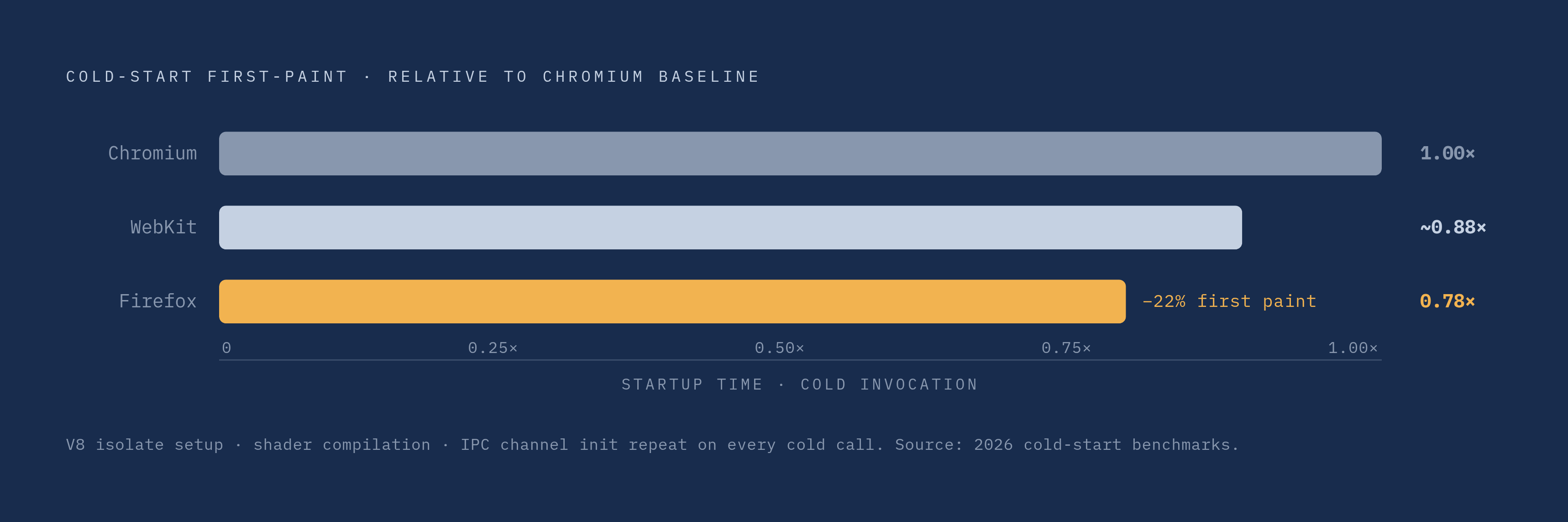
In server workloads, independent instances multiply the browser, GPU, and network-service overhead. Chromium has a substantial per-instance baseline before page content is counted, while Firefox’s lower overhead leaves room for more concurrent sessions within the same memory budget. Startup follows the same structural logic. V8 isolate setup, shader compilation, and communication-channel establishment add initialization work that becomes request latency when a browser launches on demand.
Why cold-start costs punish Chromium disproportionately in serverless and on-demand workloads
Spawning is the most CPU-intensive part of the headless browser lifecycle, rather than rendering or script execution, and Chromium’s initialization sequence is structurally longer than Firefox’s or WebKit’s. A new instance per request repeats that sequence before fetching the target page. In on-demand serverless workloads, that fixed tax can add seconds to user-facing response time.
AWS changed Lambda billing effective August 1, 2025, making the INIT phase billable for on-demand invocations of archive-packaged functions using managed runtimes. Functions using custom runtimes, OCI container images, or Provisioned Concurrency were already billed for INIT. For the newly affected functions, the time spent on browser initialization now added to the bill as well as the wait.
How much does a faster start help? In 2026 cold-start tests, Firefox reached first paint approximately 22% faster than Chromium, which helps most when invocations often start cold. Yet changing engines is not the only response. For workloads that usually take more than a second or two, containers can compete on cost even at fairly low request volumes because a browser can stay warm between requests and spread its initialization cost across them.
How browser context pooling and instance reuse change the engine calculus
For most headless workloads, a browser context should serve as the unit of isolation. Creating a context inside an existing Playwright-managed Chromium instance takes milliseconds and a few megabytes. Starting another browser repeats the full initialization sequence. A warm instance with more than one context can run sessions at the same time without mixing their state or starting the GPU and network processes again.
Reuse also changes the operational failure pattern. When browser.close() fails to fire, independently launched Chromium processes can accumulate as zombies and rapidly exhaust server RAM. Playwright exposes the same context strategy across Chromium, Firefox, and WebKit, although Chromium benefits most because its per-instance baseline is highest.
Puppeteer stays closer to the Chrome DevTools Protocol and has less per-task overhead on lean Chromium tasks, but its Chrome and Firefox support does not extend to WebKit. In that setting, an agent fleet inherits both the selected engine’s architecture and the framework’s way of managing its lifetime.
What Chromium's JavaScript performance lead actually means for real headless workloads
Chromium’s V8 engine leads raw JavaScript throughput benchmarks, and that is a genuine advantage. The value of that advantage depends on whether JavaScript execution limits the task. In DOM extraction, PDF generation, screenshots, and form automation, script execution is generally a small share of total time, while network latency and page-load waits dominate. Faster JavaScript cannot remove a wait for the target page to respond.
AI agents introduce another source of delay. Navigation-heavy workflows typically wait on the round trip between an agent’s decision and the browser’s acknowledgment of an action. Stagehand v3 illustrates the distinction. It removed its internal Playwright dependency and introduced a modular, CDP-native driver system supporting Playwright, Puppeteer, or other CDP-based drivers as adapters, while reporting a substantial performance gain over its prior version. That improvement points to protocol overhead as a binding constraint alongside engine speed.
For JavaScript-heavy SPA rendering, however, V8’s lead can make the difference. For navigation and extraction tasks, the memory saved by Firefox or WebKit may help more with running the workload. The useful comparison is between an engine’s strength and the workload’s actual bottleneck.
Where WebKit fits — and where its deployment constraints make it impractical
Safari compatibility gives WebKit a distinct purpose that memory rankings cannot capture. Its rendering behavior makes it the closest available stand-in for Safari in automation, while its process model keeps the per-instance profile lean. Compatibility is the reason to choose it here. A less expensive engine that renders differently would not answer the same testing question.
Linux deployment complicates that choice for general-purpose fleets. WebKit automation there requires the Playwright-bundled binary, creating a dependency on a maintained build. Playwright patches both Firefox and WebKit, and those patches must stay current as browser vendors release updates. The developer does not control that maintenance process and cannot easily audit it.
This constraint does not erase WebKit’s useful role. Cross-browser testing needs the way the Safari family renders pages, and macOS-native environments have access to system WebKit. For Linux server fleets without a Safari-testing requirement, however, the memory advantage does not outweigh the deployment friction enough to make WebKit a general-purpose choice.
Purpose-built headless engines as a structural alternative to the browser-derived trio
If desktop-browser architecture creates the overhead, could a headless-native design avoid it? Lightpanda takes that approach. It is an open-source engine built in Zig specifically for AI agents and web automation, rather than a headless adaptation of Chromium, Firefox, or WebKit. Its significance is architectural, because it changes the starting design instead of tuning an existing browser’s process costs.
Lightpanda includes CDP support for compatibility with Playwright and Puppeteer, allowing it to fit existing automation toolchains. It also includes native MCP support for AI agent infrastructure.
Lightpanda 1.0 reached 1.7 million passing Web Platform Tests and was described as production-ready, marking the first non-Chromium, non-WebKit, non-Gecko headless option with CDP compatibility to reach that milestone. Partial SPA support still requires validation against actual target sites. For now, it is a sound choice for specific automation workloads, especially navigation and extraction without complex SPA requirements, while a general-purpose Chromium replacement is beyond its reach.
Matching engine choice to workload type — a decision framework based on structural causes
The decision begins with four questions. What limits task completion, how many sessions must run concurrently, is deployment serverless or container-based, and does the work require cross-browser fidelity? The resulting choice need not be the same for every pipeline within a team.
For JavaScript-heavy SPA rendering or crawling where client-side execution accuracy is paramount, Chromium is the default because of V8’s performance and broad site compatibility. The recommendation is to use context pooling in a warm instance so each request can use the browser already running. High-concurrency screenshot, PDF, and DOM-extraction pipelines have a different constraint. On servers with limited memory, Firefox uses less memory per instance and has faster cold starts, which helps fit more sessions on each node as the number of instances grows.
For Safari compatibility testing or macOS-native workflows, WebKit provides the required rendering fidelity through Playwright. For high-volume AI-agent navigation and extraction without SPA complexity, Lightpanda is worth evaluating for its structural memory and latency advantages. That evaluation must include the actual target sites because partial SPA support limits how broadly the choice can be applied.
Deployment then modifies each of these decisions. For frequently cold serverless invocations, including Lambda under the post-August 2025 billing model, Chromium startup has a direct monetary cost. The recommended alternatives are to keep a warm browser in a container-based deployment or evaluate Firefox or Lightpanda where cold starts are frequent. A managed, globally distributed browser service offers another operational model, providing compute, network proximity, and scaling without making each team configure and expand a per-server browser dependency. That moves infrastructure management out of the application team’s remit, while leaving workload fit as the basis for engine selection.