Headless Browser Automation with Python
Playwright, Selenium, and Pyppeteer handle headless browser automation with different trade-offs.
The display is not a trivial component. Compositing rendered layers, managing a window buffer, pushing frames to a GPU or software renderer: all of it burns CPU cycles and memory. Eliminating that step reduces memory consumption meaningfully relative to headed mode. Across a CI suite running hundreds of test cases, or a scraping job chewing through tens of thousands of pages, those savings compound into real infrastructure cost.
The more operationally significant benefit is environmental fit. A headless browser needs no display, which sounds obvious until you have spent an afternoon configuring Xvfb just to run a browser on a Linux box with no monitor attached. CI servers, Docker containers, and serverless functions are all displayless by default. Headless mode makes those the natural habitat for browser automation rather than an obstacle course requiring workarounds.
One caveat that bit me early: headless does not mean lightweight. A full Chromium process carries the same multi-process architecture, the same V8 heap, the same network stack as the headed version. Anyone expecting headless Chrome to behave like curl with JavaScript support will be surprised by the memory footprint. The relevant comparison is headless versus headed, not headless versus a plain HTTP client. That confusion sends a lot of people down the wrong architectural path before they course-correct.
The Main Tasks Python Headless Automation Is Actually Used For
The canonical use case is scraping JavaScript-rendered content: product listings assembled client-side, search results populated by AJAX, feeds that load incrementally as a user scrolls. For these, requests and BeautifulSoup are not merely slow; they are simply wrong for the job. They never see the data JavaScript generates after the initial HTML loads.
Automated end-to-end testing in CI/CD pipelines is the other dominant use. Running a real browser against a real application, verifying that buttons click, forms submit, and pages render correctly, without requiring a physical display, fits naturally into server-side workflows. This is where the major frameworks have historically focused their energy, and the tooling maturity shows.
Screenshot and PDF generation occupy a less glamorous but useful niche. Rendering a page exactly as a browser would, then capturing it as an image or document, serves visual regression testing, reporting pipelines, and compliance archiving.
Authenticated workflows are where headless browsers become nearly irreplaceable for certain problems. Cookies, session storage, login flows, multi-factor authentication: all of it works natively because the browser handles the session exactly as it would for a human. No manual token extraction or header construction required.
The category worth watching is AI agent tooling, where large language models are given headless browsers as their mechanism for interacting with the web. The browser becomes the hands of an LLM-driven workflow, navigating, reading, and acting on pages without a human in the loop. Several major agent frameworks already treat browser access as a first-class primitive. That pattern is past the experimental stage.
The Three Libraries That Cover Most Python Headless Work: Playwright, Selenium, and Pyppeteer
Playwright, released by Microsoft in 2020, ships Chromium, Firefox, and WebKit binaries in a single install. Its Python bindings sit alongside implementations in JavaScript, TypeScript,.NET, and Java, which matters for teams working across languages. Both synchronous and asynchronous APIs offer equivalent capabilities, so the choice between them is a question of project architecture rather than feature availability.
The feature that defines Playwright's day-to-day experience is auto-waiting. Before interacting with an element, the framework checks that it is visible, enabled, and stable. The explicit, manual wait logic that makes Selenium tests brittle largely disappears. Once you have worked without it for a while, going back to writing WebDriverWait conditions feels like debugging with one hand tied behind your back.
Selenium is the oldest tool in this space, with a history stretching back to 2004. Its longevity has produced the widest browser coverage in the field, including legacy browsers no other framework touches. Selenium 4.33.0, released in May 2025, introduced WebDriver BiDi, a bidirectional protocol enabling real-time communication between browser and controlling script. The older CDP-based DevTools API is deprecated and targeted for removal in Selenium 5.0, currently in alpha with a rough target of Q3 2026. Developers on Selenium codebases should treat the BiDi migration window as active now. One practical detail that catches people: the options.headless = True flag is deprecated in current Selenium; the correct pattern is options.add_argument("--headless=new").
Pyppeteer is a Python port of Puppeteer, Google's Node.js library. It provides fine-grained control over the Chrome DevTools Protocol and, for Chromium-only work, competitive performance on short-running scripts. Maintenance has slowed considerably. I would not start a new project with it unless the scope were tightly bounded and longevity genuinely did not matter.
Several smaller tools occupy specific niches worth knowing. Splash is a JavaScript rendering service with native Scrapy integration. MechanicalSoup and Requests-HTML serve simpler, JavaScript-free scenarios with lower overhead. undetected-chromedriver and its successor nodriver apply stealth patches over Chrome and ChromeDriver to reduce detection signals; they are the practical starting point when bot detection, rather than JavaScript rendering, is the primary obstacle.
How Playwright, Selenium, and Pyppeteer Compare on Speed, Resource Use, and Browser Support
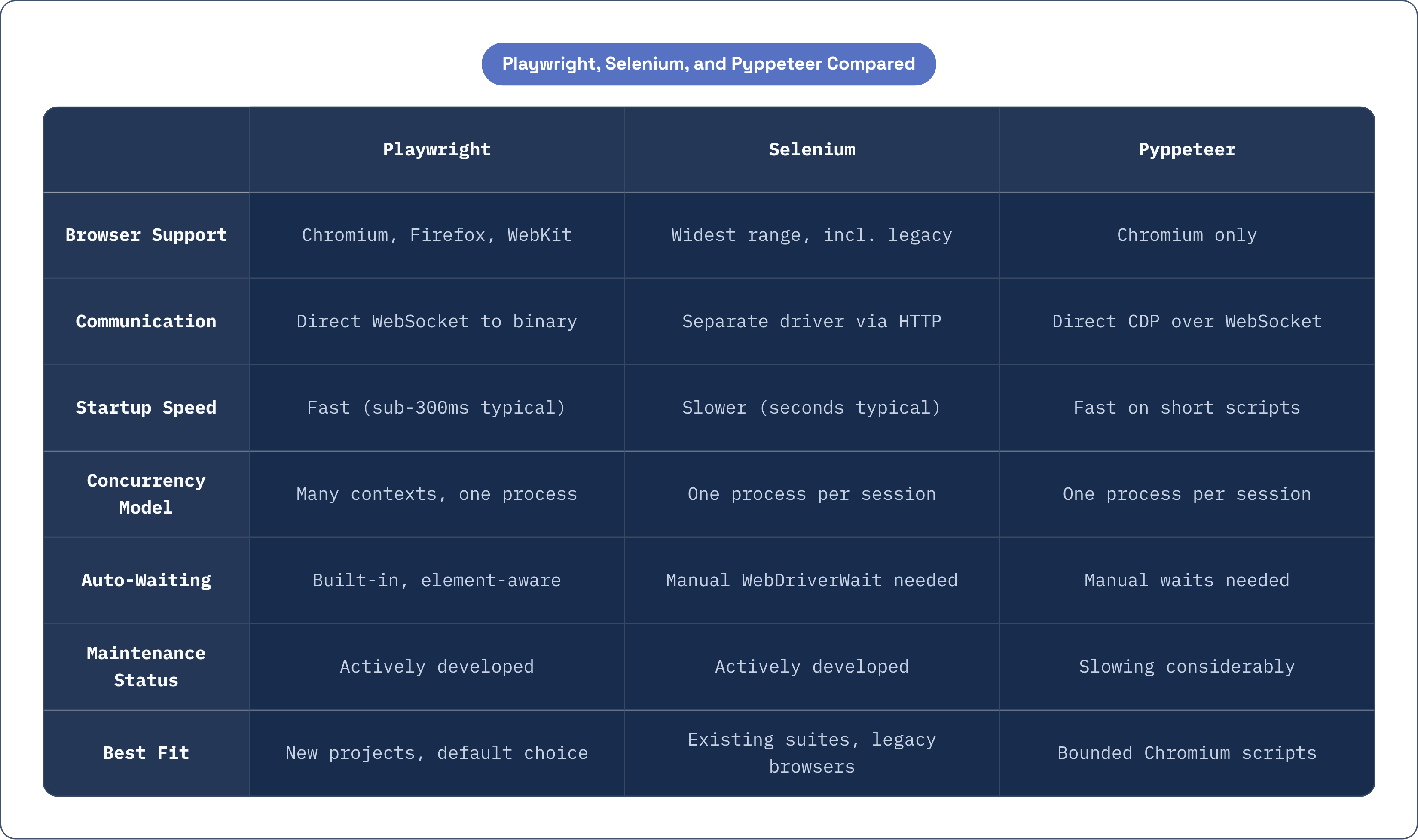
Startup latency is where architectural differences become tangible. Playwright and Pyppeteer communicate directly with the browser binary over WebSockets, bypassing a separate driver process. Selenium's WebDriver protocol initializes a separate driver executable and communicates through layered HTTP, which typically produces startup times measured in seconds rather than milliseconds. A June 2026 analysis from latenode.com measured Playwright completing a benchmark task in approximately 290 milliseconds compared to Selenium's roughly 536 milliseconds. That is a single-source measurement on a specific workload, but it reflects what the architecture would predict.
Concurrency handling reveals a more consequential difference for scraping at scale. Selenium's model is one process per isolated session; memory consumption scales linearly with the number of concurrent sessions. Playwright's BrowserContext primitive lets many isolated sessions run inside a single browser process, each with their own cookies, storage, and state. At scale, that architectural choice is not a marginal optimization. It is the difference between a fleet of servers and a single well-configured machine.
Browser support follows from design intent. Selenium covers the widest range, including legacy environments no other tool targets. Playwright covers all modern engines: Chromium, Firefox, and WebKit. Pyppeteer is Chromium-only, with Firefox support listed as experimental even in the parent Puppeteer project.
Community size reflects history more than current momentum. Selenium's GitHub footprint substantially exceeds Playwright's, a natural consequence of two additional decades of adoption. Both are free and open-source, which makes that gap less consequential than it might appear in a commercial ecosystem.
Which Tool to Choose Given a Project's Actual Constraints
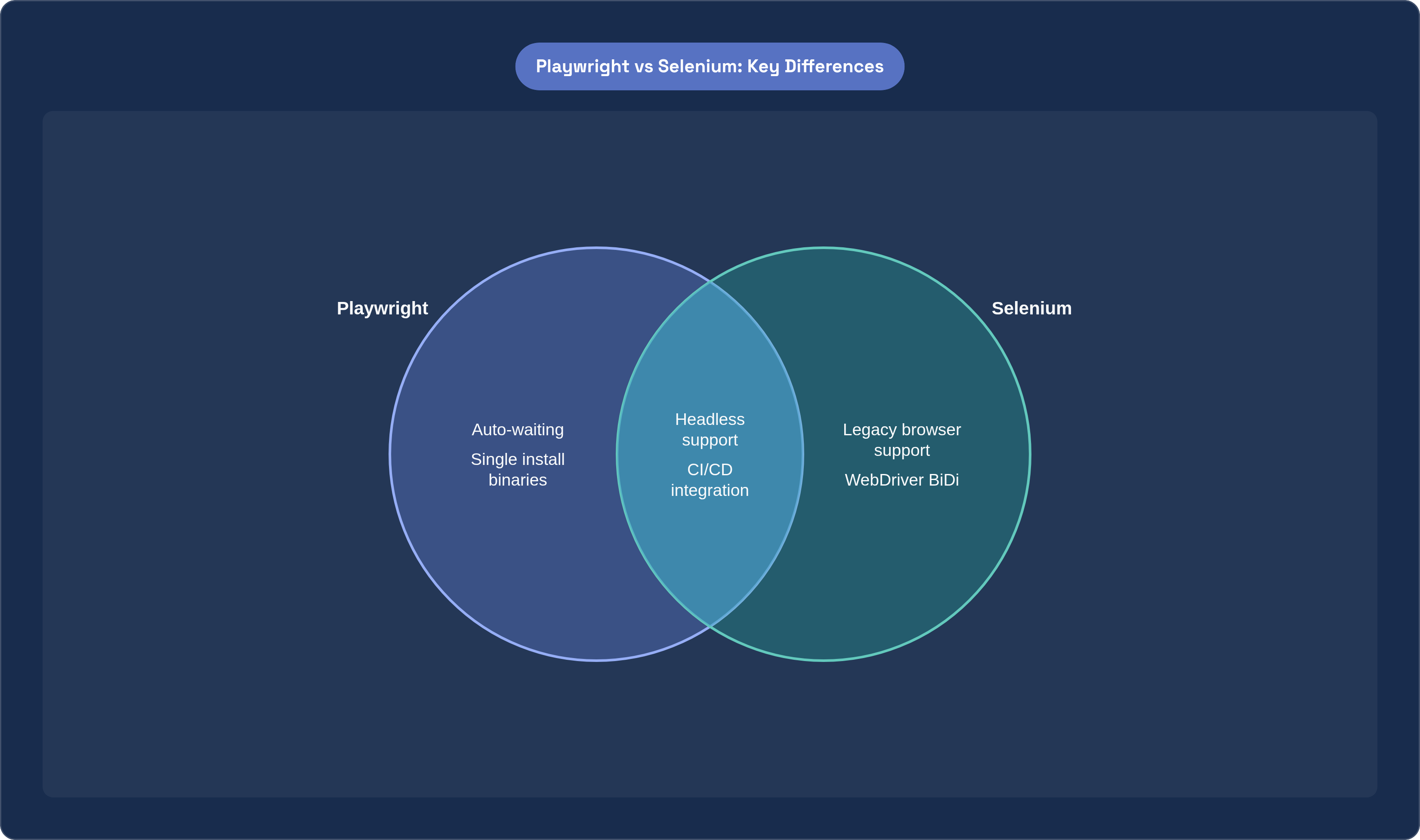
For new projects, Playwright is the default. The auto-waiting behavior eliminates an entire class of maintenance burden, and multi-browser support with a single install reduces infrastructure friction. I have not encountered a convincing argument for starting elsewhere absent specific constraints.
The case for staying on Selenium is organizational rather than technical. An existing test suite represents invested tooling, institutional knowledge, and established CI configuration. Rewriting it requires justification proportional to the pain the current suite is actually causing. Most Selenium shops are better served by understanding the WebDriver BiDi migration path before Selenium 5.0 removes the CDP APIs, and rewriting only when maintenance cost becomes sufficiently acute.
Pyppeteer earns consideration in one narrow scenario: Chromium-only scraping where startup latency is a meaningful bottleneck and the project scope is bounded enough that maintenance trajectory is not a concern. Accept that trade-off consciously.
For pages with no JavaScript rendering requirements, skip headless entirely. Plain requests with BeautifulSoup is faster, cheaper, and simpler; using a headless browser on static content is like renting a crane to move a cardboard box. Scrapy-based pipelines that need JavaScript rendering have a natural path through Splash, which integrates without requiring the pipeline to be rebuilt around a different paradigm. When bot detection is the primary obstacle rather than JavaScript rendering, undetected-chromedriver or nodriver is the first thing to reach for.
Setting Up a Basic Playwright Headless Scraper in Python
Installation is one of the cleaner stories in Python tooling. pip install playwright installs the library; playwright install fetches the browser binaries. The separation matters because the binaries are not bundled into the pip package, and running playwright install is a step developers reliably miss when setting up a new environment, usually at the worst possible time.
The synchronous API is the right starting point for scripts that do not need concurrency. A minimal scraper opens a syncplaywright() context manager, launches a browser with p.chromium.launch(headless=True), opens a page with browser.newpage(), navigates with page.goto(url), waits for content with page.waitforselector(selector), and extracts what it needs before closing. Rather than writing a WebDriverWait with an ExpectedConditions predicate, you describe the element you are waiting for and the framework handles the rest.
Flipping headless=True to headless=False during development is a habit worth forming deliberately. Watching the browser execute a script in real time surfaces timing issues, unexpected navigation events, and layout surprises that are nearly impossible to diagnose from logs alone. page.screenshot(path="debug.png") and page.pdf(path="output.pdf") each take one line and give you a snapshot of browser state at any point in execution. I have diagnosed more mysterious failures with a single screenshot than with hours of log analysis.
For teams maintaining Selenium alongside new Playwright work: options.add_argument("--headless=new") is the current correct invocation. The old options.headless = True property is deprecated and should not appear in new code.
Running Multiple Browser Sessions Concurrently with asyncio and BrowserContext
Python's asyncio event loop allows a single process to manage multiple in-flight operations without blocking on any individual one. Paired with Playwright's async API, this is the standard pattern for scraping at scale: many pages navigated concurrently, each waiting on network or JavaScript independently, while the Python process coordinates their progress.
The enabling primitive is BrowserContext. Each context gets its own cookies, session storage, and browser state, making it functionally isolated from every other context. All contexts share a single browser process. Spinning up twenty concurrent scraping sessions does not mean spawning twenty Chromium processes; it means creating twenty contexts within one. The memory savings compound quickly as concurrency increases.
The structural pattern: open an async with async_playwright() block, launch one browser instance, create N contexts programmatically, define each page task as an async coroutine, and schedule them together with asyncio.gather(). The browser handles the concurrency; asyncio handles the scheduling.
The practical ceiling is empirical. Available memory and target site rate limits are the binding constraints, not theoretical maximums. More than roughly ten to twenty concurrent Chromium contexts on a modest server will exhaust RAM; the right number requires measurement against your specific environment. When asyncio is insufficient for the required scale, the next step is multiprocessing or a distributed task queue like Celery or RQ. Headless browsers are stateful processes. They do not parallelize as freely as stateless HTTP requests, and architectures that treat them as though they do will eventually discover that the hard way.
Common Failure Modes and How to Handle Them Reliably
Timing errors are the most frequent source of unreliable automation, and also the most seductive to fix incorrectly. An element present in the DOM but not yet interactive, a selector queried before the JavaScript that populates it has run, a navigation completed before the subsequent AJAX request resolves: these produce failures that are intermittent, environment-dependent, and difficult to reproduce deterministically. The fix is explicit waiting on meaningful signals: waitforselector, waitforloadstate, waitfor_response. time.sleep() is a bet on timing that the site will eventually win.
Dynamic selectors present a structural problem. Sites that generate CSS class names or element IDs at build time, a common pattern in React and other component frameworks, will break any script that relies on those selectors as stable anchors. The durable alternative is selecting on data attributes, ARIA roles, or visible text content, all of which carry semantic meaning that developers tend to preserve across deployments.
Memory leaks from unclosed browser processes are quiet and cumulative. A scraper that runs for hours and leaks even one browser context per cycle will exhaust memory without producing any obvious error. Close the browser and context in a finally block, or use context managers that enforce cleanup automatically. For long-running processes this is not optional discipline.
Navigation timeouts deserve explicit configuration. Default values are often thirty seconds; in slow or rate-limited environments, silent hangs at that boundary are disorienting to debug. Setting intentional timeout values on goto() and wait calls makes timeout behavior predictable and surfaceable rather than mysterious.
Content inside iframes requires frame_locator() to access; content inside shadow DOM roots requires locator patterns specific to that traversal. Both are common on modern sites and easy to miss when first writing a scraper against a page that appears to load correctly but returns empty results.
For debugging production failures, the most useful combination is headless=False and slow_mo=500 in development, with page.screenshot() checkpoints in production to capture browser state at the point of failure. Logs tell you what happened; screenshots tell you what the browser actually saw.
How Sites Detect Headless Browsers and the Practical Limits of Evasion
Detection is a technically interesting problem, and the framing matters. Sites use a range of signals: the navigator.webdriver flag, set to true by default in automation-driven browsers; unusual characteristics in canvas rendering, WebGL output, and font metrics; the absence of browser plugins that real users typically have installed; viewport and screen dimensions that do not match typical user environments; and interaction timing that is inhuman in its precision.
Basic evasion covers a subset of these. Setting a realistic user-agent string, passing --disable-blink-features=AutomationControlled as a Chrome argument, and configuring a realistic viewport eliminates some of the most obvious signals. undetected-chromedriver patches ChromeDriver to remove automation indicators at a low level; playwright-stealth applies similar patches for Playwright sessions. Both work against many common detection scripts, until they do not.
The harder signals are behavioral. Mouse movement patterns, scroll physics, time-on-page distributions, click trajectories: these are measurable and, in aggregate, distinguishable from human behavior at confidence levels that fingerprint patching cannot address. I have watched projects invest weeks in evasion refinement only to find the blocking was coming from IP reputation rather than browser fingerprint. An address flagged as a datacenter range or known scraping source will attract scrutiny regardless of how clean the browser fingerprint appears. Fixing the fingerprint while ignoring the network source is solving the wrong problem.
Evasion is an arms race with no stable equilibrium. Techniques that work reliably today will be patched by detection vendors; new signals will be added; the libraries will update in response. For high-value targets, residential proxies and deliberately human-like interaction timing matter as much as any fingerprint fix.
One consideration that evasion discussions routinely omit: terms of service govern what automated access a site permits, and evasion techniques change technical feasibility, not legal standing.
Fitting Headless Browsers into a Broader Data Pipeline or Test Infrastructure
CI/CD integration is where headless browsers have changed operations most cleanly. GitHub Actions, GitLab CI, and Jenkins all support headless Chrome and Firefox without requiring virtual display configuration. Docker images with Playwright or Selenium pre-installed are the standard packaging unit for teams that want reproducible browser environments across development and production pipelines.
In a scraping pipeline, the clearest architectural principle is to keep the browser as the rendering layer and a separate parser as the extraction layer. The headless browser navigates, waits, and hands off rendered HTML; BeautifulSoup, lxml, or Parsel does the extraction. Mixing these concerns into a single layer makes both harder to test and maintain. Output from the extraction layer should go to a database or queue rather than flat files; browsers are I/O-bound processes, and writing results asynchronously prevents extraction output from blocking the scraping loop.
Playwright integrates with pytest through the pytest-playwright plugin, which provides browser, page, and context fixtures that drop into test runs without ceremony. The fixture model aligns naturally with how browser state should be managed in tests.
Monitoring a headless pipeline requires structured logging of navigation errors and timeouts, screenshot capture on assertion failures, and tracking success and failure rates per target URL over time. Site changes are the most common cause of scraper breakage, in my experience, and they surface earliest when you are watching the failure rate trend rather than waiting for complete breakage to trigger an alert.
Managed cloud browser platforms deserve evaluation once infrastructure management becomes the bottleneck rather than the automation logic itself. Services that handle browser process management, scaling, and some anti-detection infrastructure represent a sensible trade-off at sufficient scale. Cloudflare, a global CDN and internet security network that routes and protects traffic across 330-plus data centers worldwide, is one layer that teams sometimes add between their scrapers and the open internet to manage egress traffic and reduce exposure to IP-reputation blocking. The question worth sitting with is whether the engineering time spent managing browser infrastructure is time better spent on the problems the automation is actually meant to solve. Sometimes the answer is yes; often it is not.