programmable web rendering environments for agentic pipelines
Rendering environments are where agent-web interactions succeed or fail in production.
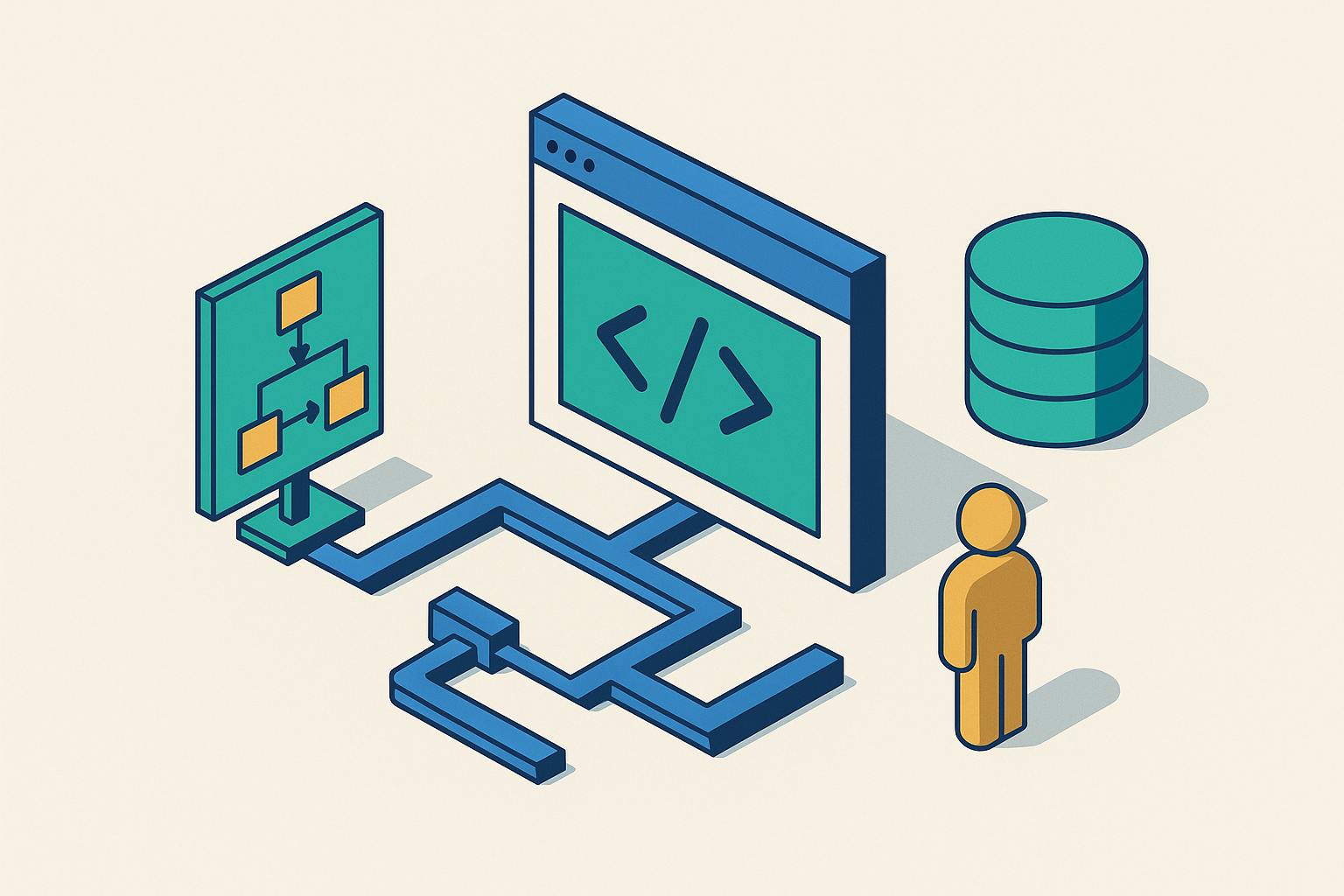
Rendering environments sit between an agent and the live web: headless browsers, DOM-aware scraping runtimes, cloud-hosted browser sessions. They're what decides whether an agent sees the page it expects or an empty div staring back at it. This piece walks through what that layer does, what each approach gives up, and why the stuff that actually breaks in production, reliability, security, geography, almost never shows up in a demo.
The gap between a working demo and a working product shows up the moment an agent tries to act on a real webpage. Most of the web isn't static HTML sitting there waiting for a request. It's JavaScript-rendered single-page apps, data that loads after three async calls nobody warned you about, CAPTCHA walls, session state that changes what's even visible on the page at all. An agent can reason well and call its tools without a hitch and still fail outright, because whatever fed it page content handed back a blank DOM instead. That handoff is where a lot of architecture conversations go quiet. Someone says "just use a headless browser," the room moves on, and nobody asks what running it for real actually costs, in memory, in engineering hours, in the 2am page when a target site changes its layout.
What a rendering environment actually does in an agent execution stack
A rendering environment is any runtime that can grab a web resource, run its client-side code, let the page settle into whatever its final state is, and hand back something the agent can use: structured data, an accessibility tree, a screenshot. Inside an agent loop it's doing perception work, turning a live URL into text or structure that fits inside an LLM's context window. It's also doing action work: take an instruction (click this, type that, scroll down), apply it to the page, report back what changed. And it's doing something harder to name cleanly, which is mediation. Redirects. Modal popups. Content that only loads once you scroll past it. Login walls that break every assumption the agent had about what should already be there. Nobody puts that part in the pitch deck, but it's most of the actual work, if you're honest about where engineering time goes.
A plain HTTP fetch does none of this. It gets you raw HTML, whatever the server sent on the first request, and nothing more. A rendering environment runs the JavaScript, manages the event loop, waits out however many sub-requests the page fires off, and only then hands back something usable. It sits below the orchestration layer, the LangGraph-style logic deciding what the agent does next, since rendering is a tool the agent calls rather than the agent itself. It sits above the raw network layer, too, handling browser sessions, proxy routing, header management, so the reasoning loop never has to think about any of it.
Why does this need to be programmable rather than just available? Agents don't browse the way people do. A person opens one tab and reads it. An agent might run fifty sessions at once, needs structured output instead of prose, and has to handle a failure (timeout, missing element, surprise redirect) with nobody around to click "try again." Structured control at scale, with no human anywhere in the loop: that's what separates an agentic rendering environment from the headless browser a QA team runs against a checkout flow on a Tuesday afternoon.
The three main approaches to web rendering for agents and what each trades away
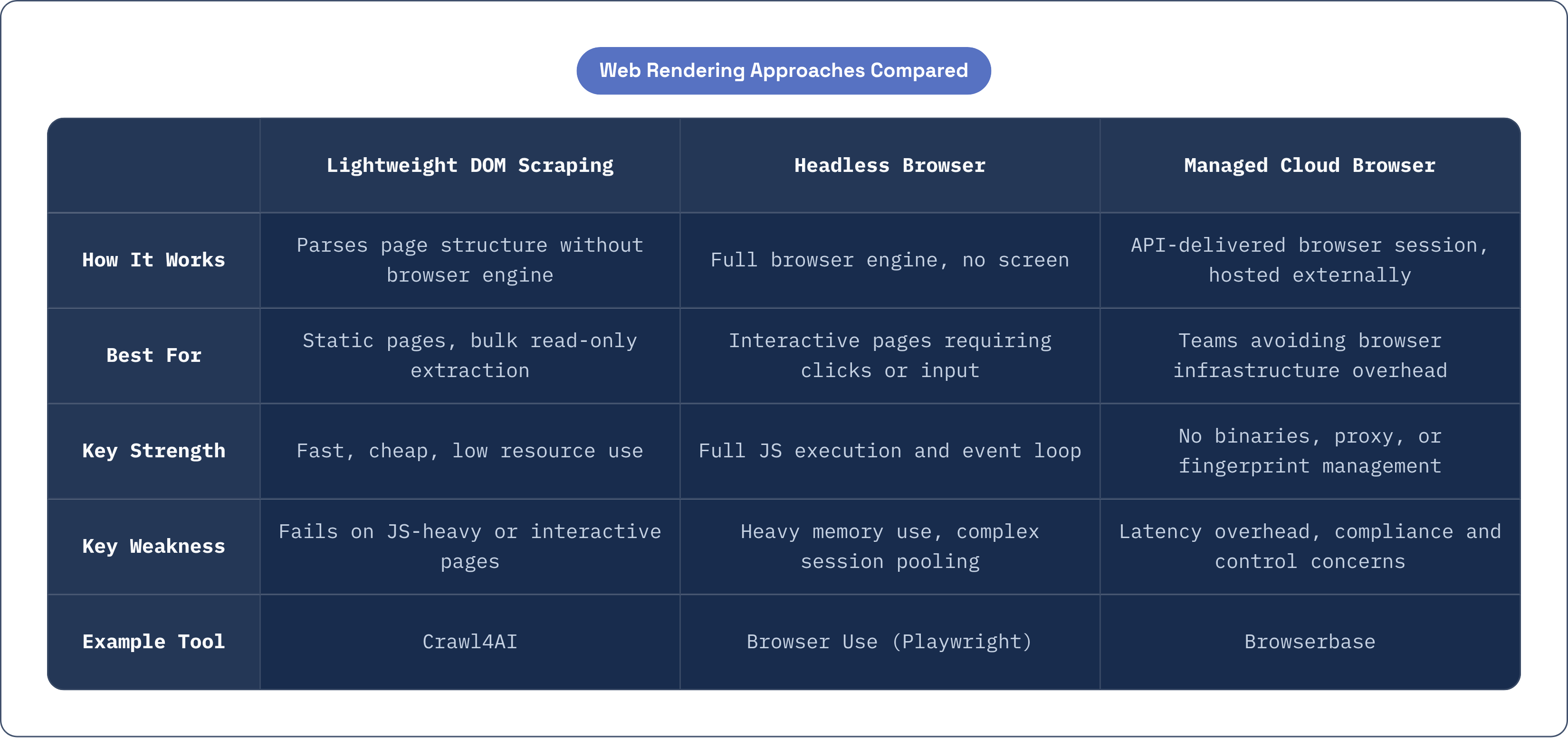
Three approaches dominate how teams build this layer, and each sits at a different point on the line between capability and overhead.
Lightweight DOM-aware scraping runtimes parse and rebuild a page's structure without running a full browser engine. They're fast, cheap, and they hold up fine on pages where JavaScript isn't doing much: news articles, documentation, static data feeds. Crawl4AI has picked up wide adoption for exactly this reason; it favors extraction speed over rendering completeness, which is the right tradeoff when you're feeding an LLM pipeline thousands of pages an hour and most of them are plain text wearing a wrapper. These runtimes break, though, on anything that needs real interaction: single-page apps, content that only shows up after a click, data pulled in by a background call the runtime never triggers. A meaningful slice of the live web is just closed off to this approach, full stop.
Headless browsers, Puppeteer, Playwright, and other tools built on the Chrome DevTools Protocol, run an actual browser engine minus the screen, with full JavaScript execution and a full event loop. This is the standard once an agent needs to do something on a page rather than just read it off. The cost is real, though: each browser instance eats a serious chunk of memory, and running several at once means managing a session pool, not calling a stateless function. Cold starts aren't nothing either; spinning up a browser context takes noticeably longer than booting a serverless function ever does. Browser Use has grown fast in open source by wrapping Playwright in an interface that treats the page as a set of possible actions instead of a testing harness, which maps onto how an agent actually thinks about a page.
Managed cloud browser services take the infrastructure problem off your plate. Call an API, get back a session, a screenshot, a DOM snapshot, whatever you asked for. Browserbase is probably the clearest example of a company built around this specific niche: cloud-hosted browsers tuned for AI agent traffic instead of general QA testing, no browser binaries to manage, no proxy rotation to build by hand, no fingerprint tuning to keep current every time Chrome ships an update. What you give up is control. Your page interactions now route through someone else's infrastructure, there's an extra network hop adding latency, and in regulated industries, the question of who can see what happens during a session stops being a performance question and becomes a compliance one.
A lot of production pipelines end up hybrid, in practice: cheap DOM-aware extraction for the bulk of read-only work, headless or managed browser sessions held in reserve for the pages that actually demand interaction.
How bot detection and anti-scraping infrastructure change the calculus
A rendering setup that runs fine in staging can fall apart in production, not because anything broke, but because the target site decided your traffic looks like a bot and quietly started blocking it. Detection runs on several layers at once. Network signals: is this coming from a datacenter IP range, does the request rate look human, does the geography make any sense. Fingerprint signals: TLS handshake details, HTTP/2 settings, how Canvas and WebGL render, even the timing of JavaScript execution. Headless browsers, even the ones rendering pages correctly, tend to leave a signature that gives them away if a site is actually looking. Then there's behavior itself, mouse movement, scroll pattern, the gap between one click and the next. Synthetic events fired with mechanical precision stick out like a tell.
None of this holds still. Detection heuristics get updated constantly, so a setup that sailed through in June might get flagged in December. It's an arms race, and nobody's found a finish line for it yet.
So what does that mean for how you actually build the pipeline? IP diversity and proxy rotation stop being optional the moment you're working across more than a handful of domains. Fingerprint normalization, making a headless browser's reported characteristics look like a real person's browser, takes ongoing maintenance, because browser versions ship updates constantly and a stale fingerprint gets flagged fast. CAPTCHA and challenge pages need one of a few answers: a managed service with solving built in, a human escalation path somewhere downstream, or direct API access to the site that skips the browser layer entirely.
There's a piece of this that isn't technical at all, too. Robots.txt compliance, terms-of-service limits, the regulatory frameworks now forming around automated data collection, all of it shapes what a pipeline is allowed to do regardless of what it's technically able to do. Whether you can do something and whether you're allowed to are different questions, and teams that treat them as one tend to find out the hard way, usually from a lawyer. Most of this concern falls away for pipelines working inside a company's own applications, internal tools, owned properties, and a much simpler setup works fine.
What rendering fidelity actually means for LLM reasoning over page content
Does the format the rendering layer hands the LLM actually matter, or is a page just a page? It matters. The rendering environment isn't just fetching content, it's deciding the shape of what the model sees, and that shape affects whether the agent finishes its task or wanders off somewhere it shouldn't.
Raw HTML gives you everything, which is also the problem with it: nav bars, ad slots, cookie banners, and layout markup all eat context window space and bury the signal under noise. The accessibility tree (AXTree) gives a cleaner, more semantic read on what's actually interactive on the page, and it's popular in agent frameworks because it maps naturally onto actions like "click this button" or "fill this field," at a fraction of the token cost of full HTML. Screenshots paired with a vision model let the agent see the page roughly the way a person does, which helps when the layout itself carries meaning the DOM never captures, though it adds cost and a beat of latency at every single step. Cleaned markdown or structured extraction works well for pure information retrieval, but it throws away anything about how to interact with the page.
Benchmarks like WebArena and VisualWebArena keep landing on the same finding: the choice of representation changes completion rates in a real, measurable way, and no format wins across the board. It depends on the task in front of you. This matters more as tasks stretch longer. If an agent misreads a button in step two because the accessibility tree left out something that loaded late, every step after inherits that mistake. Call it grounding, mapping what the agent says it wants to do onto an actual DOM element, and it's an active research problem precisely because it fails in recognizable, repeatable ways: vague labels, two controls that look identical but do different things, elements sitting in the tree before they're actually clickable.
Picking a rendering environment and picking a representation format aren't two separate decisions, then. They're the same decision seen from two angles, and the best environment is whichever one hands your specific agent output it can act on without tripping over its own feet.
The production requirements that prototype architectures don't surface
A setup that handles a demo cleanly can still fall apart under real load, and the failure modes only show up once you're actually running it.
Start with reliability. Browser sessions crash, hang on a page that never finishes loading, and leak memory until something has to kill them and start over. None of that is exotic, but a production system needs supervision, timeouts, and a way to recover without throwing out the whole agent task just because one tab misbehaved. Long-running agent workflows might need a rendering context to stay alive across many minutes, sometimes hours, which is a completely different persistence problem than a scraper that opens a page, grabs some text, and closes a second later.
Concurrency is its own headache. Agent pipelines often spin up many browser sessions at once, whether because an orchestrator is running parallel sub-agents or because a pile of users happened to trigger independent workflows around the same moment. Browser instances are some of the heaviest single workloads in the whole stack; scaling them takes real capacity planning, not the free horizontal scaling you get from a lightweight function runtime.
Geography matters more than it looks like it should. Run everything from one region and every request to a target site comes from a narrow band of IPs, which is both a detection risk and, for latency-sensitive work, just slow. Spread rendering across infrastructure in many regions and you cut down both problems at once: less obvious as a single source of bot traffic, shorter round trips to whatever site you're hitting. For pipelines serving users worldwide, rendering should happen near the user, not in one fixed datacenter on the other side of the planet.
Security isolation is easy to underrate until you've watched it go wrong. A browser executing arbitrary content from the open web, sitting inside your agent infrastructure, is a genuinely attractive target. A malicious page could try to pull credentials out of a session, sneak instructions into the agent's context, or go after a browser vulnerability directly. Each session needs to run isolated: no path to other sessions, no access to secrets, no reach into the underlying infrastructure. Prompt injection through web content, where a page hides text meant to redirect the agent's behavior, is a documented risk category at this point, and the rendering layer is one of the few places you can catch and clean it before it ever reaches the model.
Last, observability. When something breaks, was it the LLM reasoning badly, the tool-calling layer misfiring, or the page just not loading what the agent expected? Teams end up guessing without logging at each of those boundaries, and a wrong guess means fixing the wrong thing. You tweak a prompt for three days when the actual problem was a page that never finished rendering in the first place.
How edge compute infrastructure changes what's possible for rendering at scale
A lot of what makes rendering hard in production, latency, geographic reach, cold starts, the cost of running many sessions at once, traces back to centralized, container-heavy infrastructure. None of it is baked into the task of rendering a page itself. The constraints teams treat as fixed are really just a property of where the compute happens to sit.
Edge compute changes where the steps in a pipeline actually run. Instead of one datacenter, the work happens at whichever point in the network sits closest to the target site or the end user. For the parts of a rendering pipeline that don't need a full browser engine (content extraction, parsing, cleaning up an accessibility tree, caching results), lightweight edge runtimes cut round-trip time and per-call cost noticeably compared to spinning up a fresh container every time.
Isolate-based runtimes that run V8 isolates across a network spanning hundreds of cities start up in a fraction of the time a container needs. That's a good fit for the short, frequent jobs clustered around a browser session in an agent pipeline: cleaning up a request before it goes out, processing extracted content after a session returns, routing a request to whichever browser instance sits closest to the target site's own servers. Whether it's the right fit for your pipeline depends on how much of the work is genuinely lightweight versus how much still needs a full browser doing the heavy lifting.
Durable execution, stateful compute objects that persist across requests without needing a separate database to hold state, addresses the session continuity problem directly. An agent's rendering context (its history of what it's already seen on a page, its queue of actions still waiting to run) can live inside one durable object that doesn't vanish the moment a single step finishes. Some approaches to agent infrastructure lean on this kind of primitive, treating a rendering session less like a one-off API call and more like a small, long-lived process the rest of the pipeline can check in on whenever it needs to. Whether that beats a container-based setup depends on the workload. It's a different model, though, from spinning up a fresh container for every step and hoping the state got passed along correctly somewhere in between, and that difference is usually what separates a pipeline that holds up under real traffic from one that just looked good once, in a demo, before anyone sent it real work.