headless browser services purpose-built for AI agents
AI agents need browsers built for their speed and scale, not human testing workflows.

Headless browser services built for AI agents expose session state, bot detection handling, and structured data output as things an agent can call directly, mid-task, without a human watching the screen — a sharp departure from the Selenium scripts and Playwright test suites that came before them. That distinction matters because the volume and behavior of agentic web traffic has grown fast enough that the old tooling breaks in ways that are expensive and hard to see coming. This piece walks through what changed, what the new services actually do differently, and where a purpose-built browser engine like Kitesurf fits into that shift.
Start with the numbers, because they explain the urgency better than any framework could. Adobe Analytics reported a 4,700% year-over-year jump in AI agent traffic to US retail sites in July 2025. Across the broader web, agent activity grew nearly 8,000% over the past year. By Q2 2025, roughly 1 in 50 web visits came from an AI bot, up from 1 in 200 just one quarter earlier. McKinsey's 2025 research found 62% of organizations were experimenting with or actively using AI agents, meaning this isn't a problem confined to a handful of AI-native startups. It's showing up in retail, finance, logistics, wherever a workflow touches the web. Every one of those agents needs a browser somewhere in its execution path. That's the plain fact underneath everything that follows.
What headless browsers actually do and why agents stress them differently than humans do
A headless browser renders a full web page. It runs the JavaScript, holds the cookies, tracks session state, does everything a normal browser does except paint pixels to a screen. This is a requirement rather than a shortcut, because most of the modern web simply doesn't work without it. A tool like curl or Python's requests library will fetch raw HTML, but on a JavaScript-heavy site that HTML is often close to empty until the browser runs the scripts that build the actual page. If an agent needs to click a button, fill a cart, or read a price that gets rendered client-side, there's no way around running something that behaves like a real browser.
For years, headless browsers lived in a narrow lane: automated testing with tools like Playwright and Puppeteer, screenshot generation, SEO crawling. These are single-session jobs, short-lived, usually watched by a developer who reruns the test if it fails. Agent workloads break almost every assumption baked into that model. Sessions might need to stay alive for an hour while an agent works through a multi-step task, holding a login the whole time. Nobody is watching the clicks happen in real time; the agent is making its own decisions about what to click next. Traffic comes in bursts, not steady streams. When one agent spins up thirty parallel sub-tasks to research a topic or compare prices across sites, that's thirty browser instances launching at once, and a standard container setup will buckle under that kind of unpredictable spike.
There's also a memory problem that doesn't show up until you're running at scale. A single Chromium instance is heavy on its own; run a few dozen concurrently and you'll watch a server's memory graph climb until something gets killed. Traditional testing infrastructure never had to solve this because nobody ran a hundred Playwright sessions at once outside of a load test.
Two architectures have emerged for how agents actually interact with what the browser gives them. Vision agents take screenshots, mark up clickable elements, and hand the image to a model to figure out where to click next. Text agents skip the pixels and pull structured HTML instead, which tends to use fewer tokens and work faster on well-structured sites. Playwright shows up in both camps as the underlying driver. Neither pattern is what the original headless tools were designed around, which is exactly why a new category of service had to show up to fill the gap.
The capabilities that define agent-native headless browser services
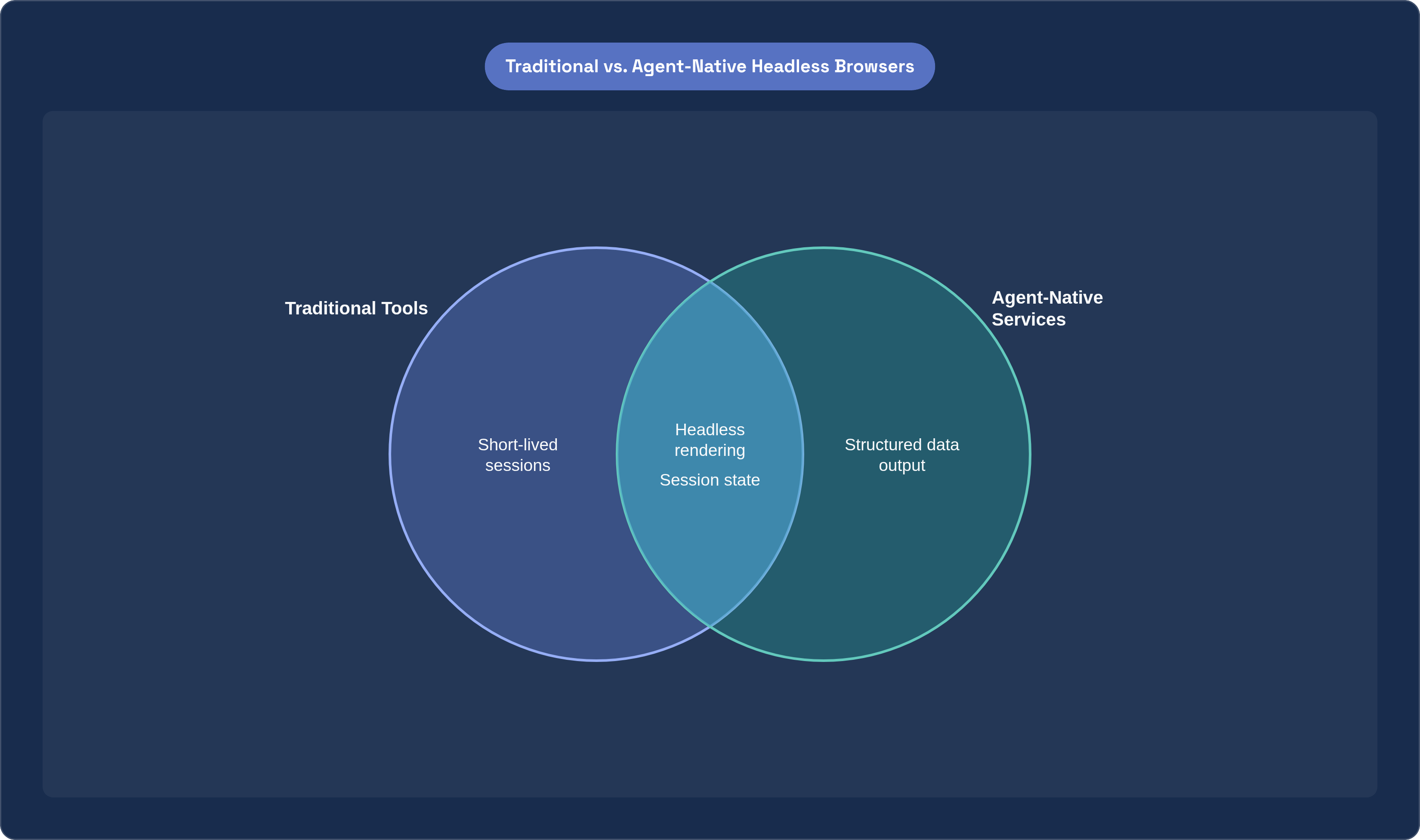
The core difference is that agent-native services treat browser behavior as something an agent calls programmatically, mid-task, rather than something a developer configures once and checks on later. Once you see that distinction, the rest of the feature list makes more sense.
Session management sits at the center of it. Persistent sessions let an agent stay logged into a site across a string of steps without re-authenticating every time, which sounds small until you've watched an agent get logged out mid-task and lose all its progress. Session handoff matters just as much: when an agent hits something it can't resolve, like a CAPTCHA or a payment confirmation that needs a human's sign-off, a well-built service lets the agent flag it, pause cleanly, hand control to a person, and pick back up once that person acts. That's a designed loop, not a crash. Session recording rounds this out; full DOM-level replay means a developer debugging a failed run can watch exactly what happened rather than trying to reproduce a flaky bug from log lines.
Anti-bot handling forces an honest choice that traditional scraping tools mostly dodged. Old-school scrapers try to look human, spoofing headers and rotating user agents to sneak past detection. Agent-native services have to decide whether to keep playing that game or declare themselves openly. Some services, Browser Run being one example, use cryptographic signatures to identify their traffic as bot traffic rather than disguising it, which matters more than it might seem: an agent misrepresenting itself as a person creates real legal exposure for whoever built it, especially as regulators start paying attention to how AI systems interact with third-party sites.
Then there's output. Agents don't need a screenshot rendered for human eyes; they need data, and every unnecessary token in that data costs money and adds latency. Agent-native services extract structured, compact representations of page content instead of dumping raw HTML or full-resolution images, which is a cost decision as much as a technical one.
Scalable remote execution covers the infrastructure layer: warm pools of browser instances so an agent doesn't sit waiting through a cold start, high concurrency so dozens or hundreds of sessions can run without a developer managing containers by hand, and isolation so one compromised or malicious page can't leak state into a neighboring session. Many of these services now expose themselves as MCP servers too, so tools like Claude Desktop or Cursor can call browser capability directly without custom glue code stitching things together.
New risk shows up alongside all of this. Prompt injection through malicious page content is a real threat model now, not a hypothetical: an agent that reads a page's text as instructions can be manipulated by anyone who controls that page's content. Tool safety, keeping an agent from being talked into an action it shouldn't take by an adversarial site, is a problem traditional headless tooling never had to think about because a human was always the one clicking.
How the main services in this space differ from each other
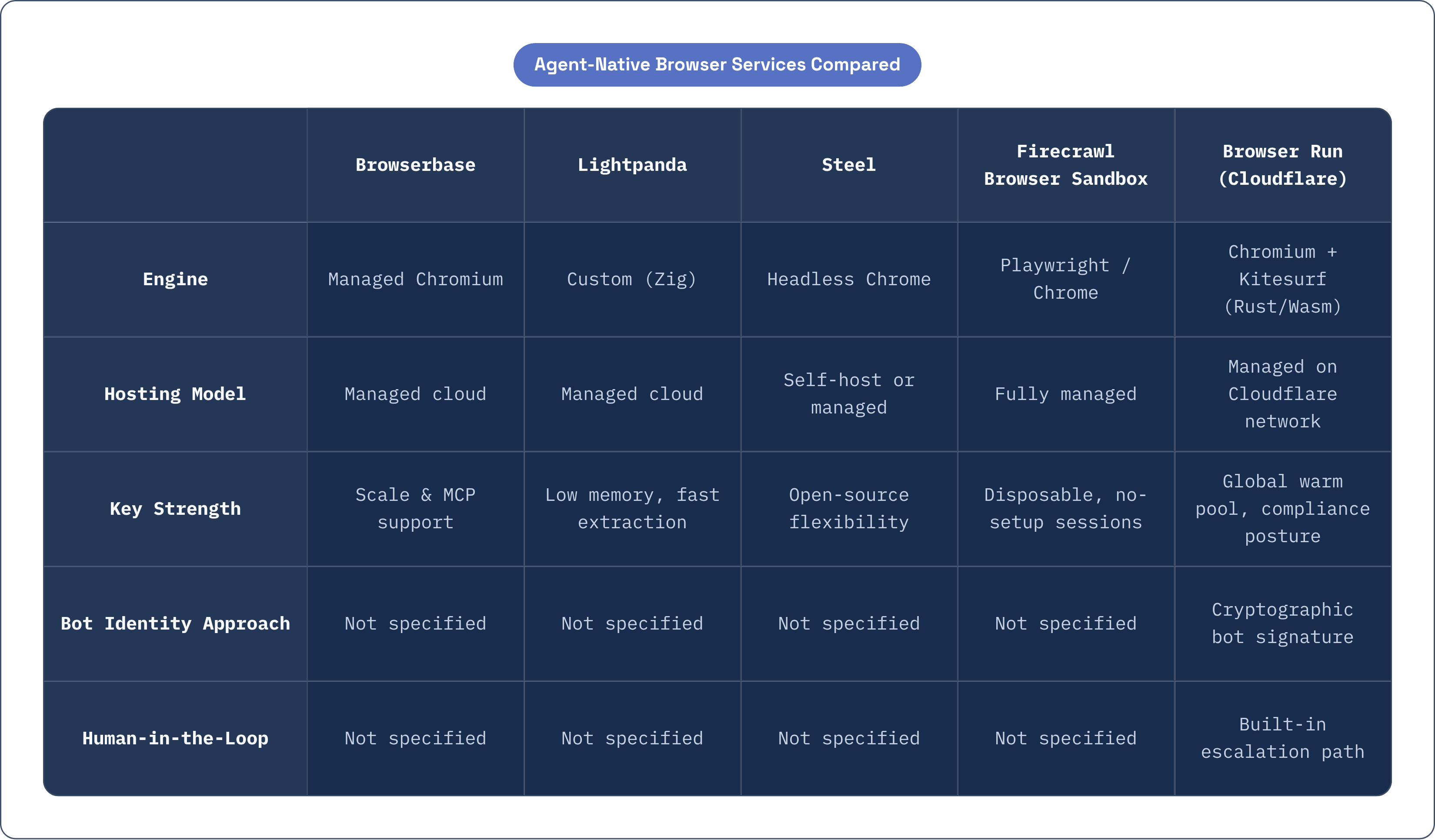
Worth sorting these by three things: what engine they run, whether you self-host or rent managed infrastructure, and how deep the agent-specific features go.
Browserbase runs managed Chromium infrastructure at real scale; the company raised a $40 million Series B at a $300 million valuation in June 2025 and says it processed 50 million sessions that year across more than 1,000 customers. Its MCP server support is a genuine strength, addressing what its CEO has called the "unsexy internet" problem: most sites simply don't have an API or an MCP endpoint, so an agent needs a browser to get anything done there at all.
Lightpanda takes a different bet entirely. It's a browser engine written from scratch in Zig, not a fork of Chromium or WebKit, and the company claims roughly 9x lower memory use and 11x faster execution than Chrome. Its PandaScript output is deterministic and doesn't burn tokens, so a team can prototype extraction logic with an LLM and then ship a production pipeline that runs without a model in the loop at all. That's a meaningful cost lever for anyone running high-volume, repetitive extraction jobs.
Steel goes the open-source route: self-hostable, with a managed cloud option if you want it, handling session lifecycle, proxies, and headless Chrome under one API. Firecrawl's Browser Sandbox leans the other direction, fully managed and disposable, a fresh container per session with Playwright pre-installed so there's no local setup or driver mismatch to fight with.
Browser Use deserves a mention even though it's a framework rather than a hosted service; you still have to bring your own browser infrastructure. It reported an 89.1% success rate on the WebVoyager benchmark across 586 web tasks, ahead of OpenAI's Computer-Using Agent, which scored 87% on the same benchmark and 58.1% on WebArena. That's a strong signal for teams evaluating which agent framework to build on top of, separate from the infrastructure question.
Browser Run belongs in this same conversation, and it earns its place honestly rather than by default. It runs a managed global pool of warm browser instances on the provider's own network, which removes cold starts and container management from the developer's plate entirely. It rebranded from Browser Rendering in April 2026 with a set of additions built specifically for agents: Live View for watching a session in real time, Session Recordings for full DOM-level replay, a Human in the Loop escalation path, and MCP client support for tools like Claude Desktop and Cursor. Concurrency jumped from 30 to 120 simultaneous browsers, which matters a lot for the bursty, parallel-task pattern agents tend to produce. The bot-signature approach mentioned earlier gives it a compliance posture that's harder to find elsewhere, and its WebMCP support, which we'll get into next, means agents using Browser Run can find structured actions on compliant sites instead of guessing at DOM structure.
Kitesurf: what a browser built from scratch for agents looks like
Kitesurf launched in beta in August 2026, and it's worth sitting with what it actually strips away, because that's the interesting part. It's a cloud-hosted browser engine, built for agents rather than people, running entirely on Workers infrastructure and written in Rust compiled to WebAssembly. No tabs. No extensions. No theme support. No effort spent on 60-fps scrolling or pixel-perfect rendering, because none of that does anything for an agent that never looks at a screen.
Under the hood it's assembled from pieces rather than adapted from an existing desktop browser: a modular rendering engine from Blitz, Firefox's CSS parser Stylo, and Boa, a Rust-based ECMAScript engine, all put together specifically for this workload rather than bolted onto Chromium's existing frame.
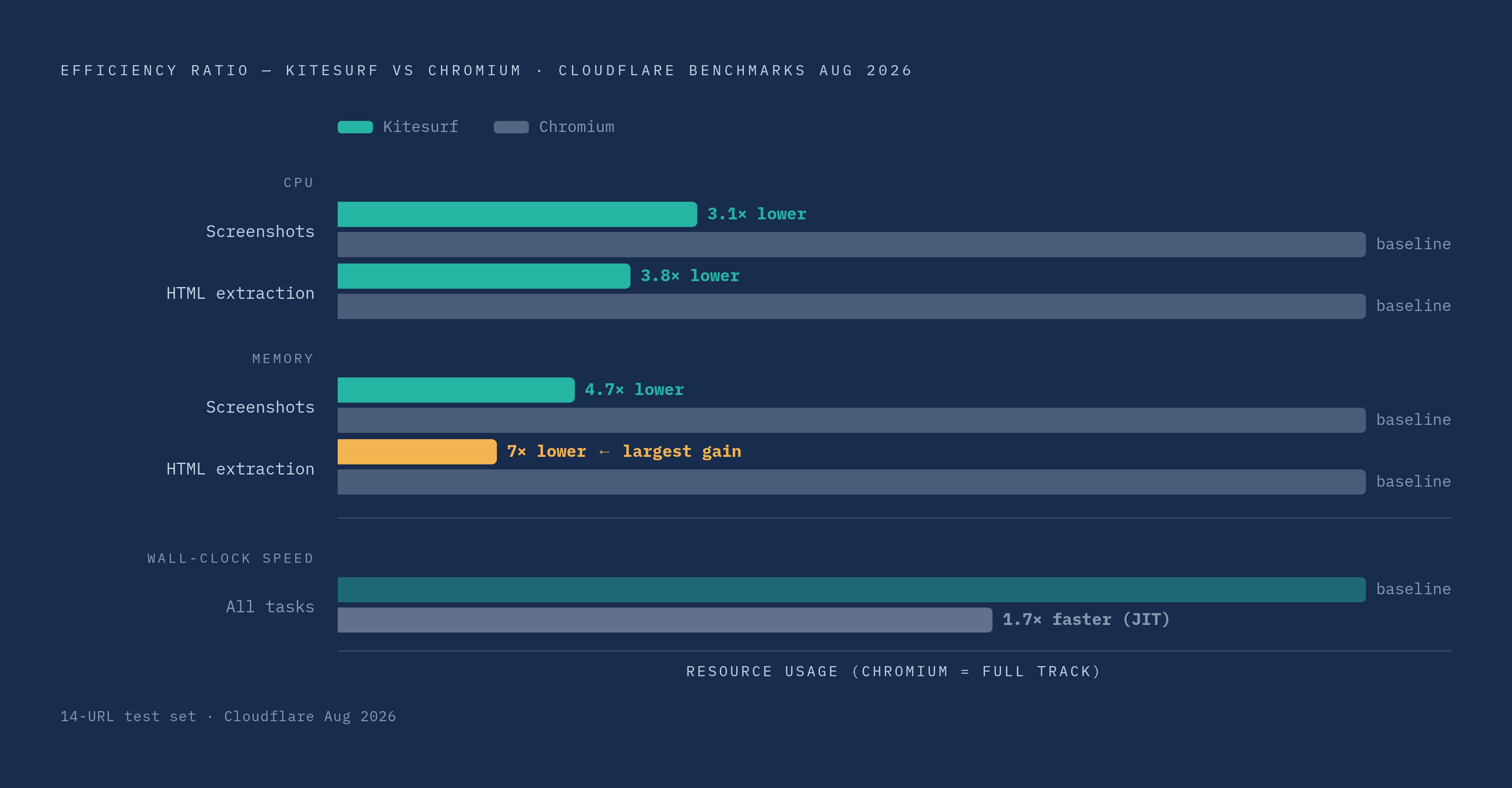
The August 2026 benchmarks published at launch, run across a 14-URL test set, tell an interesting story. On CPU, Kitesurf uses 3.1x less than Chromium for screenshots and 3.8x less for HTML extraction. On memory, it's 4.7x lower for screenshots and 7x lower for HTML extraction. But raw wall-clock speed actually favors Chromium, by about 1.7x, because Chromium's JIT compiler outruns a software renderer on straight execution time. That's a fair trade-off to name honestly rather than bury. For an agent running one task, Chromium finishes faster. For an operation running thousands of sessions a day, CPU and memory are what show up on the invoice, and that's where Kitesurf pulls ahead.
Security here isn't bolted on afterward. Pages are isolated from each other at the page level, so a malicious page an agent visits can't corrupt state in a different page running in a separate session, and prompt injection is treated as a named threat in the design rather than an afterthought patched in later. Each instance is meant to be ephemeral: it exists for the length of a task and disappears afterward, which fits the bursty, unpredictable load pattern agents tend to generate far better than a long-running server process does.
Kitesurf already passes roughly 215,000 web platform tests, with more added weekly, so it's not a toy engine cutting corners on standards compliance to hit these numbers. It's free during beta inside Browser Run, and the team behind it has said it plans to open-source the engine and eventually let customers self-host it on their own infrastructure.
WebMCP and the emerging standard for agent-readable websites
Here's the problem underneath all of this: an agent scraping a site through its DOM is standing on ground that can shift under it at any moment. A site redesign, a class name change, a restructured checkout flow, any of these can silently break an automation that was working fine the day before. Worse, the agent has no real way to know what actions a site actually wants to support. It's guessing based on what the page happens to look like.
WebMCP, which Cloudflare put into developer preview in August 2026, is an attempt to fix that at the browser level rather than patching around it site by site. It lets any website declare the actions it supports for agents through a new document.modelContext interface, no separate API to stand up, no change to how the origin serves its normal traffic. It's shipping experimentally in Chrome 146 already, so this isn't a theoretical proposal sitting in a working group somewhere.
The pairing here is worth sitting with for a second. Browser Run gives an agent something to act with. WebMCP gives a website a structured way to be acted on. They meet in the middle at an open standard rather than a proprietary integration either side controls alone, which is the detail that makes this more than a vendor feature.
One might argue this cuts site owners out of their own traffic, but that's not really how it's designed. The human stays in the loop, and site owners keep the ability to shape exactly what an agent can and can't do on their pages: WebMCP works more like a structured handshake than a bypass. For a developer, the payoff is quiet but real. An agent running on a service that supports WebMCP, Browser Run being one, gets more reliable on any site that adopts the standard, without the developer writing a line of new code. The infrastructure just handles the discovery part on its own.
It's early, worth saying plainly. Developer preview status and one browser's experimental support don't make a standard yet. But the direction is worth watching, because if this or something like it catches on, the line between scraping a site with a headless browser and calling a site's API starts to blur in a way that benefits everyone building agent infrastructure right now.
The gap most organizations hit when moving agents from pilot to production
Deloitte's 2025 research put a number on something a lot of teams have felt anecdotally: 30% of organizations were exploring agentic options and 38% were piloting them, but only 14% had anything production-ready, and just 11% were actually running agents in production day to day. Gartner, meanwhile, expects 40% of enterprise applications to integrate task-specific AI agents by the end of 2026, up from under 5% in 2025. Sit those two numbers next to each other and the gap is stark: expectations are running well ahead of what most teams have actually shipped.
Why does that gap exist? It's rarely because the agent itself can't do the task. It's because the infrastructure around the agent isn't built for what production actually demands. Standard DevOps monitoring, built around server logs and uptime dashboards, doesn't tell you what an agent actually did inside a browser session; you need session-level replay for that, the kind Browser Run's Session Recordings or similar tooling from Browserbase provide. Without it, a failed agent run is close to a black box.
Human-in-the-loop design is the other piece teams underestimate until they hit it. An agent that runs into a CAPTCHA, a paywall, or a genuinely ambiguous decision needs somewhere to hand that decision off, cleanly, rather than crashing or, worse, guessing and moving on. That's the difference between a pilot that looks good in a demo and a system a company will actually trust with real customer data.
Audit trails matter even more in regulated industries. Financial services, healthcare, legal, any of these fields where a company might need to reconstruct exactly what an agent did and why, months after the fact. Session recordings stop being a debugging tool at that point and start functioning as compliance documentation. The EU AI Act's Article 14 requires human oversight interfaces with verified confirmation steps for high-risk systems, and browser infrastructure that logs and replays every session isn't just convenient there; it's close to a direct answer to what the regulation is asking for.
And then there's the quieter failure mode: anti-bot friction. An agent that hits a detection wall doesn't usually throw a clear error. It just fails, sometimes silently, and a team can spend days debugging what looks like a logic bug in their own agent before realizing the site on the other end simply blocked them. That's the kind of failure that never shows up in a pilot running against a handful of friendly test sites, and it's exactly the kind of failure that shows up the moment a system goes live at real volume. Which is, in the end, the whole argument for treating browser infrastructure as its own serious decision rather than an afterthought bolted onto the agent itself.