Visual Regression Testing with Headless Browsers
How headless browsers cut testing costs while exposing their blind spots.

A headless browser runs the full rendering pipeline, HTML parsing, CSS layout, JavaScript execution, minus the last step of painting pixels to an actual screen. That single omission is what makes visual regression testing at scale possible, and understanding why turns out to matter more than most teams realize when they're picking a testing stack. This piece walks through the mechanics: what headless actually strips out, how a screenshot diff decides whether your UI broke, why the same test can pass on your laptop and fail in CI, and where the tooling and the AI-driven parts of this workflow stand right now.
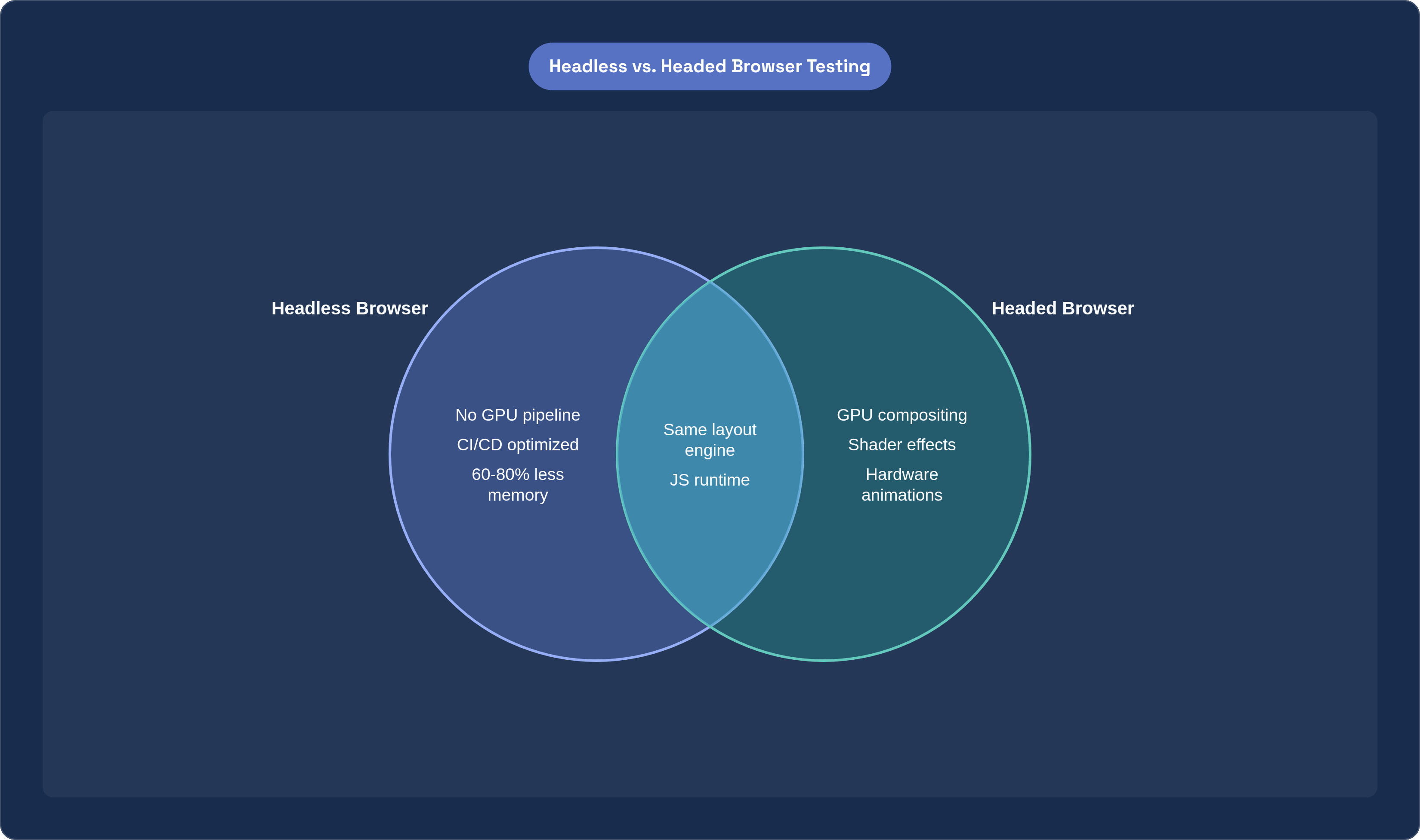
Start with what "headless" actually means, because the term gets thrown around loosely. A headless browser still runs the same layout engine, the same JavaScript runtime, the same network stack as its headed counterpart. What it skips is the GPU pipeline and the visual buffer, the machinery that composites finished pixels onto a window you can look at. No window manager, no graphics driver dependency, nothing that assumes a human is sitting in front of a monitor, and that's why it drops cleanly into a Linux container or a CI worker with no fuss.
Worth a quick history note here. PhantomJS was the tool everyone reached for in the early days of headless testing, and for years it did the job well enough. Development on it was suspended, though, and it stopped keeping pace with modern web standards, things like current CSS Grid behavior or newer JavaScript features. Headless Chrome and the browsers Playwright manages took over in practice, and today the field runs on actively maintained projects: Chromium in headless mode, Firefox headless, and WebKit through Playwright. One distinction worth holding onto as you read the rest of this: headless is an execution mode, not a separate browser. The same Chromium binary that renders your Chrome tab is the one running your regression suite at 2 a.m. in a CI pipeline.
The resource math that makes headless practical for regression suites at scale
Here's where the trade actually pays off, and it's worth being specific about the numbers rather than waving at "efficiency." A headed browser instance, one that's actually rendering pixels to a buffer with GPU acceleration turned on, costs somewhere around 300 to 500 MB of memory per instance. Strip out the rendering engine's visual components and that GPU pipeline, and you cut per-instance memory by roughly 60 to 80%.
That reduction isn't just a nice efficiency win. It's the thing that lets you run 3 to 5 times more browser instances on the same hardware, which is the actual mechanism behind parallelization, and you're not paying for more machines, you're fitting more test runners onto the ones you already have. On top of the memory savings, removing the rendering overhead itself shaves 20 to 30% off execution time compared to running the same test headed. That adds up fast across a suite with a few hundred visual assertions in it.
Put those two numbers together and you get a practical outcome that matters to anyone who's watched a CI pipeline crawl. A visual regression suite that takes an hour running headed, on the same box, with parallelization turned on, can often finish inside the merge-request window your team actually has patience for. That's the whole pitch, really: density plus speed, and both come from the same trade-off.
The trade-off does cost something, though, and it's worth saying plainly rather than glossing over it. Headless mode can miss rendering bugs that only show up when a real GPU composites layers, certain shader effects, some hardware-accelerated animations, edge cases in how a specific graphics driver handles compositing. Teams running high-stakes visual work for graphics-heavy products should keep a headed fallback in their back pocket for exactly those cases, since it's a known blind spot worth planning around.
How a visual regression test actually works: baseline capture, screenshot diff, and threshold judgment
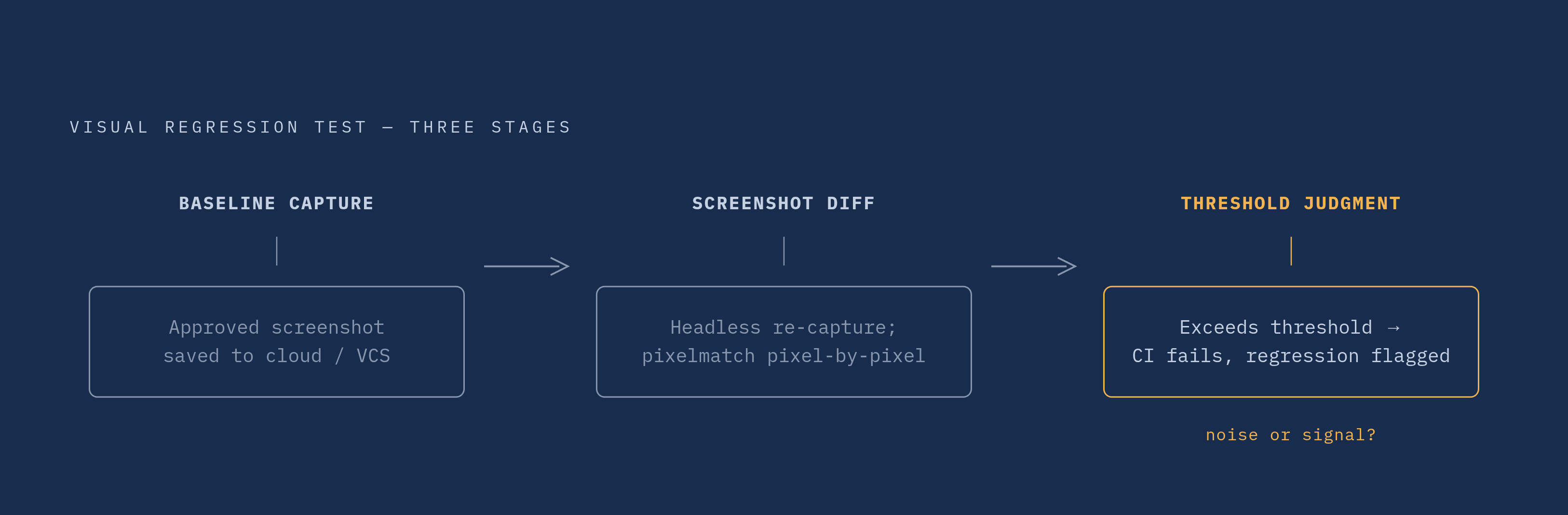
Strip away the tooling branding and a visual regression test is a three-step process, and it's worth walking through slowly because the details determine whether your suite is trustworthy or just noisy.
Step one is baseline capture. The first run of a test saves an approved screenshot, the "this is correct" state, into a cloud bucket or a version-controlled directory alongside your code. Step two happens on every subsequent run: the headless browser captures a new screenshot under conditions that are supposed to be identical to the baseline, then a diff library (pixelmatch is a common one) compares the two images pixel by pixel. Step three is the judgment call: if the pixel difference crosses a threshold you've set ahead of time, the CI build fails and flags a possible regression before it ever reaches production.
That sounds clean in the abstract, but in practice, how you compare images matters enormously, and there are three real approaches with different sensitivity profiles.
Pixel-based comparison is the oldest and simplest: fast, easy to set up, works fine on static pages and marketing sites where nothing moves. It throws false positives constantly on anything dynamic, though, a rotating carousel, a CSS animation mid-frame, an ad slot serving different creative on each run. DOM-based comparison takes a different angle, analyzing the structure and layout of UI elements rather than raw pixels, which cuts down on false positives from animation or third-party content that changes but doesn't actually represent a bug. Then there's AI-powered or perceptual diffing, which tries to separate meaningful regressions from rendering noise, anti-aliasing shifts, sub-pixel differences, the font rendering variations that show up across operating systems. This is where most modern tooling has landed, and for good reason.
The false-positive problem deserves its own moment here, because it's the practical crux of the whole discipline. A pixel-diffing tool that flags noise constantly trains your reviewers to click "approve" without really looking. That's the worst habit a testing pipeline can build into a team: once people stop trusting the red X, the tool stops doing its job even though it's technically still running.
One thing worth noting on why visual diffing matters beyond catching layout bugs: the 2026 WebAIM Million analysis found low-contrast text on 83.9% of the top 1,000,000 home pages. That's a category of problem that sails past every DOM assertion and every functional test you write, because the markup is correct and the JavaScript runs fine. A visual diff, applied with the right threshold, is one of the few automated checks that actually catches it.
Environment consistency: why the same test produces different pixels on different machines
Here's a scenario every team running visual tests has hit eventually. The code hasn't changed, the test passed yesterday, and today it's red, with the diff showing a two-pixel shift in a heading's anti-aliasing that nobody touched.
The root cause sits below the application layer entirely: font rendering, anti-aliasing, and sub-pixel hinting all differ across operating systems and GPU configurations, even when the underlying code is byte-for-byte identical. A baseline captured on someone's macOS laptop will produce phantom failures the moment it's compared against a Linux CI runner, because macOS and Linux simply rasterize fonts differently. The diff isn't lying, technically the pixels are different, but the "regression" is purely environmental, not a bug anyone introduced.
Playwright handles this at the naming level: snapshot filenames encode both browser and platform, so a macOS/Chromium baseline never gets compared against a Linux/Chromium run in the first place. It's a small design decision, but it eliminates an entire category of false alarm before it happens.
Docker plays a similar role from the infrastructure side. Running your test suite inside a container freezes the rendering environment: same OS, same font stack, same driver versions, every time, on every machine. That consistency is what eliminates the flakiness that comes from "well, it works on my machine."
A couple of smaller disciplines matter here too. Browser instances can default to different viewport sizes depending on how they're launched, so hardcoding a specific viewport in your test config isn't optional, it's a prerequisite for baselines that mean anything. Separating visual tests into their own files, something like [name].vrt.test.[ext], gives you a cleaner failure signal, too, so you want to know immediately whether a red build means "the layout broke" or "a function returned the wrong value," not spend ten minutes untangling the two.
The takeaway across all of this: environment consistency is an engineering discipline every tool, no matter how good, still requires you to practice.
The current tool options and what each one actually requires of a team
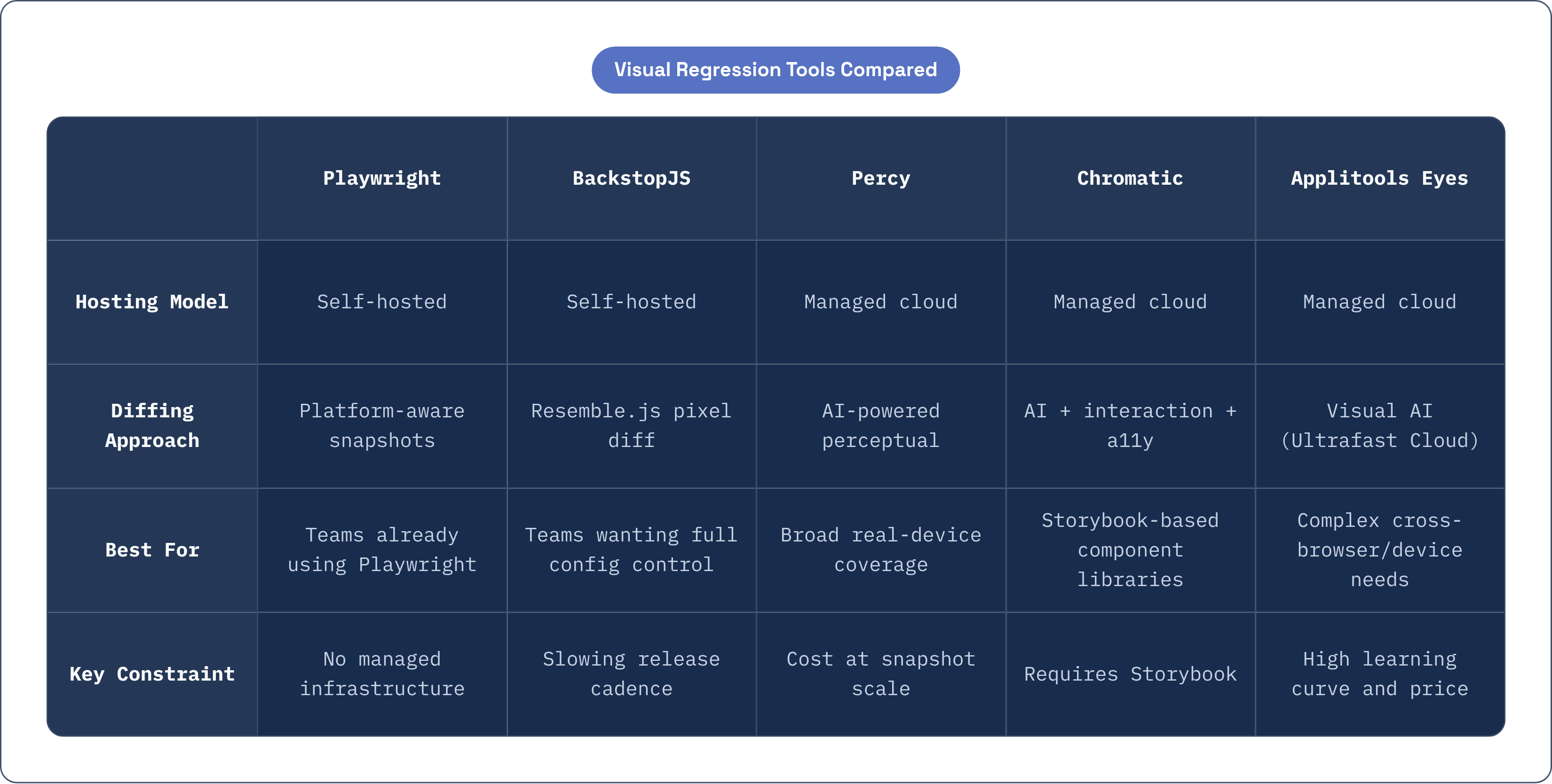
Tools in this space differ along three real axes: where the diffing runs (locally versus in someone else's cloud), whether adopting the tool adds a new stage to your pipeline, and what it costs once your suite has a few thousand snapshots in it. Here's where the current field stands.
Playwright built-in visual snapshots require nothing beyond Playwright itself, since visual testing is a first-class feature rather than a bolt-on. It runs against Chromium, Firefox, and WebKit, and the project is actively maintained (version 1.62.0, as of July 2026, Apache 2.0 license). Its platform-encoded snapshot naming solves the environment consistency problem from the last section right out of the box. For a team already writing Playwright tests, adding visual coverage is close to free.
BackstopJS takes the self-hosted route: open-source, Node.js-based, running on Puppeteer or Playwright under the hood with Resemble.js handling the actual diffing. It's fully scriptable, Docker support makes environment parity straightforward to set up, and you get complete control over configuration. The release cadence has slowed noticeably, though, version 6.3.25 came out in September 2024 and there's been nothing since, so teams evaluating it should weigh that maintenance trajectory before committing.
Percy, now part of BrowserStack since the 2020 acquisition, is the widely adopted managed option, integrated with BrowserStack's real-device cloud of over 50,000 devices. Its AI-powered Visual Review Agent, launched in late 2025, cuts review time by roughly 3x and automatically filters out around 40% of false positives, the anti-aliasing shifts and OS font variations that would otherwise clutter a reviewer's queue. Good fit for teams that want managed infrastructure and broad device coverage without running their own fleet.
Chromatic ties itself tightly to Storybook, which is both its strength and its limit. One test run gives you visual, interaction, and accessibility results together, three concerns reviewed in a single pass instead of three separate ones. TurboSnap, which only re-tests components actually affected by a code change, is the practical fix for cost as your component library grows; the free plan includes a real monthly snapshot allowance with unlimited projects and collaborators. The hard constraint is unavoidable, though: no Storybook means Chromatic is off the table, which rules it out for server-rendered apps or legacy front ends that never adopted it.
Applitools Eyes sits at the high end: a visual AI platform with an Ultrafast Test Cloud for parallel execution, supporting Selenium, Cypress, WebdriverIO, and mobile frameworks. It has real capability for complex cross-browser, cross-device testing, but that comes with a learning curve and a price tag that only makes sense once you actually need that breadth.
Fitting visual regression into a CI/CD pipeline without creating a bottleneck
Placement in the pipeline matters more than people give it credit for. Visual tests should run after unit and integration tests pass, not before, because running them earlier just burns headless compute on a build that's going to fail anyway for some unrelated reason. Let the cheap, fast checks fail first.
Once visual tests are running, the density advantage from headless mode (that 3 to 5x figure from earlier) becomes your main lever for keeping the pipeline fast: sharding the visual suite across multiple workers is how you keep wall-clock time reasonable as the suite grows into the hundreds of snapshots.
Baseline storage deserves a deliberate policy, not an afterthought. Committing baselines to version control alongside the application code gives reviewers an actual diff history, and it turns baseline updates into a pull-request event, something deliberate, reviewable, and reversible if it turns out to be wrong. This also forces a distinction that trips up a lot of teams: a red visual test could mean "this is a real regression" or it could mean "this is an intentional design change that hasn't been approved yet." Without a clear approval path for the second case, teams either rubber-stamp everything or block legitimate changes out of caution.
Selective execution matters as the suite scales. Tools like Chromatic's TurboSnap or Playwright's affected-file detection cut down the number of screenshots taken per commit, which keeps costs and runtime in check as the project grows rather than letting it balloon linearly.
On the infrastructure side, run the same Docker image in CI that you use locally. This is the environment consistency argument from earlier applied directly: drift between what runs on a developer's machine and what runs in CI is the single most common source of flaky visual tests, and it's entirely avoidable with a shared container image.
Last point, and it's more about team process than tooling: a visual failure should route to whoever made the change that likely caused it, not get broadcast to the whole team. Noise kills a testing signal faster than false positives do, because once people learn to ignore notifications, they ignore the real ones too.
Where AI agents are beginning to change the economics of visual test authoring and triage
Two things have always made visual regression testing expensive in terms of human time: writing the test scripts in the first place, and reviewing the screenshot diffs afterward. AI is starting to chip away at both, and the shift is worth watching closely rather than either dismissing or overselling.
On the authoring side, instead of hand-writing Playwright or Cypress interaction code, teams are starting to describe user journeys in plain language, "log in, add an item to the cart, check out as guest," and an agent handles the rest: spinning up headless browser instances, executing the journey, capturing screenshots across multiple viewports and rendering engines concurrently. Self-healing locators are part of this too. When a developer renames a CSS class or restructures a component, tests built around these locators adapt on their own instead of breaking on every routine refactor, which used to be one of the more tedious maintenance burdens in any visual suite.
On the triage side, Percy's Visual Review Agent is a live example of what this looks like in production: 40% false-positive suppression, review time cut roughly 3x. The reviewer's job shifts from "is this actually a bug?" to "confirm this flagged item matters," which is a meaningfully lighter cognitive load when you're staring at fifty diffs after a big merge. Underneath this sits perceptual diffing powered by machine learning models trained to approximate human visual judgment, distinguishing an actual layout regression from anti-aliasing noise rather than applying one fixed pixel threshold across every image.
All of this raises an infrastructure question worth sitting with: agents running browser automation at scale need headless browsers provisioned on demand, and the density advantage described at the start of this piece becomes even more valuable once you've got agents running dozens of journeys in parallel rather than a fixed nightly suite. Cloudflare's Browser Rendering product addresses exactly this: managed headless browsers available on demand, with Playwright support at general availability synced to the current Playwright release, so teams (or their agents) can run browser automation without standing up and scaling their own browser fleet. Its integration with Stagehand lets an agent combine deterministic code with natural-language instructions, which tends to produce more resilient automation than either approach alone.
One honest caveat before closing. Agentic test generation is still maturing, and teams that are getting real value from it treat the agent's output as a piece of software in its own right, something that needs version control, its own tests, and human review, since the agent writes the test, but someone still has to decide whether the test is actually testing the right thing.