Running Stagehand on a Remote Browser
Stagehand now runs efficiently on remote browsers without adapter overhead or extra latency.

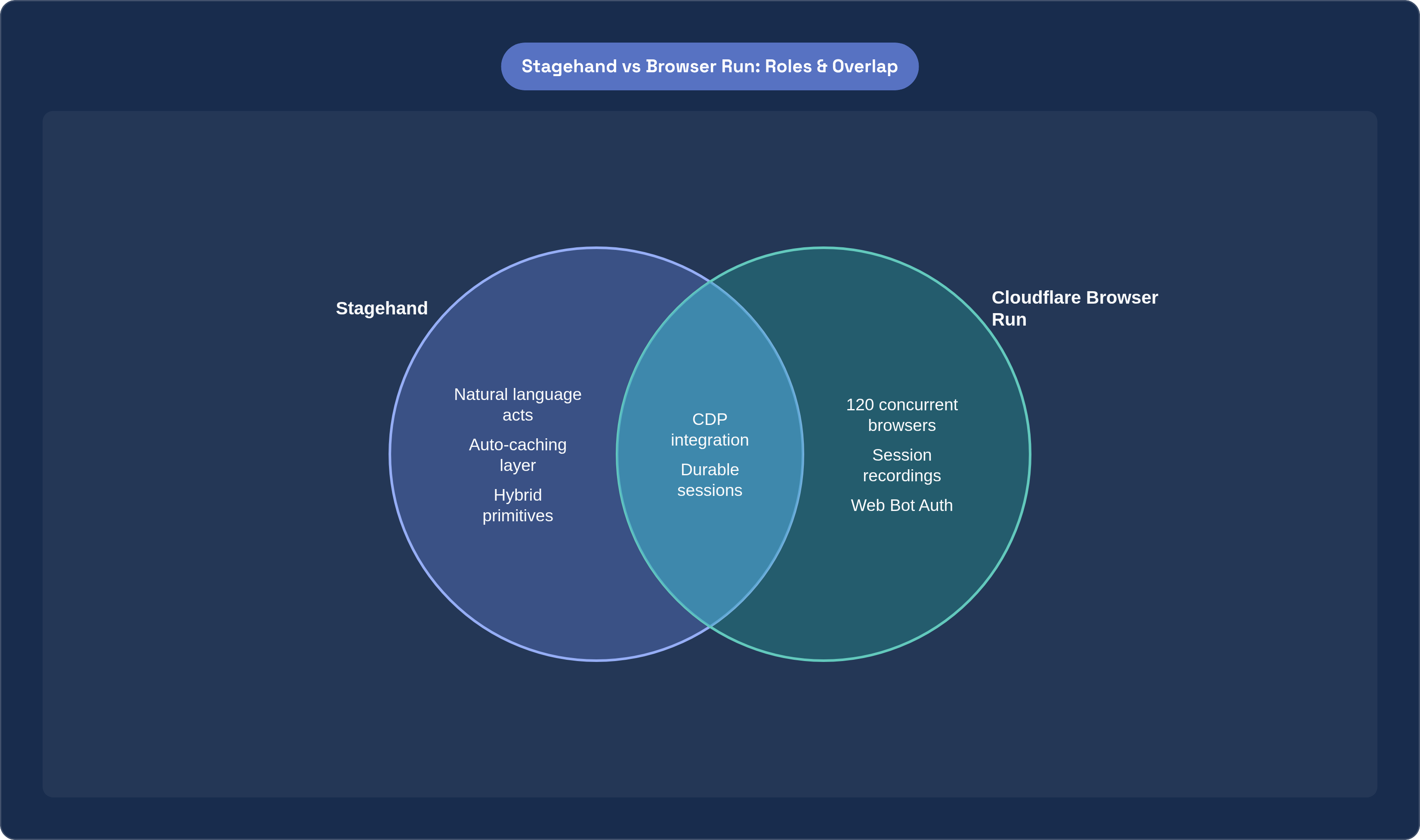
Stagehand's core proposition is straightforward: instead of targeting a DOM element with a hardcoded selector, a developer writes a natural language instruction, and the framework resolves it at runtime against whatever markup actually exists. The four primitives, act, extract, observe, and agent, give teams a spectrum from deterministic step-by-step control to autonomous multi-step workflows. Most production teams converge on a hybrid: agent for exploratory navigation where the path through a site is unpredictable, and individual primitives for critical paths where outcomes must be guaranteed. The TypeScript and Python SDKs implement this model consistently, and the auto-caching layer, which stores successful actions and replays them without calling the model when nothing on the page has changed, addresses the two objections that surface in any serious evaluation: cost and flakiness.
None of that changes when you move from a local browser to a remote one. What changes is everything else.
Stagehand v3, released October 29, 2025, is a ground-up rewrite. The most consequential architectural decision was moving to direct communication over the Chrome DevTools Protocol. CDP is the same protocol that remote browser platforms expose natively, which means v3 fits into remote environments without the adapter layers and round-trip overhead that characterized earlier approaches. Browserbase reports a 44.11% average speed improvement across iframe and shadow-root interactions. Before treating that as a headline win, it is worth noting what the benchmark actually covers: authenticated dashboards, embedded iframes, and complex single-page applications, the interaction patterns most likely to appear in workflows teams actually care about, not synthetic benchmarks engineered to flatter the product. What matters is not the exact percentage; it is that the gains cluster where they are hardest to fake.
Two other v3 changes matter for deployment. First, the SDK is no longer tied to a single browser driver; it runs across Puppeteer, Playwright, Bun, and more. Second, a unified REST API ships alongside the SDK, so Stagehand can be invoked from orchestration tools, MCP-compatible AI coding assistants, or curl without requiring a dedicated Node process. V3 doesn't just run on remote browsers; it was designed for the architecture that makes remote deployment worth attempting in the first place.
How Cloudflare Browser Run Provides the Remote Browser Layer
Cloudflare relaunched its Browser Rendering product as Browser Run in April 2026. The rename was accurate: "rendering" implied a narrow, document-conversion use case, while the actual product runs full browser sessions on a global network with capabilities including programmatic control, session recording and replay, real-time debugging, and human-in-the-loop handoff when an agent reaches something it cannot resolve autonomously.
The product divides into two tiers. Quick Actions covers stateless tasks, screenshots, PDF generation, and page scraping, with no code deployment required. Browser Sessions is the tier relevant here: full programmatic control via Puppeteer, Playwright, CDP, or Stagehand, with Stagehand support in Beta as of September 25, 2025, and Playwright on Browser Run reaching general availability at the same time.
Browser Run supports 120 concurrent browsers, a fourfold increase from its prior limit. Session state persists via Durable Objects, meaning cookies, authentication tokens, and open tabs survive across multiple invocations tied to the same session. Cold-start overhead disappears for repeated tasks. Billing, which began on a consumption basis in August 2025, works through each REST API response reporting actual browser time in milliseconds via an X-Browser-Ms-Used header, so cost tracks use rather than provisioned capacity.
For teams that have operated browser automation at scale locally, each of these represents a real constraint lifted. Locally, concurrency is bounded by the machine; one browser crash can propagate to others; there is no persistent session state across invocations; failures in specific environments are often impossible to reproduce. These are not Stagehand-specific limitations. They apply to any local browser automation. Stagehand makes the gap more visible because it was designed for conditions where those limitations actually bite.
Setting Up the Worker: The Required Configuration Before Any Stagehand Code Runs
The integration runs inside a Worker. The Worker is the deployment unit; everything else, the browser session, the LLM routing, the session state, attaches to it.
Three configuration items in wrangler.toml are non-negotiable. The nodejs_compat compatibility flag must be present. The compatibility date must be set to 2025-09-15 or later, per the official documentation at developers.cloudflare.com/browser-run/stagehand/. A browser binding must be declared to give the Worker access to Browser Run. A Workers AI binding is also required, because Stagehand routes LLM calls through a WorkersAIClient that uses the Worker's own AI binding rather than an external credential.
Skip the compatibility flag and things get instructive in the worst way. The Workers runtime does not natively expose Node.js APIs; without the flag and a sufficiently recent compatibility date, those APIs are simply absent. Stagehand then proceeds in ways that surface as behavioral failures rather than startup errors. The automation appears to execute while actually doing nothing recoverable. I have lost more than one afternoon to this exact scenario, watching logs that looked plausible right up until the point where nothing had actually happened. The culprit only becomes obvious in retrospect, and only if you know to look for it.
The Worker is a fetch-handler: the browser session initiates per incoming request or per invocation, not on a schedule unless you wire it that way. Developers coming from scheduled-job backgrounds sometimes expect the Worker to have its own lifecycle independent of requests. It does not. The session lives and dies with the invocation unless Durable Objects are used to persist state across calls.
Wiring Stagehand to the Remote Browser and Routing LLM Calls
The instantiation sequence inside the Worker follows three steps. First, acquire a CDP endpoint from the Browser Run binding. Second, pass that CDP URL to Stagehand's constructor; this is what attaches Stagehand to the remote browser rather than launching a local one. Third, pass a WorkersAIClient as the llmClient, which routes all model inference through the Worker's AI binding.
The default configuration, Workers AI as the inference backend, requires no external API keys and no credential management. Inference runs on the same network alongside the browser. For teams with existing relationships with OpenAI or Anthropic, or specific model requirements that Workers AI does not yet satisfy, swapping in an alternative provider means changing only the llmClient constructor and supplying the relevant credentials via Worker secrets. The rest of the code is unchanged.
AI Gateway sits between the llmClient and the model endpoint when configured. Creating a gateway in the dashboard and pointing the llmClient to the gateway URL rather than directly to the model adds full observability to all LLM calls: what model was invoked, what the inputs were, what it cost, without modifying any automation logic. For teams facing the question of how to give a security or finance team visibility into AI inference spend without granting access to production code, this is the practical answer. Not the only answer, but the least invasive one in this stack.
After wiring, the Stagehand API surface is identical to local use. The automation code does not know it is running against a remote browser. That transparency is the design goal, and it holds.
Writing Automation Logic That Holds Up Under Real Conditions
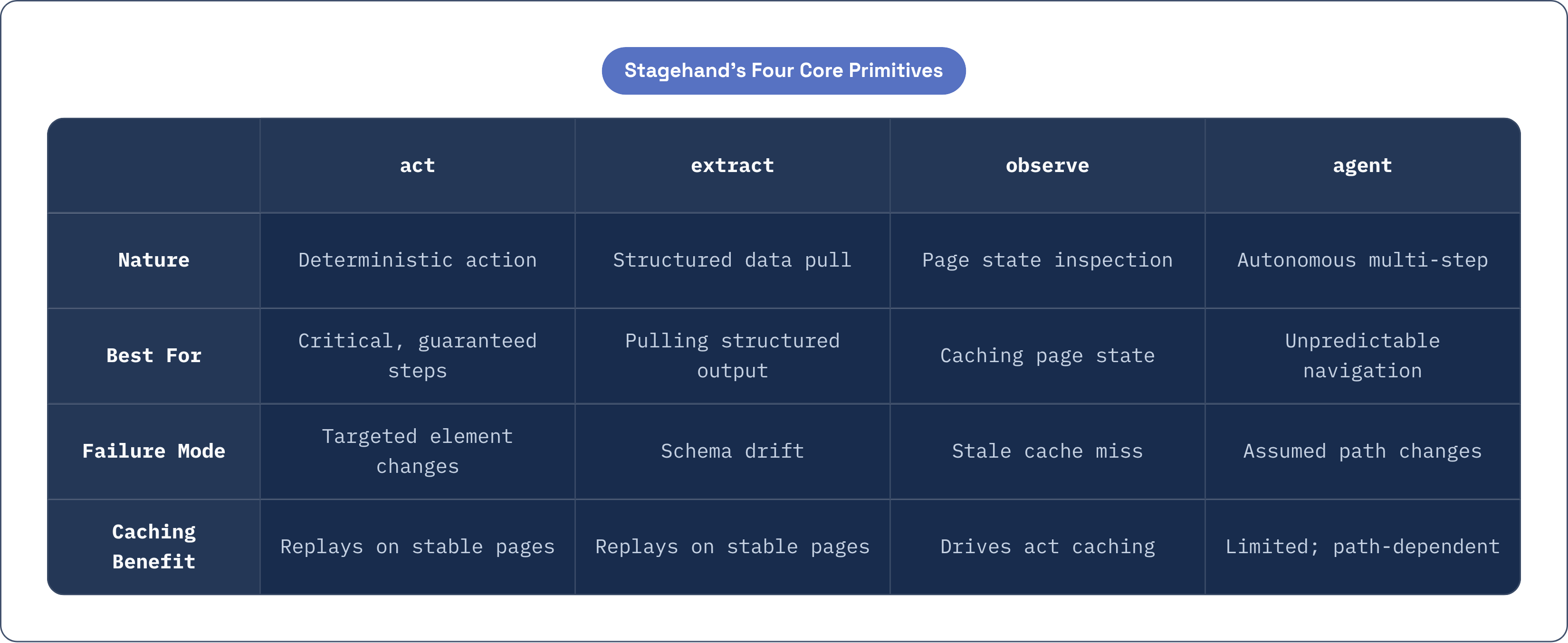
The hybrid model, agent for exploration, individual primitives for critical paths, reflects a real distinction in how browser automation fails. Exploratory navigation fails when the assumed path through a site changes; deterministic steps fail when the specific element being targeted changes. Using the right primitive for each type of step does not eliminate failure, but it localizes it, which is the prerequisite for fixing it. The goal is not prevention; it is recoverability. That framing changes which primitives you reach for and where you invest in error handling.
Caching behavior in a remote context works the same as locally: observe-then-act patterns run against cached results on repeated executions, and model inference is called only on a cache miss, meaning the page has changed in a way the cached action no longer handles. For CI workloads, the cost implication is significant. Cost scales with the frequency of site changes, not the frequency of executions. A suite running a hundred times a week against a stable internal tool incurs model inference costs proportional to how often that tool's frontend changes, which for most internal tools is infrequently.
Session persistence via Durable Objects changes the scripting model in a way that is easy to underestimate. When state survives across invocations, multi-step workflows that previously required re-authenticating on every run become straightforward: log in once, navigate to a report, extract data, return the following day and check for updates, all within the same session. Re-running the full authentication flow each time is not merely slower; it is also a more frequent point of failure, and compounding those failure points across hundreds of runs produces reliability numbers that become difficult to explain to anyone outside the team.
Human-in-the-loop handoff is the feature that separates production-grade automation from scripts that work until they encounter something unexpected. When an agent hits a login page, an unexpected CAPTCHA, or a modal it has not been trained to handle, Browser Run can pause the session and hand off to a human operator before resuming. Session recordings, which capture DOM changes, interactions, and navigation for every session, close the observability loop: when something fails in production, the question becomes not "can I reproduce this locally?" but "can I replay what actually happened?" Those are very different questions. The second one is almost always answerable. After enough failed attempts at the first, that distinction starts to feel like the whole point.
How Bot Auth and AI Gateway Keep Automated Traffic Accountable
At scale, browser automation traffic looks like bots. It is bots. Origin servers, and the bot management systems sitting in front of them, increasingly treat unidentified automated traffic as adversarial, and for understandable reasons: the tooling that legitimate automation teams use is largely identical to the tooling bad actors use. The historical response has been evasion, spoofing user agents, mimicking human interaction timing, rotating residential proxies. These techniques work for a while, and then they corrode the relationship between automated infrastructure and the broader web.
One might argue that evasion is simply the pragmatic path; the counterargument is that it compounds the problem it is trying to solve. Web Bot Auth takes a different approach. Browser Run automatically attaches cryptographic identity headers, Signature-agent, Signature, and Signature-input, to outbound requests from automated sessions. For sites using compatible bot management, this traffic is recognized and assigned a bot score of 1, meaning it is trusted rather than challenged or blocked. Browserbase CEO Paul Klein has described the intent plainly: "For AI to thrive, agents need reliable, responsible web access." Web Bot Auth is the identity layer that makes responsible access distinguishable from irresponsible access at the protocol level, rather than relying on behavioral heuristics that sophisticated bad actors have learned to defeat.
AI Gateway complements this at the inference layer. When configured, all LLM calls Stagehand makes flow through the gateway, producing an auditable record of what models were called, with what prompts, and at what cost. Security teams gain visibility into inference behavior without blocking developer workflows or requiring access to production code. The same governance applies to agent-driven sessions initiated by AI coding assistants via MCP; Browser Run exposes CDP, so tools like Claude Desktop, Cursor, and similar clients can use it as their remote browser, and the AI Gateway and Web Bot Auth controls apply uniformly across all of them.
Scaling Beyond a Single Session: Concurrency, Global Reach, and What Comes Next for Agent-Driven Browsing
The 120-concurrent-browser limit represents genuine parallelism for real workloads. Nightly data extraction, competitive monitoring, regression testing across dozens of pages: these workloads can run as a single Worker deployment without provisioning or managing infrastructure. Teams that struggle to scale browser automation locally are rarely struggling because their code is wrong. They are struggling because their infrastructure model treats a single browser process, or a small pool of them, as the natural unit of execution. That assumption does not survive contact with production volume.
Geographic placement matters for browser automation for the same reason it matters for APIs. A browser session running physically close to its target origin loads pages faster, receives DOM events sooner, and is less likely to trigger geographic-based bot detection. The underlying network spans more than 335 cities, giving Browser Run sessions proximity to most targets by default rather than by configuration.
The broader Agents platform extends the picture further. Agents deployed on Workers can hold durable identity, local SQL storage, real-time connections, scheduled work, and recoverable execution across failures. In this architecture, a browser session is one capability inside a larger agentic workflow, not the whole system. The browser becomes a tool the agent reaches for when it needs to interact with the web, rather than the primary runtime everything else is organized around.
That opens a genuine question about longevity. WebMCP, which landed in Chromium 146 and is backed by the Google Chrome team, allows websites to expose structured tools directly to AI agents: a search_flights tool with typed parameters, for instance, rather than a screenshot-analyze-click loop. The concern worth taking seriously is that automation scripts written today against UI paths will become obsolete as these structured interfaces proliferate. A more measured reading: they become simpler, because the stable, typed surfaces WebMCP introduces are exactly what this stack is positioned to consume. A Worker, a Browser Run session, Stagehand primitives, Workers AI inference, and AI Gateway observability form an architecture that handles today's scraping workloads and could plausibly handle tomorrow's agent-driven browsing. Whether it holds up as conditions change is worth watching. I have been wrong before about which transitions turn out to be cleanly additive and which ones break things in surprising ways.