Headless Browser Platforms for Large-Scale Web Scraping and Screenshot Automation
Choosing the right headless browser platform is infrastructure, not a formatting preference.
Web scraping runs on headless browsers now, and the choice of which one to run is an infrastructure decision, not a formatting preference. Get it wrong and the pipeline doesn't degrade gracefully, it just stops working the moment a target site's anti-bot system notices. This piece walks through what these tools actually do, the three ways teams deploy them in production, and where the platforms genuinely differ once traffic gets real.
Scraping has stopped being a side project. Generative AI models train heavily on scraped web data, seventy percent of them, according to Actowiz, which puts the practice closer to foundational infrastructure for the AI industry than to a business intelligence tactic on the side. Add in enterprises replacing shrinking API access, e-commerce pricing intelligence, and financial data feeds built on scraped inputs, and the demand stops looking like something a solo developer handles on a weekend.
What breaks first at scale is rarely the part anyone budgeted for. A script pulling 100 pages a day runs fine for months. Push the same logic to 10,000 pages and proxy pools run dry, fingerprints get flagged, CAPTCHA walls show up where they never did before, and session state starts leaking across requests in ways that are hard to reproduce on a laptop. Plain HTTP scrapers fail against a majority of target sites today because modern frontends are JavaScript-heavy, behaviorally monitored, and fingerprinted at the TLS layer. So the question facing engineering teams isn't whether to run a headless browser. It's which platform holds up under real traffic, keeps costs contained, and survives anti-bot defenses that get sharper every quarter.
What headless browsers do that simpler scrapers cannot
A headless browser is a real browser engine, Chromium, Firefox, or WebKit, running with no visible window, controlled through an API like the Chrome DevTools Protocol. That's the whole idea: the same rendering engine sitting inside a human's browser, minus the screen. The gap between that and a plain HTTP scraper isn't small. HTTP scrapers pull raw markup off the wire. Headless browsers execute JavaScript, build out the DOM, hold cookies and session state, scroll through infinite-load pages, and copy the click-and-wait rhythm of an actual visitor sitting at a keyboard.
That capability carries a real performance cost, and a real performance payoff. Headless setups process roughly three times as many pages per minute as a full GUI browser instance, using up to 40% fewer resources to do it. Playwright specifically runs up to 15 times faster than GUI browsers once it's in headless mode, so the framework picked inside this category carries its own spread worth paying attention to before anything else gets built on top of it.
But raw JavaScript execution only solves part of the problem, and treating it as the whole problem is where a lot of scraping projects go wrong early. Anti-bot systems check HTTP headers, client hints, TLS fingerprints, device profiles, timezone settings, even the graphics stack reporting back from the browser. A page can render perfectly and still get flagged because the fingerprint generates the render, and that fingerprint looks synthetic to whatever's watching. Chromium dominates production scraping work mostly because it has the widest site compatibility and the largest community behind it. Firefox and WebKit matter for teams that need multi-browser coverage or vendor-specific rendering parity, but they're the exception here, not the rule, and building a scraping stack around either one as the primary target usually means solving problems nobody else has already solved for you.
None of this runs itself. The browser is one layer in a stack that also needs proxy management, session persistence, fingerprint rotation, and retry logic built around it. Skip any one of those, and a browser executing JavaScript flawlessly becomes irrelevant the second a datacenter IP gets blacklisted.
The three architectural approaches teams use in production
Three patterns recur once scraping moves past a proof-of-concept and into something that has to run every single day without someone babysitting it.
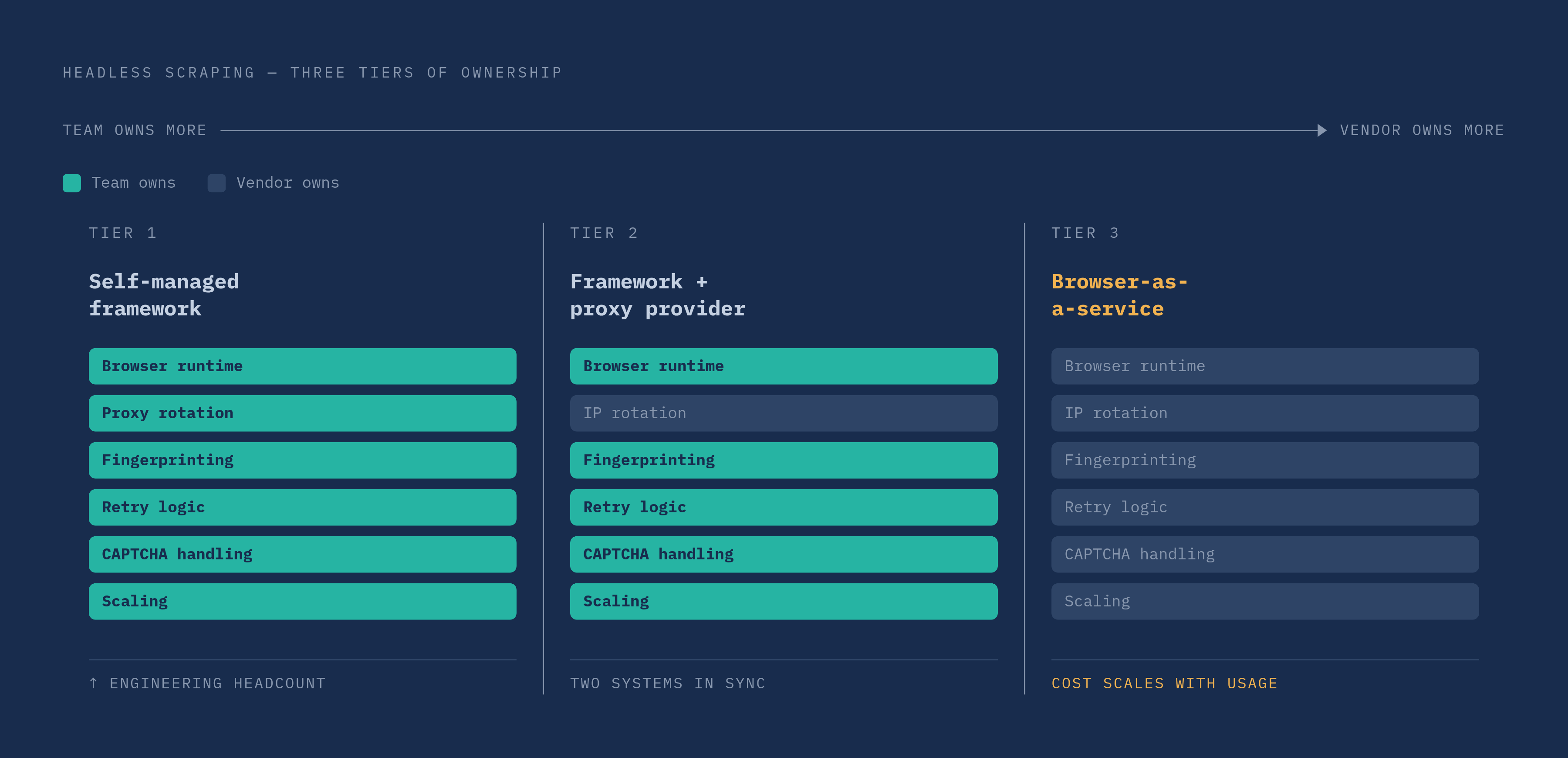
The first is the self-managed framework: Playwright, Puppeteer, or Selenium, run entirely in-house. Full control, no licensing fee, and the team owns everything else: proxy rotation, fingerprint management, scaling, retry logic, keeping browser versions current as upstream ships changes. It's a reasonable starting point for custom workflows or teams with real DevOps depth behind them. But these frameworks were never built with adversarial scraping environments in mind. Detection avoidance, CAPTCHA handling, ban recovery: none of that ships in the box. It's homework the team assigns itself, and it never really stops being due.
The second approach bolts a proxy provider onto that same framework, adding IP rotation and some unblocking ability while keeping code-level control intact. It's more resilient than a bare framework running alone, but now two systems have to stay in sync, proxy rules on one side and browser behavior on the other, and diagnosing a failure across that seam gets genuinely hard. Teams running this way often end up juggling multiple proxy vendors and hand-built rate-limiting logic just to keep success rates where they need them.
The third approach is the managed platform, sometimes called browser-as-a-service, where the browser, the proxy network, fingerprint handling, and anti-ban logic all live inside one vendor's surface. Zyte's 2026 analysis points to this as the direction most production scraping stacks are heading. The trade is straightforward: less direct control over the infrastructure itself, and a cost structure that scales with usage instead of sitting fixed. What it buys back is the engineering time that would otherwise go into maintaining a browser fleet and chasing every new detection update as it lands.
Most teams get this decision backwards. They treat it as a framework choice, when it's really a question of who owns the browser infrastructure and what that ownership costs in engineering hours, reliability risk, and dollars over time. Teams that keep everything in-house because "we want control" often end up spending more engineering time maintaining stealth plugins and proxy logic than they'd spend on a managed platform's invoice. Control has a price tag, and it's usually paid in headcount rather than dollars, which makes it easy to underestimate until the on-call rotation starts absorbing it.
Open-source frameworks: Playwright, Puppeteer, and Selenium as the foundation layer
Playwright, built by Microsoft, runs across Chromium, Firefox, and WebKit from a single API, with auto-waiting logic, network interception, and native support for running many sessions in parallel. It's the most actively developed of the three as of 2026, and its speed advantage, up to 15 times faster in headless mode, makes it the default pick for teams that want multi-browser coverage without maintaining separate codebases for each engine. Most managed platforms now support Playwright as the primary way developers control sessions, which tells you where the ecosystem has already settled.
Puppeteer sits closer to the metal: direct control over Chrome and Chromium through the DevTools Protocol, with a simpler API surface than Playwright's. It fits performance-critical work built around a single browser target, and teams that want to stay close to what CDP actually exposes without an abstraction layer in between. Its community has grown more slowly relative to Playwright's in recent years, though it remains a solid pick for single-browser workflows that don't need cross-engine support.
Selenium is the oldest name in the group, and it still has the widest footprint inside enterprises that built QA infrastructure around it years before scraping was the point. It supports Python, Java, C#, Ruby, and JavaScript across multiple platforms, which matters for mixed-language teams inheriting old test suites. It moves slower than Playwright, though, and it shows its age more in new scraping builds than in the legacy suites it was actually designed for.
All three cost nothing to license. The real cost appears later, in infrastructure, in maintenance, and in the engineering hours spent building everything these frameworks leave out: proxies, stealth, CAPTCHA solving, retry logic. A common pattern: teams prototype fast on one of these three, then migrate the busiest, highest-value paths to a managed platform once the true cost of running it themselves appears on a spreadsheet instead of staying invisible inside someone's sprint.
Managed headless browser platforms compared: what each one offers at scale
Judging these platforms against each other means checking a specific set of things: how deep the anti-bot bypass actually goes, what proxy network sits behind it and how large that network is, what pricing looks like at real volume, how sessions persist and how easy they are to debug, and whether a self-host option exists at all for teams that need one.
Browserbase launched in January 2024 and raised a $40 million Series B in June 2025 at a $300 million valuation. By 2025 it had processed 50 million sessions across more than 1,000 customers. It runs managed Chromium in the cloud with built-in proxy rotation, CAPTCHA solving, automatic scaling, and a "Session Live View" for stepping through what happened in a past session, which matters for long-running agent workflows that need to hold context across many actions. Browserbase also released Stagehand, an open-source SDK for browser automation driven by a language model, and added a Model Gateway that folds token costs from that model into the same invoice as browser-session billing. Pricing as of 2026 starts with a a free tier, moves to $20/month for Developer (100 hours, then $0.12/hr), $99/month for Startup (500 hours, then $0.10/hr), and custom pricing at Scale. The consumption-based structure lines cost up with actual use, and the bundled agent tooling makes it a natural fit for teams building AI-agent scraping specifically, less so for teams running simple, predictable crawl jobs where the agent tooling just sits unused.
Browserless runs managed Chromium, Firefox, and WebKit in the cloud, with stealth features, CAPTCHA solving, IP rotation, and session management built in. It also offers a self-host option: the same Docker image and APIs run inside a team's own cloud or on-prem environment, which matters for anyone with data residency requirements or network policies that rule out routing traffic through a third party. Cloud-hosted plans start around $50 a month. The platform runs from datacenter IPs by default, and those get blocked immediately on sites running serious bot-protection layers, no matter how clean the rest of the fingerprint looks. Browserless fits teams that need managed infrastructure with a self-host escape hatch, and whose targets don't lean hard on residential-IP filtering.
Zyte API grew out of the platform formerly known as Scrapinghub, and by 2026 has folded browser rendering directly into its infrastructure alongside automatic proxy selection and anti-ban logic. One API call abstracts away browser versions, scaling, and the fiddly work of tuning proxy rules per site, applying IP selection automatically based on the target. It also renders with a browser only when a page actually needs it, not by default, which keeps costs down on large crawls mixing static and dynamic targets. It fits teams working heavily in Python especially well, and comes with a marketplace of pre-built scrapers plus a proxy network tuned to handle most common bot-protection setups.
Apify pairs a browser API with a marketplace of more than 4,000 pre-built scrapers, called Actors, plus an integrated proxy network. The marketplace angle actually matters here: a lot of common scraping problems against popular sites are already solved somewhere in that catalog, so teams start from an existing Actor and customize instead of writing from a blank file. Apify offers a free plan, then usage-based pricing, and it fits teams that want scheduled runs sitting alongside custom automation work.
Bright Data operates at enterprise scale, with a proxy network numbering in the tens of millions of IPs paired with a Browser API, and it's generally positioned as the strongest anti-bot bypass available for enterprise workloads. It fits large operations that need real global IP diversity against the most heavily protected targets, and pricing reflects that positioning, it isn't the cheap option and doesn't pretend to be. Bright Data's own 2026 web data report puts the public-facing scraping market at roughly $1.5 billion in annual spend, growing about 13% a year.
The vendor landscape has been consolidating, driven by all of this. Oxylabs acquired ScrapingBee in June 2025, though ScrapingBee keeps operating independently with its existing leadership and brand intact. ScraperAPI acquired Traject Data in April 2026 to add structured-data APIs on top of its existing proxy infrastructure. Both deals point the same direction: vendors bundling more of the stack under one roof, rather than leaving teams to stitch together separate point solutions on their own.
Edge-native headless browsing: running browser sessions at the network layer
A different architecture runs browser sessions directly at the network edge, next to compute, instead of routing every request out to a separate browser fleet somewhere else. Two modes cover most of what this looks like in practice. Quick Actions are stateless calls, no code deployment needed, hitting REST endpoints for screenshots (/screenshot), PDFs (/pdf), structured extraction (/json), link extraction (/links), and Markdown conversion (/markdown). Browser Sessions offer full programmatic control through Puppeteer, Playwright, CDP, or Stagehand, deployable inside Workers or reachable from any outside environment over CDP.
The rollout through 2025 moved fast, faster than most infrastructure launches in this space. The REST API went generally available on April 7, 2025, landing on the Workers Free plan the same day, with /json, /links, and /markdown added alongside it. Playwright support arrived in beta on April 4, 2025. Web Bot Auth headers started getting auto-included in Browser Rendering requests by June 2025. July brought Playwright v1.54.1 paired with MCP v0.0.30. Billing went GA on August 20, 2025. By September 2025, Playwright v1.55 reached GA with Stagehand framework support built in.
Durable Objects integration lets browser sessions persist across separate requests, which matters for stateful agent workflows where session state has to survive request boundaries without standing up external storage to hold it. And there's a genuinely different philosophy baked into this approach: Browser Run identifies itself cryptographically as a bot, using signed Web Bot Auth headers, instead of disguising itself as human traffic the way most of the managed platforms above are built to do. That's a compliance posture, not an anti-detection one, and it matters specifically for teams operating under strict terms-of-service or legal constraints where evasion was never the goal in the first place.
This setup fits teams already building on Workers, or running agentic workflows that need browser capability sitting right next to compute logic, without standing up a separate fleet or routing every call through a third-party service. Billing went consumption-based at GA in August 2025, with a free tier on the Workers Free plan, so cost tracks actual browser time used rather than capacity provisioned ahead of time and left sitting idle most of the day.
The anti-bot and detection-avoidance layer: where platforms diverge most sharply
At this point, platform choice matters less for API ergonomics than for whether the scraper works at all. Modern anti-bot systems check HTTP headers, client hints, TLS fingerprints, device profiles, timezone data, graphics stack signatures, and behavioral patterns in mouse movement and keystroke timing, stacked on top of ordinary IP reputation scoring. A browser that clears one of those checks can still get caught by the next one waiting behind it.
The single most common failure point is the split between residential and datacenter IPs, and datacenter IPs are the side that loses. Sessions coming from datacenter ranges get blocked immediately on sites running serious bot-protection layers, no matter how well the browser fingerprint itself has been disguised. Browserless is the clean example here: it has no residential proxy layer, running sessions from datacenter IPs, is exactly the kind of gap that turns into a deployment blocker the moment a target site tightens its filtering.
Proxy network scale matters differently depending on the target. Bright Data's network, numbering in the tens of millions of IPs, sits close to the ceiling of what's available anywhere, and that scale becomes necessary against the most aggressively protected enterprise sites, not against a mid-tier retailer's catalog page. Apify pairs its browser API with an integrated proxy network without forcing a separate proxy vendor into the stack. Self-managed setups, by contrast, often end up juggling several proxy vendors at once just to hold success rates at an acceptable level, since no single vendor covers every target evenly, and that juggling act is itself a maintenance cost nobody puts on the original budget.
CAPTCHA solving comes built into platforms like Browserbase. Teams running bare frameworks own that problem outright, and it adds latency, cost, and one more system that needs maintaining as CAPTCHA vendors update their challenges out from under whatever solution was working last month. Fingerprinting stealth follows the same split: managed platforms bake stealth in at the platform level, while frameworks rely on stealth plugins the team has to keep patched by hand as detection techniques shift underneath them, usually discovered only after a scraper that worked yesterday stops working today.
None of this settles into one right answer, and treating it like it does is the mistake. The sensible move is auditing the actual portfolio of target sites against what each platform's anti-bot capabilities can realistically handle, before committing budget and engineering time to any single piece of infrastructure. What works cleanly against a mid-tier e-commerce catalog can fall apart completely against a site running enterprise-grade bot defense, and that gap is exactly what separates a scraping pipeline that scales from one that quietly breaks the moment traffic gets serious.