on-demand browser sandbox providers for AI automation workloads
Trade speed and isolation to match your workload's threat model.

On-demand browser sandboxes exist because AI agents that browse the open web need somewhere safe to do it. The market splits along four axes, cold-start speed, isolation depth, session persistence, and network control, and no single provider wins on all four at once. The right pick depends on matching those trade-offs to a specific workload, not chasing a provider that claims to do everything well.
What the sandbox category actually covers, and why browser sandboxes are their own problem
By 2026 the market had settled into three rough buckets. Code execution sandboxes give agents an isolated place to run shell commands and scripts (E2B, Modal, Daytona, Northflank, Upstash Box fall here). Browser sandboxes, or cloud browsers, hand the agent a remote Chrome instance or a purpose-built browser it drives through Playwright, Puppeteer, or the Chrome DevTools Protocol (Browserbase, Steel, Hyperbrowser, Browser Run, Kitesurf). Full dev environment sandboxes go further still, pairing the agent with databases, queues, and APIs in a long-lived environment (Northflank, Freestyle, Fly.io).
Browser sandboxes earn their own conversation because the threat surface is the content and scripts the agent touches on the open web. It's every adversarial page, CAPTCHA, bot-detection script, and redirect chain the agent might stumble into while doing its job. State works differently here too: a login flow or a multi-step form submission needs cookies and DOM state to survive across steps, not just files sitting on disk. And browsing carries a compliance weight that code execution simply doesn't. Robots.txt, terms of service, questions about bot identity, none of that comes up when an agent is just running a Python script in a container.
Plenty of workloads need both layers running at once. A coding agent that also has to fetch a dependency or check a live API is running a code sandbox and a browser sandbox side by side, and each one carries its own isolation and persistence questions. A distinction gets flattened constantly here too: a "browser agent" like Browser Use, Stagehand, or Skyvern is the framework deciding what to click. A "browser sandbox" like Browserbase, Steel, or Browser Run is the infrastructure that click actually runs on. Neither substitutes for the other, and picking a slick framework answers nothing about where it runs.
The four dimensions that separate browser sandbox providers in practice
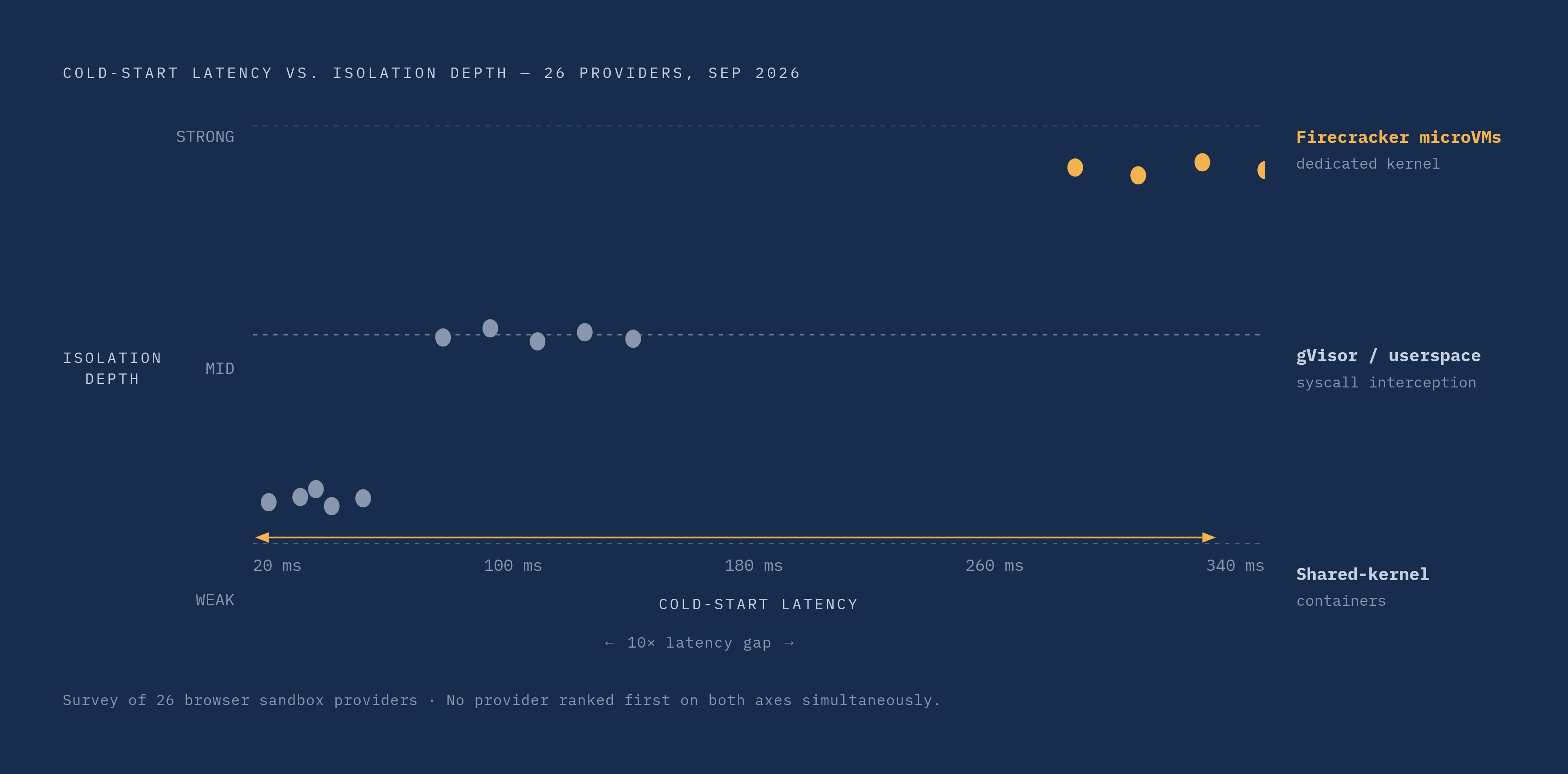
Cold-start latency is the one agents feel first. A 15-step agentic workflow with a 2-second cold start on every browser call racks up 30 seconds of dead time before any real work happens. Push that under 100 milliseconds and the same workflow loses less than 2 seconds to startup. A September 2026 survey covering 26 providers found the fastest option booting in under 30 milliseconds on a shared kernel, while the most isolated option took more than ten times as long behind its own dedicated kernel. No provider in that survey won on both axes at once, and that tension is basically the whole category in miniature. Snapshot and resume technology, which can bring warm starts down to the 5 to 30 millisecond range, is the industry's current answer for stateful sessions that need speed without giving up isolation.
Isolation depth is the harder trade-off to reason about, since it stays invisible until something breaks. Three primitives dominate: Firecracker microVMs, which give each sandbox its own kernel and the strongest isolation; gVisor, which intercepts syscalls in userspace as a middle ground; and shared-kernel containers, fastest but weakest. The choice should follow the threat model, not habit, and here's where most teams get it backwards: they pick shared-kernel containers for cost, then point the agent at the open web anyway. If page content the agent visits could be attacker-influenced, and Rehberger's ZombAIs work demonstrated real risks for open-web browsing, making a microVM or gVisor setup a strong consideration. Shared-kernel containers are fine for semi-trusted, internal workloads. They're a bad fit the moment an agent touches an untrusted URL, full stop.
Session persistence decides whether cookies, local storage, and DOM state survive between agent steps, and for how long. This matters enormously for login sequences, multi-step forms, and any authenticated SaaS scraping job, where losing session state mid-task means starting the whole thing over. Ephemeral-by-default versus persistent-by-default is a foundational choice baked in from the start. It's baked into how a provider architects sessions from day one, and switching philosophies mid-project costs real engineering time.
Network egress control rounds out the four, and it's the one teams underweight until a scrape gets blocked or, worse, leaks something it shouldn't. Some sites reject datacenter IPs outright, pushing providers toward residential proxy routing. Some providers disclose that a bot is a bot, cryptographically. Others build stealth-by-default to dodge detection systems. Those are close to opposite philosophies, and which one fits depends on whether the target site's terms actually allow automated access in the first place. Cloud region matters more than it sounds like it should too, since where the browser physically runs decides what data crosses what border.
Billing model deserves a mention as a fifth, quieter differentiator. Per-hour pricing is predictable if session lengths stay consistent. Per-session pricing is simpler to reason about for short-lived tasks. Layered meters, charging separately for browser time, concurrency, data transfer, and steps, make forecasting genuinely harder, and in practice an agent's retry behavior swings the final bill more than the sticker price per session ever does.
Browserbase: managed cloud browsers with the deepest AI agent polish
Browserbase is really two products stapled together. There's the remote browser infrastructure itself, spun up over an API and driven with Playwright or Puppeteer, and there's Stagehand, the open-source automation framework built alongside it that has crossed roughly 23,000 GitHub stars and pulls over 700,000 weekly downloads. The two are built to work as a pair, and that pairing is Browserbase's clearest edge: persistent sessions with full replay, native Stagehand integration, and probably the most stable Playwright and CDP surface among the managed providers.
As of August 8, 2026, pricing runs across three tiers. The free plan gives 1 browser hour a month, 3 concurrent browsers, 15-minute session caps, 3 Agent runs, 1,000 Search calls, 1,000 Fetch calls, 7-day data retention, and $5 in model tokens. The Developer plan, at $20 a month, bumps that to 100 browser hours, 25 concurrent browsers, 15 Agent runs, 1,000 Search and 1,000 Fetch calls, and 1 GB of proxy traffic, with overage priced at $0.12 per browser-hour, $7 per 1,000 Search calls, and $12 per GB of proxy. The Startup plan, at $99 a month, scales to 500 browser hours, 100 concurrent browsers, 50 Agent runs, 10,000 Fetch calls, 5 GB of proxy traffic, and 30-day retention, with overage dropping to $0.10 an hour and $10 per GB.
The best fit here is multi-step browser work: login flows, form submissions, anything where session reliability and developer experience matter more than squeezing out the lowest cost per session. Session recording and replay earns its keep as a debugging tool once an agent starts failing intermittently three steps into a flow, and that's worth paying for. Where Browserbase actually loses is high-volume, cost-sensitive scraping and crawling, where the premium pricing stacks up fast against workloads that never needed the polish to begin with.
Steel: open-source browser infrastructure for teams that want to own the stack
Steel launched as a developer-first cloud browser platform, and its defining choice was to open-source the core and make the whole thing self-hostable rather than lock customers into a managed product. It doesn't tie itself to a proprietary automation layer either, so any agent framework sits on top of it without friction. Feature-wise it covers sessions, file uploads, live view, and some residential routing options, and its API is designed with simplicity as a stated priority.
The self-hosted path shifts costs to whatever infrastructure a team runs it on, while the managed cloud version targets teams that prefer not to take on the hosting burden themselves. That points to who it's actually for: teams with strict data-residency or compliance requirements who need browser infrastructure running inside their own cloud, or developers who want framework freedom badly enough to take on the hosting burden themselves. That burden is real and deserves to be named clearly. Self-hosting means someone on the team now owns Chrome version upgrades, scaling decisions, and session cleanup, work a managed provider would otherwise absorb for them.
Hyperbrowser: stealth and captcha solving for high-volume extraction workloads
Hyperbrowser builds specifically for the scrape-and-crawl crowd. Captcha solving and stealth configuration are core features, and pricing is positioned for high-volume extraction work, exactly the workload where cost per session compounds fastest.
The philosophy behind that is the opposite of what a provider like Browser Run does. Hyperbrowser is built with stealth and captcha-solving as core features rather than bot disclosure. That's a legitimate design choice for plenty of extraction work, but it isn't a neutral one, and teams running large-scale pipelines through it need to ask whether the sites they're targeting actually permit automated access. Stealth-by-default leaves the terms-of-service question unresolved. It just sidesteps it technically, which isn't the same thing as answering it. For workloads where pages actively resist automation and the priority is cost-per-session over debugging polish, Hyperbrowser is built for exactly that job.
Browser Run and Kitesurf: what a network-layer provider brings to browser sandboxing
Browser Run, formerly Browser Rendering, runs headless Chrome on demand across a global network, with no Chrome version to patch and no infrastructure to provision. Sessions open close to the end user, which keeps latency down without manual region selection.
For agent workloads specifically, Browser Run added Live View, Human in the Loop intervention, direct CDP access, and full session recordings that capture DOM changes, mouse and keyboard events, and page navigation as structured JSON, replayed through rrweb-player. Concurrency limits have been significantly expanded from earlier versions of the product. On the control side it supports CDP directly, WebMCP (a browser API that lets websites declare available actions to agents, improving on blind DOM guessing for navigation), and MCP client support for tools like Claude Desktop and Cursor. Notably, Browser Run identifies itself as a bot cryptographically rather than hiding that fact, which puts it philosophically opposite the stealth-first providers: compliant, disclosed scraping by design, not by exception.
On August 6, 2026, Cloudflare launched Kitesurf, available through Browser Run: an entirely new browser built for agents rather than humans. It uses less compute than Chromium for the automation tasks agents actually run, and it's assembled from a different set of parts than a typical browser: the Blitz modular rendering engine, Firefox's Stylo CSS parser, and Boa, an ECMAScript engine built with a systems-level programming language, with everything else running inside Workers. It already passes roughly 215,000 web platform tests and adds more weekly.
Cost-wise, Browser Run bundles into existing platform pricing, so a fleet of 120 concurrent browsers carries no separate metered rate for teams already building on the network, and testing a new agent workflow on Workers costs next to nothing at the margin. That makes it a strong fit for teams already on that stack, for cost-sensitive workloads where bundled capacity beats a per-session rate card, and for anyone whose scraping needs to be verifiably disclosed rather than stealthed. Teams with no existing footprint on the network still have to weigh onboarding cost against those benefits before switching over.
Firecrawl Browser Sandbox and open-source frameworks: the web data layer approach
Firecrawl started as an API-first web data platform built around search, scrape, and extract, and added Firecrawl Browser Sandbox on top of that as a managed browser session layer. Its GitHub footprint is hard to ignore: it's crossed 170,000 stars, putting it among GitHub's top 50 repositories overall. Pricing runs on a free tier followed by a per-page credit model rather than per-hour billing, which suits jobs built around discrete page fetches far better than open-ended, long-running agent sessions.
Sitting above the infrastructure layer are the open-source frameworks that actually decide agent behavior. Browser Use has crossed 109,000 GitHub stars and posts an 89.1% success rate on the WebVoyager benchmark, and it's the natural pick for developers who want custom agents without getting boxed into one infrastructure provider. Stagehand offers a multi-language SDK, has over 23,000 stars, and integrates natively with Browserbase. Skyvern, also past 23,000 stars, scores 85.85% on WebVoyager and leads specifically on form-filling tasks, with a no-code workflow layer for less technical teams.
The same distinction from earlier holds here: a framework decides what to click, and the infrastructure decides where that click actually executes. Choosing Browser Use or Skyvern doesn't answer the sandbox question, and choosing Firecrawl doesn't answer the framework question, which is exactly why teams keep conflating the two and then get surprised when swapping one doesn't fix a problem caused by the other. Firecrawl's own sweet spot is agents whose real job is pulling web data rather than running long authenticated workflows, since per-page credits map cleanly onto predictable crawl jobs but awkwardly onto sessions of unknown length.
The Kubernetes-native path: Agent Sandbox (SIGS) and Novita AI for teams with existing cluster infrastructure
Agent Sandbox, hosted at sigs.k8s.io, takes a fundamentally different approach. It's an open-source, standardized Kubernetes API that separates the execution layer from the isolation technology underneath it. Teams can run it on gVisor, with its userspace syscall interception, or on Kata Containers, which use hardware virtualization to give each sandbox a dedicated kernel through QEMU, and swap between them without touching the agent code at all.
That's the real value here: isolation technology turns into a configuration decision instead of a vendor lock-in, which is a genuinely different trade than anything a managed provider offers. The project covers a spread of use cases, from short-lived code execution to medium-lived coding agents and computer-use sessions, CI/CD integration, and always-on environments through OpenClaw. SDKs exist in Python and Go, and it runs as a contributions-driven project with a public GitHub repo and mailing list behind it. For teams already running Kubernetes clusters who don't want to bolt on a third-party managed browser service, this path keeps sandboxing inside infrastructure they already operate and understand, and that alone rules out most of the managed options above.
One more thing before closing: network egress deserves a second look across every provider covered here, not just Browser Run. Whether a browser sandbox transparently proxies traffic, routes through residential IPs, or discloses its bot identity cryptographically matters just as much as which kernel isolation runs underneath, because a leaky egress path hands over credentials or lets data walk out the door just as easily as a weak sandbox boundary does. Cloudflare's Browser Run treats that as a first-class design question rather than an afterthought. Any team evaluating providers should hold the rest of the field to the same standard.