Python Headless Browser Options for Test Automation
Choosing between speed, JavaScript support, and browser coverage.
Picking a Python headless browser tool comes down to four things: speed, how closely the tool mimics a real browser running real JavaScript, how pleasant the API is on a Tuesday afternoon when a test breaks for no obvious reason, and how well it fits into a CI/CD pipeline. Nail those four and the rest sorts itself out. The harder question is which trade-offs your team can actually stomach long-term.
Headless mode means the browser runs its full rendering engine, parsing HTML, applying CSS, executing JavaScript, without ever drawing a window on screen. That distinction matters most in continuous integration, where build machines rarely have a display attached and every second of run time gets multiplied across dozens of pull requests a day. A headless Chromium instance uses less memory, starts faster, and skips the Xvfb workaround entirely. For a team running a large regression suite on every merge, that's the gap between a five-minute feedback loop and a thirty-minute one.
Why do headless browsers exist at all instead of teams just firing off HTTP requests and parsing what comes back? Because of the JavaScript problem. React, Vue, and Angular apps don't render content in the initial HTML payload; they build the DOM client-side, often after several rounds of async data fetching. A plain HTTP request gets you a nearly empty shell. Seeing what a user actually sees means running an engine that executes JavaScript the way Chrome or Firefox does, and that's the whole reason headless automation exists as a category.
That need shows up in three recurring situations: regression suites running on every pull request, end-to-end tests of JavaScript-heavy apps where the real behavior only surfaces after scripts finish executing, and scraping or workflow simulation that has to look like an actual person clicking through a session. Playwright currently holds a leading share of adoption among QA professionals, and the automation testing market has grown into a multibillion-dollar segment. That's a sign this decision carries real weight, worth more attention than a line in someone's config file usually gets.
The rest of this piece walks through the main Python options, Playwright, Selenium, Pyppeteer, Requests-HTML, Splash, and Robot Framework, against the dimensions that actually separate them once you're past the marketing copy.
Five dimensions do most of the work. Speed covers both single-action latency (how long one click or navigation takes) and suite-level throughput across hundreds of tests. JavaScript fidelity asks whether the tool drives an actual browser engine or just simulates one closely enough to fool most pages. Browser coverage separates Chromium-only tools from ones that also handle Firefox and WebKit, or, in Selenium's case, legacy Internet Explorer. API ergonomics covers auto-waiting, how expressive the selectors are, async support, and whether debugging a failed test takes five minutes or fifty. CI/CD readiness covers parallel execution, Docker support, official pipeline integrations, and how often tests fail for reasons that have nothing to do with the code under test.
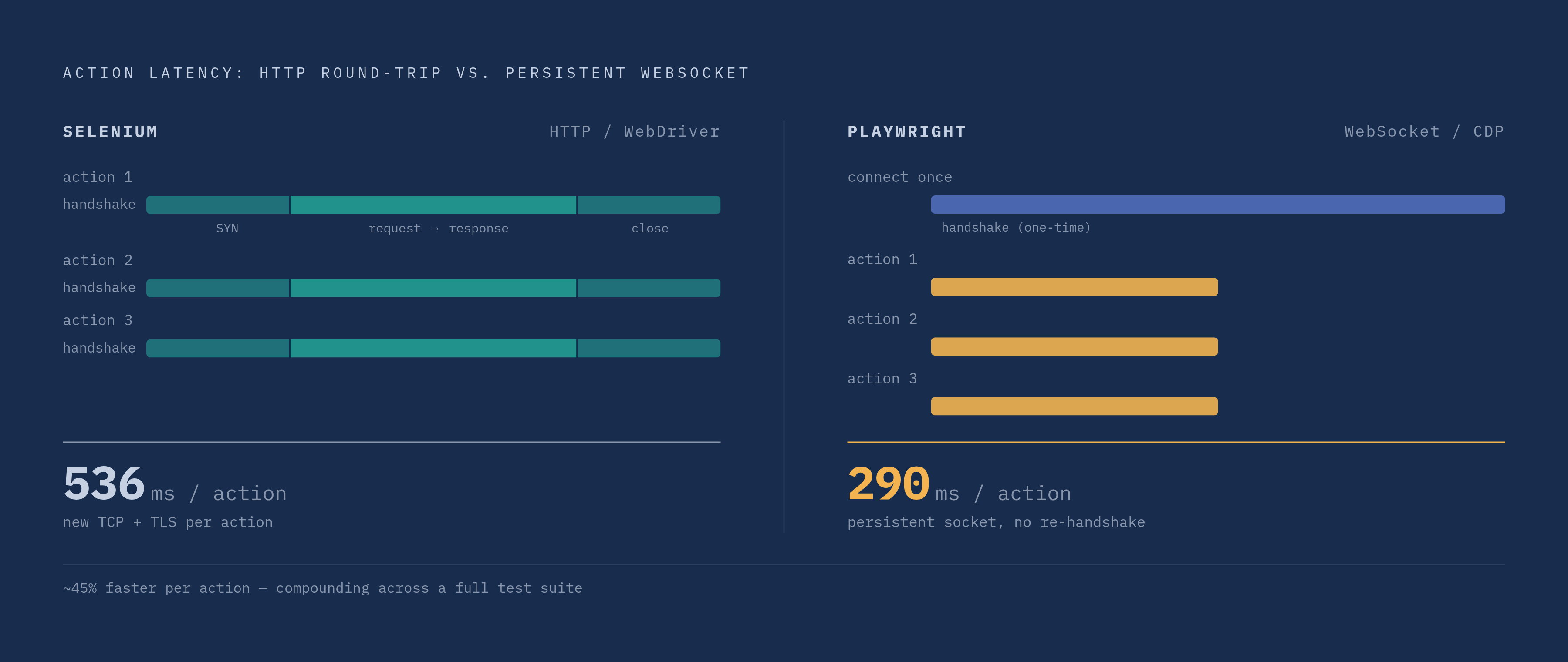
Underneath all of this sits a protocol split worth understanding before comparing anything else. Selenium talks to browsers through WebDriver, an HTTP-based protocol that sends a request and waits for a response for every single action. Playwright and Pyppeteer instead speak over WebSocket using the Chrome DevTools Protocol, keeping a persistent connection open and skipping the repeated handshake overhead of HTTP. That's the root cause of the speed gap covered later. Any benchmark number in this piece traces back to how the wire format works, a mechanical consequence rather than some mysterious property baked into the tool itself.
No tool wins on every dimension. A team scraping mostly static pages doesn't need Playwright's three-engine coverage any more than a team running a legacy Internet Explorer compliance suite can just switch to WebSocket-based tools that don't support IE at all. The right answer depends on what's being tested and where it runs.
One cost tends to hide until it's already a problem: flakiness. Any tool that pushes manual wait conditions, sleep calls, or polling loops onto developers shifts the maintenance burden from the tool itself onto the engineers who then have to keep patching tests that shouldn't have broken in the first place. That burden compounds in CI, where a test that passes locally but fails intermittently on the build server erodes trust in the whole pipeline faster than almost anything else.
Playwright: what makes it the current consensus choice for most Python teams
Microsoft released Playwright in 2020, and it's since passed 70,000 stars on GitHub. Its Python bindings are an official SDK maintained by the same team building the core library, built directly alongside upstream changes rather than chasing them from outside.
The single biggest practical win is auto-waiting. Playwright waits for an element to actually be clickable, visible, and stable before it acts on it, instead of assuming readiness the instant something shows up in the DOM. That one design choice wipes out most of the manual sleep() calls and explicit wait conditions that make Selenium suites brittle over time, and it cuts flaky failures that have nothing to do with the feature actually being tested.
Playwright also runs the same test against Chromium, Firefox, and WebKit from one API, so a single suite can approximate Chrome, Edge, and Safari behavior without maintaining three separate codebases. Each test gets its own isolated browser context rather than a whole new browser process, which makes parallel runs cheap in a way that starts to matter once a suite crosses a couple hundred tests.
On raw speed, independent benchmarks put Playwright at roughly 290 milliseconds per action against roughly 536 milliseconds for Selenium, a 30 to 50% edge at the suite level. Since version 1.45, Playwright's default headless Chromium mode uses a dedicated chromium-headless-shell binary, a stripped-down build lighter than full headless Chrome, and headless runs land about 24% faster than headed ones. Playwright also ships its own developer tooling out of the box. Codegen records browser interactions and writes the test code for you. The Inspector lets you step through a test live. Trace Viewer replays a failed run with full DOM snapshots and network logs attached, making it substantially easier to diagnose failures that only surface on a remote build server.
Playwright isn't the fastest tool for every job, though. On narrow, Chromium-only tasks, Pyppeteer and its JavaScript sibling Puppeteer edge it out by roughly 15 to 20%, because they sit closer to the raw CDP wire. Playwright sends around 326KB of WebSocket messages for tasks where Puppeteer sends about 11KB, a gap that traces back to Playwright's abstraction layer supporting three engines instead of one. Still, for most Python teams building test suites against modern web apps, Playwright is the sensible default.
Selenium: when the oldest tool in the room is still the right one
Selenium has been around since 2004, and more than 283,000 GitHub repositories reference it, by far the largest community and compatibility footprint of any browser automation tool out there. That longevity isn't an accident. It reflects two decades of enterprises building reporting pipelines, internal tooling, and hiring practices around it, and none of that unwinds overnight just because a faster tool showed up.
Its WebDriver standard gives it the broadest browser support of anything covered here: Chrome, Firefox, Edge, Safari, Opera, and even legacy Internet Explorer. No other Python option touches IE at all. That breadth costs something, though. The WebDriver JSON Wire protocol runs over HTTP, and every single action involves a full request-response round trip, the direct source of that roughly 536 millisecond average action time mentioned earlier. Selenium also has no native auto-waiting; teams either write explicit wait conditions by hand or accept a higher rate of flaky failures from timing races between the test and the page.
Turning on headless mode is simple mechanically, just a --headless flag set in ChromeOptions, FirefoxOptions, or EdgeOptions, though Safari and Internet Explorer don't support headless mode natively at all. Running tests in parallel at scale usually means standing up Selenium Grid or something equivalent to distribute the load, an operational layer Playwright's built-in parallelism doesn't ask for.
So when does Selenium remain the right call? Testing against real Internet Explorer or other legacy browsers is one clear case, since nothing else here supports it. Enterprise environments where Selenium is already woven into reporting dashboards and years of institutional knowledge are another; ripping that out has a cost of its own that's easy to underestimate from the outside. Teams that need the widest possible pool of QA talent to hire from lean toward Selenium too, simply because more people already know it, and real-device testing workflows tied specifically to WebDriver compatibility will keep it in the stack regardless of what benchmarks say.
Greenfield Python projects targeting modern browsers tend to look elsewhere, as do teams where flaky tests and slow CI runs are already an active source of pain. In those cases, the argument for switching gets stronger every month the pain sticks around.
Pyppeteer, Requests-HTML, Splash, and Robot Framework: the narrower-use-case tools
Pyppeteer showed up in 2017 as an unofficial Python port of Puppeteer, maintained by the community rather than backed by a vendor the way Microsoft backs Playwright. It talks directly over the Chrome DevTools Protocol, which is exactly why it edges out Playwright by that 15 to 20% margin on narrow, Chromium-only tasks mentioned earlier. It fits quick scripts, Chromium-only scraping jobs, and teams whose developers already know Puppeteer's API from prior JavaScript work. The trade-offs are real, though: it's less actively maintained than Playwright's official SDK, it doesn't touch other browser engines, it has no auto-waiting, and its CI/CD tooling is thin next to what Playwright ships out of the box.
Requests-HTML is a scraping library that renders JavaScript through an embedded Pyppeteer backend, but only when a page needs it. For pages that are mostly static, it's the fastest option in this lineup, since it only pays the cost of a full browser render on the pages that actually need one. That makes it solid for lightweight scraping pipelines where most targets don't need full browser fidelity. It's a poor fit for any real end-to-end test suite, though. It wasn't built for that job and doesn't pretend to be.
Splash takes a different approach entirely. It's an HTTP API for JavaScript rendering, built in Python on top of Twisted and Qt, and aimed at scraping JavaScript-heavy pages rather than test automation. It earns its place in a pipeline specifically when rendering needs to happen over HTTP instead of through a local browser process.
Robot Framework paired with SeleniumLibrary takes yet another angle: keyword-driven, tabular test syntax readable by people who don't write code for a living. It runs headless tests through SeleniumLibrary underneath, so it inherits Selenium's browser coverage and its speed profile, HTTP round-trip overhead included. It fits teams with a mix of technical and non-technical members where shared ownership and readable tests matter more than shaving milliseconds off a suite run. Performance-first testing of a complex, JavaScript-heavy app calls for something else.
How the tools stack up across the dimensions that matter in practice
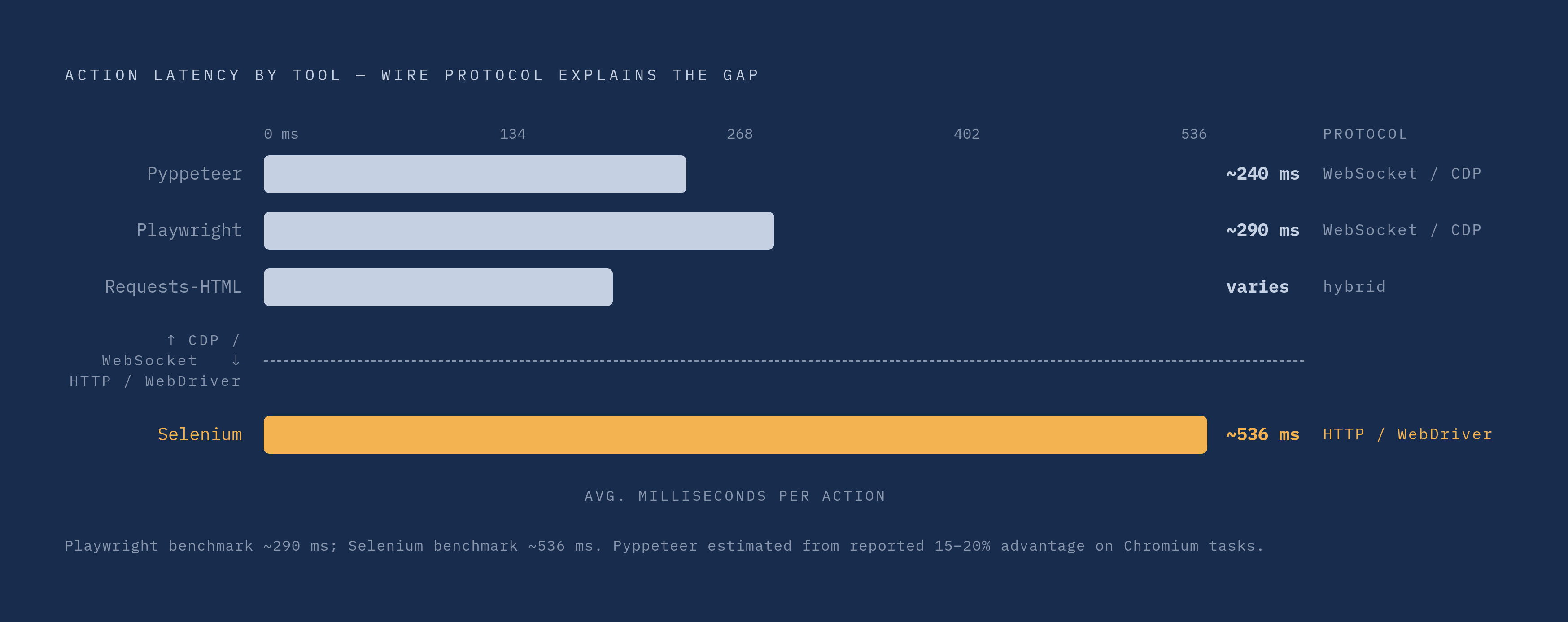
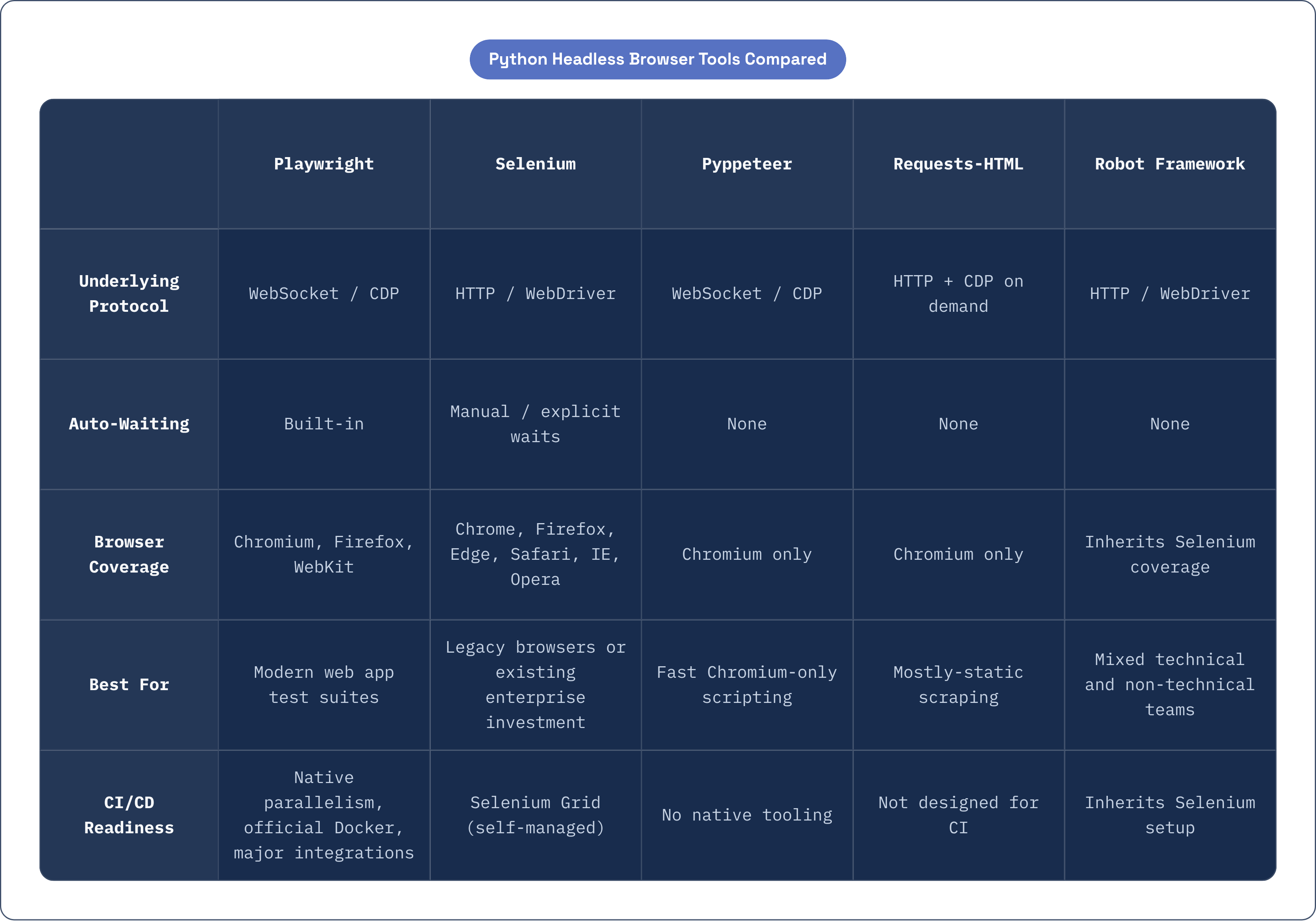
Line these tools up and the protocol split from earlier does most of the explaining. Selenium, running over HTTP-based WebDriver, sits at the slow end. Pyppeteer and Playwright, both running over WebSocket via CDP, sit at the fast end. Requests-HTML falls somewhere in the middle by design, using plain HTTP for static pages and only reaching for CDP-based rendering when a page actually needs JavaScript executed.
Auto-waiting is still Playwright's clearest edge over the field. Selenium and Pyppeteer both leave that job to the developer, which means more manual wait logic and, over time, more flaky tests to hunt down late on a Friday when everyone wants to go home.
On browser coverage, Selenium still covers the most ground: Chrome, Firefox, Edge, Safari, Internet Explorer, and Opera. Playwright covers Chromium, Firefox, and WebKit, modern but not exhaustive. Pyppeteer, Requests-HTML, and Splash are all Chromium-only.
CI/CD readiness follows a similar shape. Playwright offers native parallel execution, an official Docker image, and direct integrations with GitHub Actions, Jenkins, GitLab CI, Azure Pipelines, CircleCI, and Bitbucket Pipelines. Selenium handles scale reasonably well through Selenium Grid, though that's infrastructure you run and maintain rather than something built in. Pyppeteer offers no native CI tooling of its own, so teams end up wiring that by hand. Requests-HTML and Splash weren't designed with CI pipelines in mind at all.
Boiled down: a modern web app test suite points toward Playwright. A legacy browser requirement or existing enterprise investment in Selenium points toward staying with Selenium. Chromium-only scripting where speed beats breadth points toward Pyppeteer. Mostly-static scraping with the occasional JavaScript-rendered page points toward Requests-HTML. A team with mixed technical skill that values keyword-driven test writing points toward Robot Framework.
Running headless browser tests reliably in CI/CD pipelines
CI integration is what makes automated tests worth writing in the first place. Teams with strong CI/CD practices report meaningfully faster lead time for changes and fewer failed deployments, and headless browser tests sit right in the middle of that feedback loop, catching problems before a human reviewer ever sees them.
For teams running Playwright, since that's where most will land, a handful of habits separate a pipeline that stays reliable from one that quietly erodes trust over months. Using Playwright's official Docker image skips the browser install step entirely, which kills a whole category of "works on my machine" failures. Pin that image to a specific tag rather than latest, too. An unpinned Chromium update can introduce a silent regression that has nothing to do with the code you're actually testing. Playwright's own team recommends setting worker count to one in CI specifically for stability, since sequential runs get the full resources of the build machine instead of workers stepping on each other. Once a suite's serial run time creeps past roughly ten minutes, sharding it across multiple machines can bring that down to under five.
Flake rate deserves tracking as an actual health metric, not a vague complaint someone brings up in a retro. If a noticeable share of CI runs fail intermittently, same test, no code changes, different result on rerun, trust in the pipeline starts to erode, and that erosion compounds fast once engineers start ignoring red builds on principle because "it's probably just flaky." Turning on tracing for failed runs helps here: Playwright's Trace Viewer records every action, network request, DOM snapshot, and assertion made during a test, so debugging a failure doesn't mean reproducing it locally from scratch.
All of this backs up what's sometimes called the shift-left argument: tests running automatically on every pull request catch a regression the moment it's introduced, not days later once it's tangled up in other changes and far more expensive to isolate. Selenium can run in CI too, though it asks for more manual environment management up front, and Selenium Grid, while it does enable real parallelism at scale, adds an operational layer that teams already invested in Selenium tend to accept as the price of sticking with a tool their whole org already knows.
Bot detection and what it means for headless automation beyond internal testing
Here's a distinction worth being precise about: running headless tests against your own app inside CI is a completely different situation from running headless automation against third-party sites or production environments actively watching for it.
Detection systems generally work across several layers at once. IP reputation checks what kind of network a request comes from, whether it's a known datacenter range, and any history of abuse tied to that address. Browser fingerprinting looks at Canvas rendering, WebGL output, audio API behavior, and font enumeration, all of which headless browsers can expose in ways that differ subtly from a real user's setup. Behavioral analysis watches mouse movement curves, scroll patterns, and timing between interactions. TLS fingerprinting examines the order of ciphers offered during the handshake, often condensed into what's called a JA3 hash. Active challenges, CAPTCHAs, JavaScript puzzles, interstitial checks, sit as a last layer when the earlier signals raise enough suspicion.
Default headless configurations in both Playwright and Selenium expose detectable signals across more than one of these layers. Out-of-the-box headless mode carries signals that a system built to look for it can pick up on. Teams that need headless automation to blend in with regular traffic apply a handful of fixes. Some randomize viewport size, user-agent string, and language headers on each run. Others run in headed mode on a cloud VM with an actual display server attached, trading some resource efficiency for a lower detection profile. Others reach for stealth patches and anti-detection libraries, though those need constant upkeep as detection techniques keep changing on the other side.
Worth flipping the lens here, too. Teams building and running web applications get the benefit of these same detection layers on defense. Bot management infrastructure that inspects traffic at the network level, operating across an enormous volume of requests every day, catches exactly the fingerprint signals headless browsers tend to leave behind, giving application owners real visibility into how much of their traffic is automated and where it's coming from.
For teams whose headless automation stays inside their own CI, testing their own app, bot detection is basically a non-issue. There's no adversarial system on the other end trying to tell a script apart from a person. It only becomes a real concern once that automation crosses into scraping or touching sites and services the team doesn't control.
Picking the right tool given your team's specific context
So where does this leave you? The right tool depends on what you're testing, where the tests run, and what your team can realistically keep maintained six months from now. No formula replaces sitting down with your own app and your own CI setup and working through it by hand.
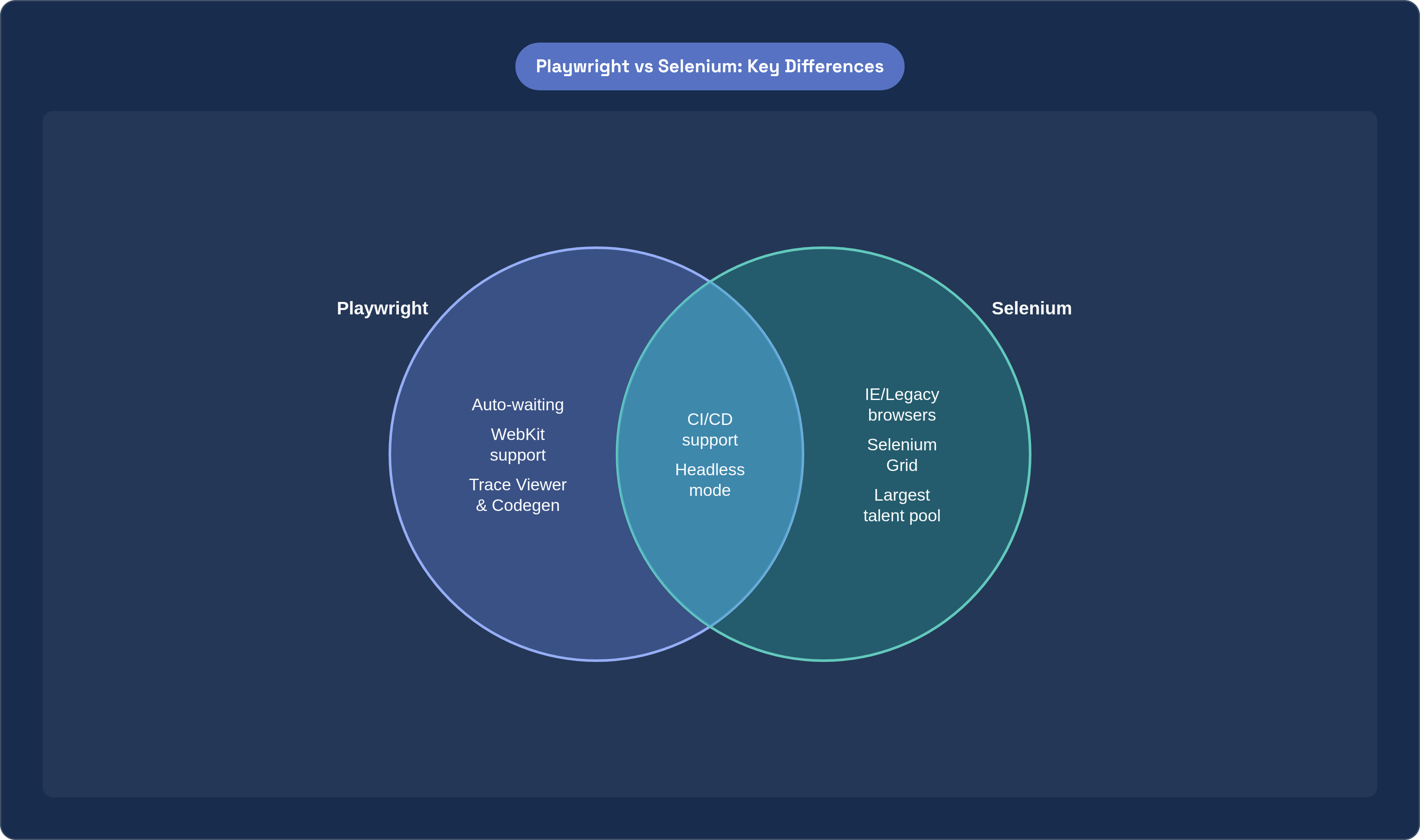
For most teams building Python test suites today, Playwright is the sensible starting point. It has an official Python SDK maintained directly by Microsoft, covers three browser engines from one API, waits for elements automatically instead of leaning on manual timing hacks, and plugs into the CI tools most teams already use. That 30 to 50% speed edge over Selenium at the suite level isn't a one-time win, either. It compounds every day the suite runs, across every pull request, for as long as the project lives. Trace Viewer and Codegen also lower the ramp-up cost for engineers new to a codebase, since they can watch a test record itself and step through a failure instead of guessing from a stack trace.
Selenium still earns its place in specific situations: legacy browser requirements nothing else here can cover, and organizations with an existing investment in Selenium-based tooling, reporting, and hiring that would cost more to unwind than to keep. Pyppeteer, Requests-HTML, Splash, and Robot Framework each solve a narrower problem well, and forcing one of them into a job it wasn't built for tends to cost more in workarounds than it ever saves in setup time.
None of this is a scorecard to follow blindly. Look at your own app, your own pipeline, your own engineers, and make the call that actually fits, even if that call looks nothing like what the survey data says everyone else is doing.