serverless runtimes for browser automation: platforms compared on V8 isolate constraints
Three architectural tiers reveal why browser automation platforms are not interchangeable.
Serverless browser automation covers at least three different architectural bets wearing the same marketing language. The confusion starts with a basic mismatch: V8 isolates were built for short bursts of JavaScript, and headless Chromium was built to behave like a full, memory-hungry desktop application. Everything worth understanding about this space, from cold start times to why certain sites break certain platforms, traces back to that mismatch. Demand for solving it has moved fast too; AI agent traffic on the web grew nearly 8,000% over the past year, and that growth is what's forcing platforms to figure out how to hand a browser to code that has nowhere persistent to run. What follows is a look at how different platforms have answered that problem, and why the answers are not interchangeable.
What V8 isolates actually are and what they hard-prohibit
An isolate is a slice of a single, shared V8 engine process, allocated per request, with no separate kernel and no full memory image to speak of. That's the whole trick, and it's also the source of every constraint that follows.
The upside of that design is startup speed most container platforms cannot touch. Isolates cold start in the low single-digit milliseconds; container-based serverless functions land closer to 100 milliseconds. Memory tells a similar story: an isolate runs with something like 10KB of overhead, against roughly 10MB for a comparable container, a gap on the order of a thousand-fold — figures that reflect the architectural design, not a tunable configuration. That efficiency is not a minor optimization. It's the reason isolates can be spun up per-request at massive scale without the per-instance cost that would make the idea absurd.
But the same design that makes isolates cheap also makes them hostile to anything resembling a browser process. There's no filesystem access, so no reading or writing local files and no tmp directory to stash intermediate state. There are no native binaries, so nothing can spawn Chromium, run Python, or execute any compiled program outside JavaScript and WebAssembly. Nothing persists between invocations by default; each request gets a fresh isolate with no memory of the one before it. Network access is limited to curated fetch-style APIs, not arbitrary TCP sockets, which rules out a direct CDP connection unless a platform builds a bridge for it. And eval(), along with other forms of dynamic code generation, is blocked by the security sandbox outright, which matters more than it sounds like it should, since a meaningful slice of the web relies on eval() to run.
Layer CPU and memory ceilings on top of all that, imposed by the platform rather than negotiable at the code level, and the picture is clear. Isolates run JavaScript and anything that compiles down to WebAssembly, Rust, Go, C++, AssemblyScript among them. Everything else is off the table.
Here's the part worth sitting with: headless Chromium cannot run inside a V8 isolate. It's a native binary, full stop, no version of "just compile it to Wasm" gets around that at the fidelity a real browser needs. So when a platform says it does browser automation in isolates, one of two things is actually happening. Either Chromium is running somewhere else and the isolate is bridging into it, or somebody built a browser engine that was never Chromium to begin with. That fork in the road is the whole story of what comes next.
How platform architectures actually differ: a taxonomy before the comparison
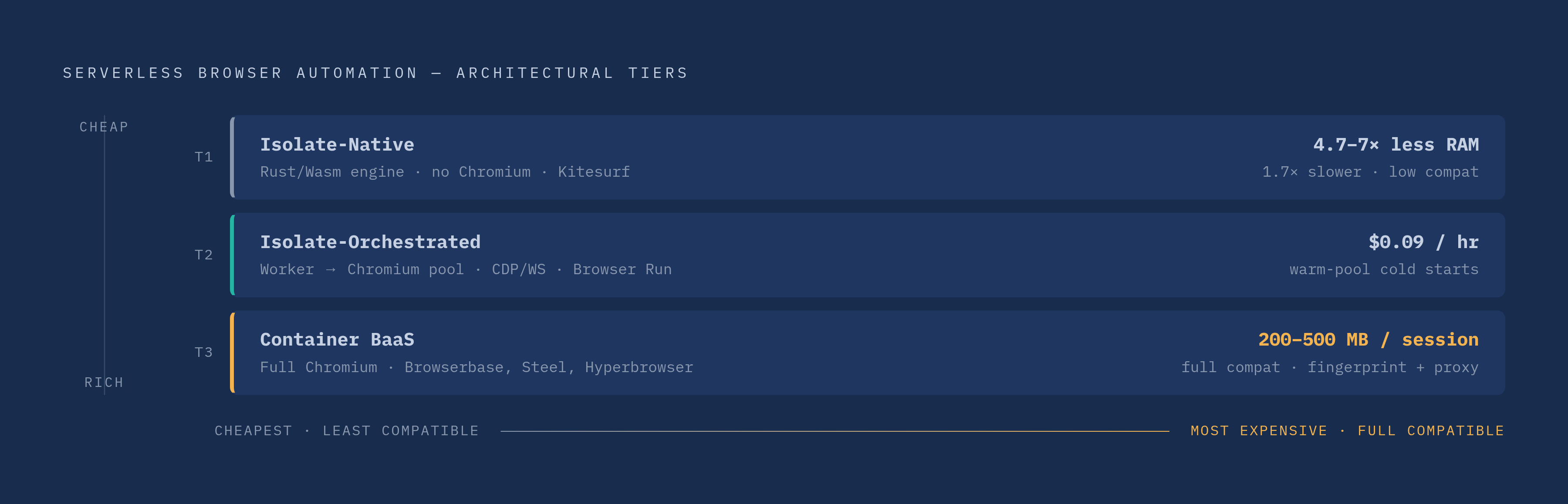
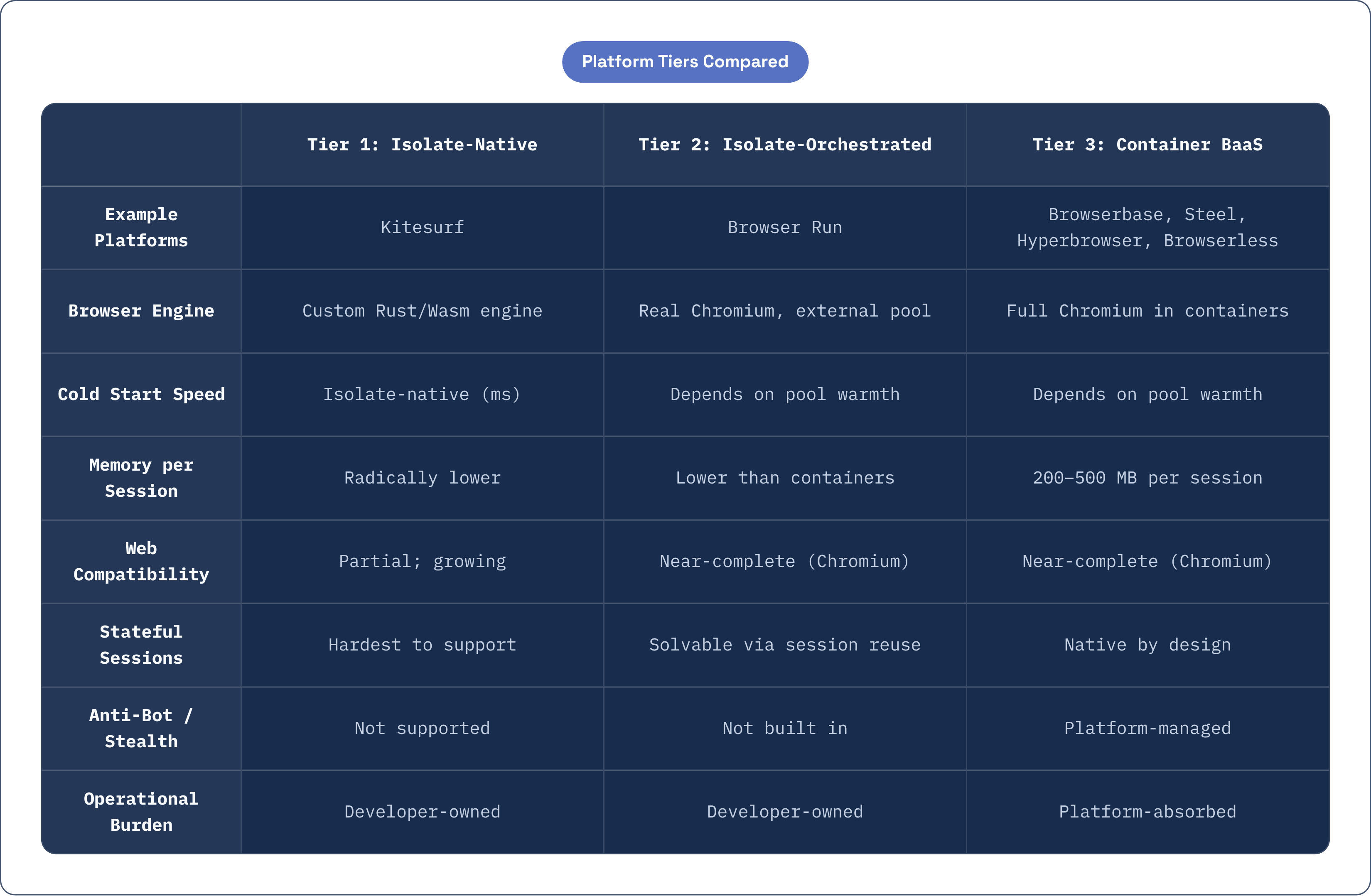
Once you accept that isolates and Chromium cannot occupy the same space, three genuine tiers fall out: real structural differences in where the browser logic lives.
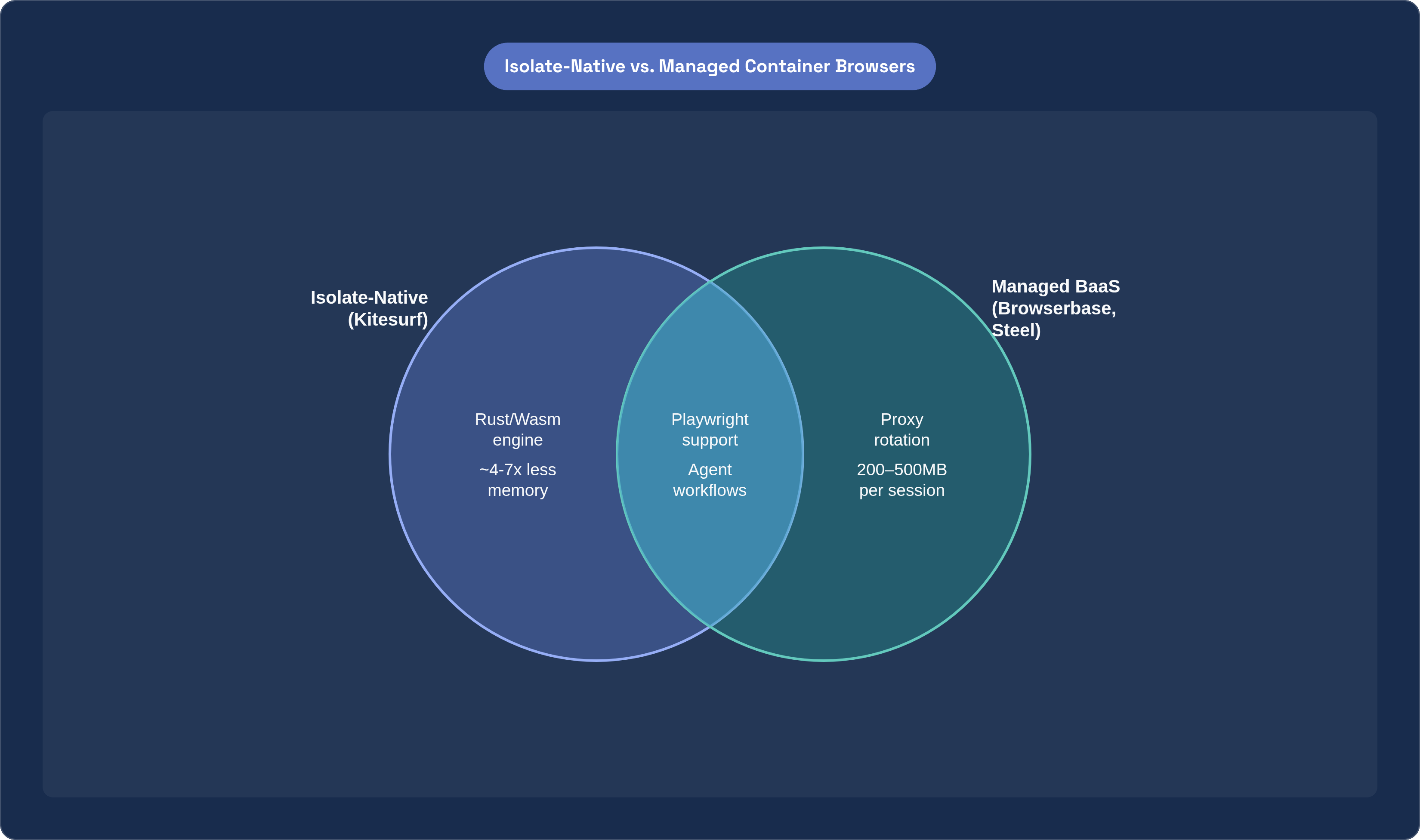
Tier one is isolate-native: browser functionality written in Rust, compiled to WebAssembly, running entirely inside the V8 isolate itself. No Chromium anywhere in the stack, no container, no bridge process to manage. Kitesurf is the clearest example of this approach, and it's rare enough that it deserves its own extended treatment later on.
Tier two is isolate-orchestrated. Here, the Worker or equivalent runtime acts as the conductor, but the actual Chromium instance runs in a separate process or pool, outside the isolate, and the two sides talk over the Chrome DevTools Protocol via WebSocket. Browser Run lives in this tier, using Workers as the orchestration layer while real Chromium runs in a separate pool.
Tier three is the container-managed browser-as-a-service model: full Chromium running in cloud containers, reached through an API, with isolates nowhere in the picture at all. Browserbase, Hyperbrowser, Steel, and Azure Playwright Testing sit here, and this is where fingerprinting, proxy rotation, and horizontal scaling become the platform's job rather than the developer's.
What tier a platform occupies determines almost everything downstream. Cold start speed depends on it: tier one inherits the isolate's native speed, while tiers two and three depend on how warm the Chromium pool happens to be at the moment of the request. Memory and CPU cost per session follows the same logic, with tier one radically cheaper and tier three carrying the full weight of a real browser, something in the range of 200 to 500MB of RAM per session for container options like Steel. Web compatibility runs the other direction: tier one is bounded by how much of the actual web platform a custom engine has managed to implement, while tiers two and three inherit Chromium's compatibility wholesale, which is close to complete. Stateful sessions, the kind where an agent logs in, navigates, and comes back later to pick up where it left off, are hardest to reconcile in tier one, solvable in tier two through session reuse APIs, and native to tier three by design. And operational burden, meaning who handles fingerprint rotation and proxy management and scaling policy, falls almost entirely on the developer in tiers one and two, and gets absorbed by the platform in tier three.
This is a filter rather than a ranking. The right tier depends entirely on what kind of workload you're pointing at it, and a stateless scraping job, a multi-step agent flow, and an anti-bot-hardened crawl are three different problems that happen to share the word "browser."
Browser Run: how Workers bridges the gap between isolates and real Chromium
Browser Run is the clearest illustration of tier two, and its architecture is worth walking through in some detail because it shows exactly how much engineering goes into making an isolate feel like it's driving a browser when it isn't.
Each data center keeps a pool of warm Chromium instances sitting ready. A Worker asks for a browser, gets one handed back essentially instantly, and from there all communication happens over CDP via WebSocket. The Chromium process lives outside the isolate the whole time; the Worker just holds the connection.
There are two ways to use it. Quick Actions cover stateless, one-shot tasks, screenshots, PDF generation, basic scraping, through a REST API with no code to deploy at all. Browser Sessions is the fuller option: programmatic control through Puppeteer, Playwright, raw CDP, or Stagehand, deployable inside Workers or reachable from any other environment that can hit the API.
The detail that actually matters for cost is session reuse. Calling browser.disconnect() instead of browser.close(), then reconnecting later using the session ID, avoids the overhead of cold-starting a fresh Chromium instance on every single request. At any real volume, that's the difference between a workload that's affordable and one that isn't; standing up a new browser process per request is expensive in a way that compounds fast.
The eval() problem shows up here in a very concrete form. Workers blocks dynamic code generation as a security measure, but some portion of the live web depends on eval() to function, and those pages currently get routed through Boa, a Rust-based JavaScript engine compiled to WebAssembly. It works, though it's slower than native V8 execution, and it's a workaround rather than a fix; anyone building against sites they haven't audited for this behavior should check for it before assuming full coverage.
Pricing gives a concrete sense of where this tier sits cost-wise. The free plan includes 10 minutes of browser time a day with 3 concurrent browsers at no charge. The paid plan bumps that to 10 hours a month and 10 concurrent browsers, averaged monthly, still at no charge. Past that, REST API usage runs $0.09 per browser hour, and Workers Bindings usage is priced the same $0.09 per browser hour plus $2.00 for each additional concurrent browser beyond the plan's allotment. Worker compute itself is billed on CPU time actually consumed, not wall-clock time, so a Worker sitting idle while it waits on a slow remote browser response doesn't rack up charges for the wait. There's no egress or bandwidth fee on top of any of it.
This tier makes the most sense for teams already building on Workers, workloads that are mostly stateless with occasional bursts of statefulness, and developers who want Puppeteer or Playwright ergonomics without owning any browser infrastructure themselves. It stops making sense the moment a workload needs serious anti-bot bypass, proxy rotation, or fingerprint isolation across many accounts; that's a tier three job, or requires stacking something else on top.
Kitesurf: what it means to build a browser engine inside V8 isolates from scratch
Kitesurf takes the opposite bet from Browser Run. Instead of bridging out to real Chromium, it asks what a browser looks like if you strip away everything a human needs and rebuild only what an agent actually uses.
Gone are tabs, extensions, themes, pixel-perfect rendering, and smooth 60fps scrolling, none of which matter to a script reading a DOM. What remains, the HTML parser, the CSS engine, JavaScript execution, and a renderer, gets rebuilt in Rust and compiled to WebAssembly, small enough and self-contained enough to run entirely inside a V8 isolate. This is worth restating plainly: there is no Chromium underneath any of it. This is a separate engine, built from the ground up for the kind of workload an agent generates.
The tradeoffs are exactly what that architecture would predict. Memory use comes in at roughly 4.7 times lower than Chromium for screenshot tasks and about 7 times lower for HTML extraction, numbers that matter enormously once you're running hundreds of concurrent sessions rather than one. Wall-clock speed goes the other way, with Chromium finishing tasks around 1.7 times faster, largely because its JIT compiler has decades of optimization behind it that a from-scratch software renderer hasn't caught up to yet.
That tradeoff, slower per session but dramatically cheaper per session, is the entire economic argument for this tier. Infrastructure bills at scale are driven by CPU and memory footprint far more than by raw clock time, so a platform that trades some speed for a large drop in resource consumption can run more concurrent sessions for less money even though any single session takes a bit longer to finish.
Compatibility is the honest caveat here. Kitesurf currently passes more than 215,000 Web Platform Tests, with hundreds more added weekly, which is meaningful and growing but is not full parity with Chromium. Sites that lean on obscure or cutting-edge platform features may not render correctly yet, and that gap is worth checking against before committing a workload to it. Adoption, at least, is close to frictionless: existing Puppeteer, Playwright, and MCP clients can point at it with a browser=kitesurf parameter and nothing else needs to be rewritten.
There's also a security dimension unique to this tier that's easy to overlook. A browser running inside an AI agent's workflow faces prompt injection risks on top of the usual web security concerns, since the content it renders can potentially manipulate the agent reading it. Kitesurf's design treats context window management, token cost, and tool safety as first-class priorities rather than things bolted on after the fact, which matters more the deeper agentic workflows get embedded into production systems.
It's currently free in beta, with an open-source release planned that would let teams self-host it on their own infrastructure. Strategically, it reads as the same move Workers made with KV, Durable Objects, and D1: taking something that used to be an external dependency, in this case, browser access, and turning it into a native compute primitive instead of a bolted-on product.
Managed container platforms: Browserbase, Browserless, Hyperbrowser, and Steel on their own terms
Step outside the isolate model entirely and you land in tier three, where the shared premise is straightforward: run real, full Chromium in a container, handle the messy parts of doing that at scale, and let developers treat it as a plain API.
Browserbase has raised the most capital of the group, a $40 million Series B in June 2025 valuing the company at $300 million post-money, with $67.5 million raised across all rounds. Its headline feature is launching thousands of parallel browser sessions within milliseconds, built for high-throughput crawling and for wiring large language models directly into live web pages. Stagehand handles agent orchestration on top of it, and session inspection gives visibility into what a given browser actually did. The concurrency claim is the real differentiator; this is the option to reach for when the job requires horizontal scale across many simultaneous Chromium sessions, a scale no isolate-native platform currently matches.
Browserless has been in this space the longest, with roots in Puppeteer that go back further than most competitors here. Its Scale plan tops out at 50 concurrent sessions for $500 a month, and it supports Playwright, Puppeteer, Selenium, REST, and GraphQL, the widest protocol surface of any managed option on this list. It also offers real deployment flexibility, managed cloud, self-hosted Docker, or private cloud, which matters for teams under data residency requirements that rule out a fully managed SaaS. It's worth noting Browserless doesn't solve fingerprinting or proxy rotation by default; teams that need those add them separately or reach for its BrowserQL layer.
Hyperbrowser is newer, YC-backed, and built specifically with AI agents in mind from day one rather than adapted toward them. Cold starts land under 500 milliseconds, and native integrations exist for both Claude and OpenAI's APIs. It positions itself less as raw browser infrastructure and more as a managed gateway for agent builders who'd rather not think about browsers at all.
Steel is open-source and also AI-native, with session management, proxy support, and stealth plugins for basic anti-detection work built in. Each concurrent session costs somewhere between 200 and 500MB of RAM, and that number is worth holding onto: it's the real cost of full Chromium per session, and it's exactly what makes Kitesurf's memory reduction claims meaningful by comparison. In October 2025, Steel doubled its concurrent session limits and added an MCP server for agent integration, though its single-session architecture still limits how far it stretches for workloads that need true high-volume parallelism.
Azure Playwright Testing rounds out the tier, supporting up to 50 parallel browsers with usage-based billing against Azure credits. It's built for test suites already living inside Azure environments rather than general-purpose automation or agent workflows, and it's worth knowing about mainly for teams already committed to that ecosystem.
Matching workload type to platform tier: the actual decision logic
So which tier actually fits a given job? The honest answer depends less on the platform's marketing and more on the shape of the workload itself, and three shapes cover most of what teams are actually building.
Stateless, high-volume extraction, screenshots, PDF generation, scraping structured data off JavaScript-rendered pages, fits isolate-orchestrated platforms well. Browser Run's Quick Actions in particular carry low operational overhead, consumption-based pricing, and no idle cost sitting in the background.
Stateful multi-step agent flows, the kind that log in, navigate across several pages, interact with forms, and extract data across a session that needs to persist, point toward isolate-orchestrated platforms with session reuse, Browser Run's Browser Sessions with reconnection by session ID, or toward managed BaaS options like Browserbase or Browserless. Which of those two you pick usually comes down to one question: does this workload need serious anti-bot bypass or not?
Anti-bot-hardened crawling, or automation running across many accounts that each need distinct fingerprints, belongs squarely in managed container BaaS territory. Chromium-level fingerprinting, proxy rotation, and stealth tooling are table stakes there, and no isolate-native platform currently covers that ground; it's simply not what that architecture was built for.
Kitesurf's current sweet spot sits with agent workloads where CPU and memory cost at scale matter more than shaving milliseconds off wall-clock time or having full Chromium-level compatibility on day one. Being free in beta lowers the cost of testing it out, and the 215,000-test compatibility floor already covers a meaningful chunk of real-world usage, even if it isn't total parity yet. The eval() limitation on the Workers side is worth treating as an actual workload filter rather than a footnote; teams whose targets lean heavily on dynamic code generation should test against that constraint directly before building around an isolate-native or isolate-orchestrated approach.
Cost structure itself is a variable worth weighing on its own terms, separate from raw capability. Isolate-based platforms charge for CPU actually consumed, with no idle charges, no wall-clock billing, and no egress fees, which favors workloads that are bursty and hard to predict in advance. Container-based BaaS platforms typically bill by session-hour or by concurrency tier, a structure that favors steadier, more predictable traffic where the cost of a warm, fully-featured Chromium instance is easier to plan around.
These tiers coexist rather than compete, and treating them as competing for the same job misses what's actually happening here. Each one reflects a different, deliberate bet about where the constraints of the isolate model are worth working around, and where they're worth abandoning altogether in favor of full Chromium. The right choice was never going to be universal; it was always going to depend on what the workload actually needs.