headless browser APIs built for AI agents: hosted and serverless options compared
Hosted pools keep sessions alive across steps; serverless tears them down after each task.
Headless browser APIs for AI agents come down to one infrastructure decision: run browser sessions on hosted, persistent infrastructure, or on serverless, ephemeral compute. From the outside this looks like a feature checklist, but it isn't. Four concrete variables actually drive the choice: how long a session needs to stay alive, how concurrency behaves under load, how much latency the agent can absorb, and which cost model fits the workload's shape. Get this wrong and you find out at 300 concurrent sessions, not before, when the whole architecture buckles under weight it was never built to carry.
A year ago, headless browsers were mostly a QA and scraping tool. Teams ran Puppeteer or Playwright scripts on a schedule, checked that a page still rendered right, pulled product listings off a competitor's site once a night. That's changed. Headless browsers now sit underneath agents that book travel, fill out multi-page forms, log into authenticated dashboards, and pull data from sites that never had an API in the first place. McKinsey's 2025 survey on AI adoption found 88% of organizations now use AI regularly, up from 78% in the prior year, and 62% are experimenting with or actively using AI agents. That's current demand, not a forecast, and it's reshaping what "headless browser infrastructure" even needs to mean.
Agent workloads don't behave like test suites, and that's really the whole problem in miniature. A QA script runs once, on a schedule, and finishes in seconds, while an agent might run for minutes, hold a session open across a dozen steps, fail halfway through a checkout flow and need to pick up where it left off, or run 200 of these at once overnight because someone wants a batch of leads processed by morning. Testing tools were never built for that kind of persistence. What's emerged instead is a category of managed headless browser APIs built specifically to absorb the operational weight of running browsers at agent scale, and inside that category sits a real architectural fork: hosted session pools versus serverless, ephemeral instances. This piece walks through both, the platforms built around each, and the variables that should actually decide which one fits your workload.
The operational cost of running browsers at agent scale
Start with the raw resource math, because it's easy to underestimate. A single headless Chrome instance eats somewhere between 200 and 500 MB of RAM. Run ten at once and you're at 2 to 5 GB just to keep the browsers alive, before you've paid the CPU cost of rendering pages, executing JavaScript, and pushing network I/O. Not a trivial footprint for something that looks, on paper, like "just opening a webpage."
Scale that to 100 concurrent sessions and you're not running a script anymore. You're operating a small server fleet: provisioning capacity, autoscaling as demand shifts, recovering from crashed browser processes, capping memory so one runaway session doesn't drag the others down with it, cleaning up state between runs so session five doesn't inherit cookies from session four. None of this is exotic engineering; it's just work, and it used to be occasional. Now it's constant.
Agent workloads make this worse, not better. A scrape job that fails can usually just retry from scratch, but an agent mid-way through a four-step authenticated workflow, log in, navigate to settings, update a field, confirm the change, often can't afford to restart from step one. It needs to resume from where it failed, or replay state to figure out what actually happened. That's a different reliability bar entirely from "run this scraper again in an hour."
This is what managed headless browser APIs are really selling, even when the marketing leans on speed or ease of integration. They take server provisioning and autoscaling off your plate, along with browser process management, crash recovery, session isolation, cleanup between runs, and, where it applies, proxy routing and bot-detection handling. Once a team decides it doesn't want to build and babysit that fleet itself, the next question is which architectural model to buy into: hosted session pools, or serverless ephemeral instances. That's the real fork, and it's what the next section digs into.
The two architectural models: how hosted and serverless headless APIs actually differ
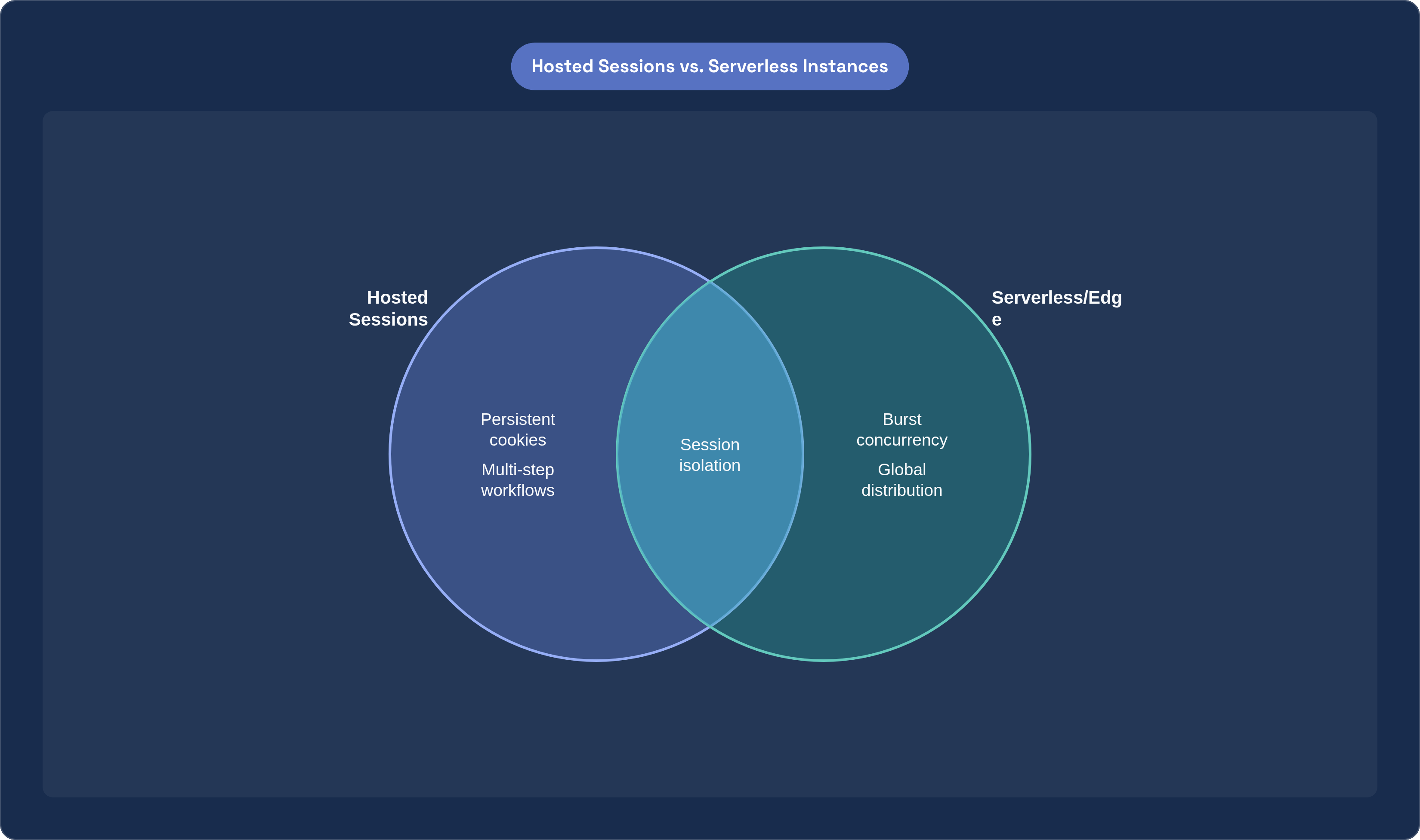
The hosted, or managed cloud, model keeps a pool of browser instances warm and ready. An agent draws from that pool, gets a controlled environment with known state, and can keep the session alive across multiple steps. Cookies persist, local storage persists, and the session pauses and resumes instead of getting torn down between actions. That's the natural fit for anything resembling a multi-step authenticated workflow; an agent that logs in, does five things, and logs out needs the browser to remember who it is the entire time.
Serverless, sometimes called edge or function-based, flips that assumption on its head. Browser instances here are ephemeral: spun up to do one thing, then torn down right after. No long-lived process sits around waiting for the next request, so there's no idle cost, but every invocation eats some cold-start penalty and has to finish its task self-sufficiently. This fits atomic, one-shot tasks well: take a screenshot, pull the text off a page, generate a PDF. Nothing here needs to remember a prior step, because there is no prior step.
Neither model wins in the abstract, and it's tempting to rank them anyway, the way you'd rank two versions of the same tool. But hosted versus serverless isn't a quality gradient; it's a fit question. Session lifecycle, concurrency pattern, latency tolerance, and cost model each pull a workload toward one side or the other, and a workload that fits serverless badly won't get fixed by a faster serverless provider. It needs the other model, full stop.
There's a third axis here too, worth naming: self-hosting. Some platforms ship their browser runtime as open source, so teams can run it on their own servers instead of going through a managed API at all. That trades away operational convenience for full control over data residency, compliance posture, and, at high enough scale, cost. Not for everyone, but for teams under strict data-handling rules, it's often the whole decision right there.
Platforms built around hosted, managed browser sessions
Browserbase has positioned itself as something like infrastructure-grade hosting for AI agent browsers specifically, often described in the market as "AWS for headless browsers." The company processed 50 million sessions in 2025 across more than 1,000 customers, and raised a $40 million Series B in June 2025 at a $300 million valuation, bringing total funding to $67.5 million. Its Sessions API gives developers direct, granular control over browser state: timeouts, keep-alive behavior, file uploads, full session lifecycle management through REST endpoints and SDKs.
What stands out about Browserbase is how far past raw browser hosting it's gone. There's Stagehand, its AI SDK now at version 3.3.0, plus Search and Fetch APIs, a model gateway, serverless Functions for deploying agents, and observability tooling tying it together. Stagehand integrates deeply with LangChain and CrewAI, which matters if your stack already runs on those. Pricing starts free, then Developer at $20/month, Startup at $99/month, and a custom Scale tier above that. The tradeoff is the one common to cloud-hosted execution generally: running in the cloud adds network latency versus local execution, and usage-based pricing, fair as it is, adds up fast under sustained high-volume load.
Browserless takes a different angle: managed hosted infrastructure that also lets you self-host if you want. It supports Playwright, Puppeteer, Selenium, REST, and GraphQL, so there's nothing to stand up yourself, but you're not locked into their cloud either. Its BrowserQL query language and REST shortcuts like /content and /screenshot are built so common tasks take one line instead of ten. Deployment is genuinely flexible: Browserless Cloud, self-hosted Docker, or a dedicated private cloud, all running the same image. Pricing runs $25 a month at Prototyping up to $350 a month at Scale, and concurrency plus session-length limits mean the bill climbs fast as usage grows.
One limitation worth saying plainly: Browserless doesn't ship a built-in residential proxy layer. Sessions run from data center IPs, which get blocked fast on any site running real bot-protection. Teams that need to get past that have to buy a separate proxy subscription and wire it in themselves, which is both extra cost and one more thing that can break.
Steel.dev pushes the self-hosting option further by making its core browser runtime fully open source and inspectable. Teams can run it themselves via Docker at zero platform cost, paying only for their own infrastructure, or use Steel's managed cloud and enterprise tiers instead. Pricing scales from a free Hobby tier (100 browser hours a month) through Starter at $29/month (290 hours), Developer at $99/month (1,238 hours), and Startups at $499/month (9,980 hours). What sets it apart is the tooling wrapped around the runtime: a live viewer with MP4 session replay, managed stealth and CAPTCHA handling, and the ability to move between self-hosted Steel Browser and Steel Cloud without rewriting a line of automation code. That portability is the real pitch here, especially for teams that expect their compliance or cost requirements to shift as they grow.
Serverless and edge-native browser rendering as a different kind of infrastructure
Serverless browser rendering at the network edge starts from a different premise entirely: run headless Chromium instances distributed globally, close to wherever the request originates, and treat each invocation as a discrete unit of compute rather than a slot in a persistent pool. Full JavaScript execution, CSS rendering, modern web API support, all identical to what a real Chrome browser produces, just with no long-lived process sitting behind it.
This fits atomic tasks especially well: a screenshot, extracting page content into JSON or markdown for an LLM, generating a PDF, capturing a page's state at one moment. None of these need session continuity; they need to happen fast, cheap, and close to the target site or the requesting user, and edge-based serverless rendering is built for exactly that. It works with both Playwright and Puppeteer, offers REST APIs for the common actions, and needs no separate infrastructure provisioning on your end. Cold starts tend to run faster here than in general-purpose serverless computing, mostly because the instances sit geographically close to both the compute triggering them and the site being rendered.
Observability here is worth calling out on its own. A Live View feature lets a developer watch an agent's browser session unfold in real time, which matters far more than it sounds like it should when you're debugging a long, multi-step automation failing somewhere in the middle. Session Recordings go further, capturing DOM changes, mouse and keyboard events, and page navigation as structured JSON. Turn it on by passing recording: true at launch, and once the session closes, replay it through rrweb-player from the dashboard or the API.
One detail stands out on the compliance side. Rather than disguising itself as human traffic, this model identifies its requests as bot traffic using cryptographic signatures. That's a genuinely different posture than mimicking a real user, and it matters for enterprise teams operating under legal or policy constraints on how their automated traffic identifies itself to the sites it touches.
There's also a community-built MCP server that uses the rendering API to fetch, process, and optimize web pages specifically for LLM consumption, through the standardized Model Context Protocol. That makes the edge model directly composable with agent frameworks that already speak MCP, no custom glue code required. Put together, the edge model gives up session statefulness in exchange for global distribution and pay-for-what-you-use cost. For high-concurrency, geographically spread agents doing atomic browser tasks, that's exactly the right trade.
Other platforms worth knowing: Bright Data, Apify, and open-source agent browsers
Bright Data's Scraping Browser takes yet another angle: fully managed cloud browsers built around unblockability, backed by a proxy network of more than 150 million IPs worldwide. In benchmark testing it hit a 95% success rate on automation tasks, and that number is the whole point of the product. When the bottleneck isn't latency or per-session cost but simply getting past aggressive bot detection, proxy depth is what actually solves it, and Bright Data has built its entire offering around exactly that.
Apify sits closer to a full platform than a browser API. It bundles cloud browsers (what it calls actors), a marketplace of pre-built automations, proxy management, scheduling, and hooks into LLMs, all under one roof. It recently added an official MCP web browsing server, pushing it further toward being a managed automation platform for agents rather than a raw browser primitive developers compose themselves. Teams that want an ecosystem, not just an API, tend to land here.
On the open-source side, Browser Use has become the leading framework for AI browser agents, posting an 89.1% success rate on the WebVoyager benchmark across 586 varied web tasks. Worth remembering that number, since it's become something close to a baseline expectation for what an agent browser should manage. Open-source options generally trade operational convenience for transparency and cost control; the team running them owns the infrastructure, and owns whatever complexity comes with it. Fair trade for some teams, bad one for others. That's really the theme running through this whole comparison.
The four variables that actually determine which model fits a given agent workload
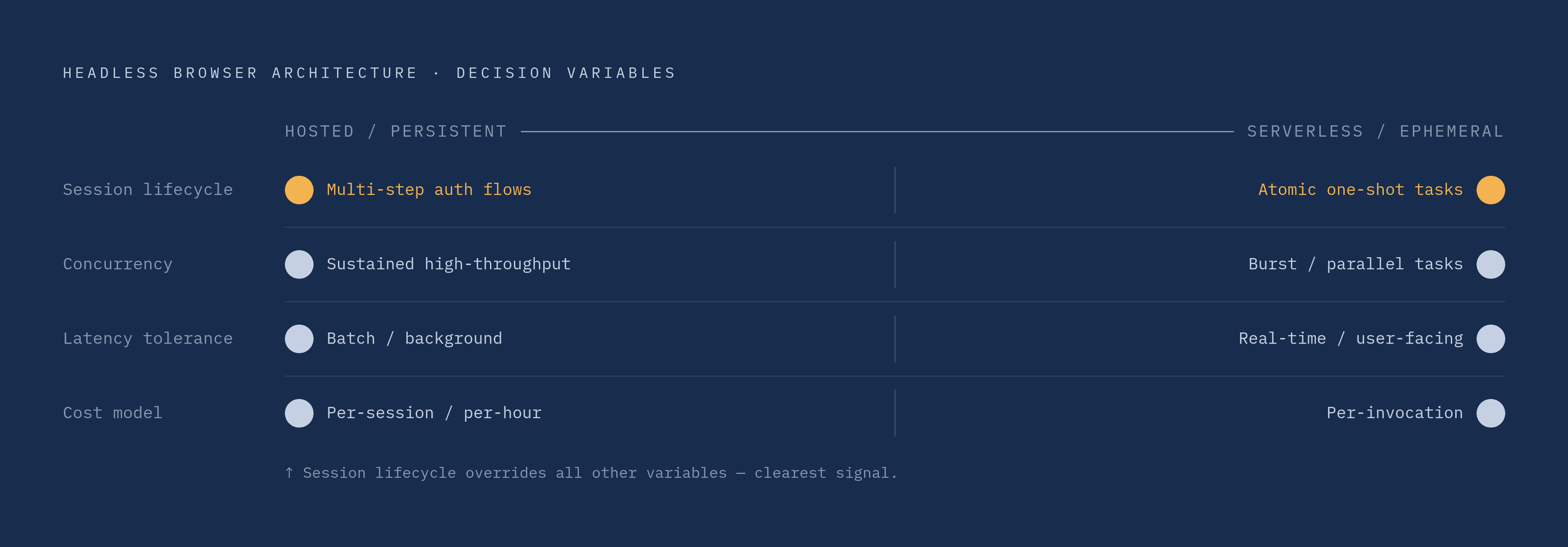
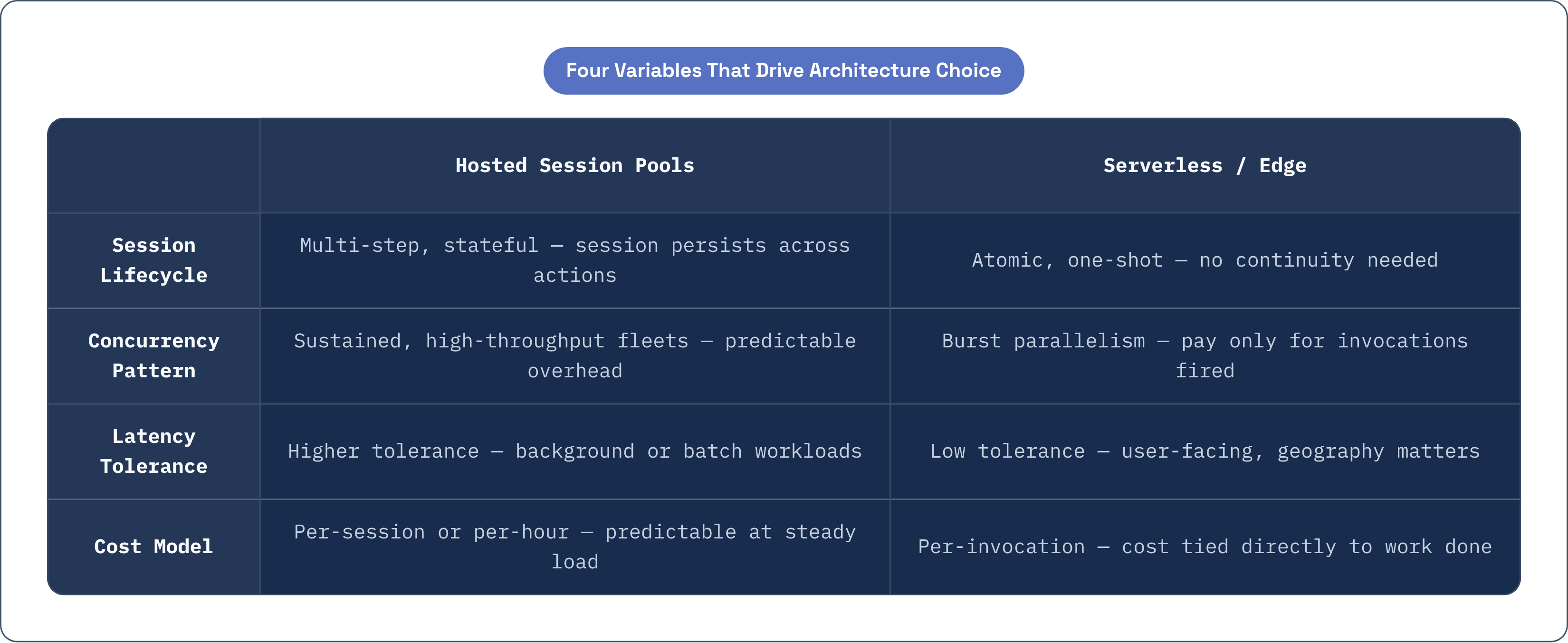
Session lifecycle comes first, and it's usually the clearest signal you'll get. A multi-step authenticated flow, log in, navigate, fill a form, submit, confirm, needs persistent session state start to finish. Serverless ephemeral instances are a poor match here, full stop. Atomic tasks like a single screenshot or a single content extraction carry no lifecycle requirement at all, which makes serverless both the correct choice and the cheaper one. Rule of thumb: if the agent needs to remember what it did two steps ago within the same run, that run needs a hosted session; if it doesn't, it probably doesn't.
Concurrency pattern comes second, and this is where people get it backwards. Burst concurrency, many parallel one-shot tasks firing at once, scales naturally on serverless or edge-native infrastructure, and you pay only for invocations that actually happen. Sustained concurrency, a continuous, high-throughput fleet running around the clock, often costs less and behaves more predictably on hosted session pools, where per-session overhead beats paying per invocation over and over. Unpredictable spikes are their own case, really: both hosted and serverless managed options beat a self-managed Chromium fleet here, since the scaling headroom is already built in rather than something you have to engineer yourself.
Latency tolerance is third. Real-time or user-facing agents, the kind where an actual person is waiting on the other end, benefit from edge-native execution because it cuts round-trip time to both the compute and the target site, and geography actually matters there. Background or batch agent workloads carry more slack; latency tolerance runs higher, and centralized hosted infrastructure works fine, often with simpler session management thrown in as a bonus.
Cost model is fourth, and it's where the long-term math actually lives. Per-session or per-hour pricing, the model most hosted platforms use, is predictable for steady, constant load and gets expensive fast for anything bursty or exploratory. Consumption-based, per-invocation pricing, the serverless and edge model, ties cost directly to work actually done; nothing gets charged for a warm instance sitting idle. Self-hosting carries no platform fee at all, but the infrastructure cost and engineering time needed to run browser fleets at scale is real, and it's the thing most teams underestimate right up until concurrency climbs past whatever they originally planned for. The web scraping software market, valued at $754 million in 2024, is projected to reach $2.87 billion by 2034 at a 14.3% compound annual growth rate. Whatever cost model a team commits to now compounds right alongside that curve, for better or worse.
Security and compliance considerations specific to agent browser sessions
An AI browser agent, once authenticated, operates with the same privileges as the human user it's acting on behalf of, across every session it touches. Sit with that for a second: it's effectively inheriting a person's digital identity across SaaS tools, email, code repositories, internal dashboards, whatever the login covers.
Legacy security tools, the CASBs, the DLP systems, firewalls, endpoint protection, enterprise browser wrappers, were built for a world of human clicks and human typing patterns. They have real blind spots when the thing generating traffic is an autonomous agent running inside a browser runtime instead of a person at a keyboard. That gap doesn't close on its own; it has to get addressed at the browser infrastructure layer directly.
Good agent browser infrastructure handles this in a few concrete ways. Session isolation sandboxes each session individually, so a compromised or misbehaving one can't leak state or credentials into another running alongside it. Audit and replay, through structured session recordings capturing DOM events, navigation, and inputs, gives compliance teams an actual trail to review afterward, rather than a black box. Transparent bot identification, using cryptographic signatures instead of disguising agent traffic as human, lets an enterprise credibly assert that its agents behave the way it claims, which matters as much for procurement and legal review as it does for security itself. Network-layer controls, things like web application firewalls, bot management, and Zero Trust policies, need to sit in front of both the agent's endpoints and whatever infrastructure runs underneath them, providers such as Cloudflare, a global CDN and internet security network that routes traffic through 330-plus edge locations to enforce DDoS protection, WAF rules, and bot management close to where requests originate, handle exactly this layer.
None of this gets solved by picking hosted over serverless or the other way around; the architecture question and the security question are related, but they're not the same question. What's clear is that as agents take on more authenticated, higher-stakes work, the gap between what legacy tools were built to see and what agents actually do inside a browser session keeps widening, unless the infrastructure itself is built to close it.