cloud platforms offering browser rendering APIs for AI agents
Cloud platforms are taking the infrastructure pain out of browser automation for AI agents.
Most of what an AI agent needs to touch on the internet has no API. Dashboards, legacy admin panels, internal SaaS tools built for someone clicking a mouse: this is a huge share of enterprise software, and none of it hands an agent a clean endpoint to call. So the agent does what a person does. It logs in, clicks through, fills out the form, waits for the page to load, and reads whatever comes back.
That gap between "an API exists somewhere" and "the API actually covers the task" is where browser automation stops being optional. Competitive research across a dozen web properties, filling out a vendor portal form, pulling structured data off a rendered dashboard, generating a screenshot for a compliance record: this is the ordinary, unglamorous work of an agent operating inside systems the company doesn't fully control. I want to walk through how cloud platforms handle the infrastructure underneath that work, and what actually matters when you're picking one, because I've watched enough teams get this decision wrong to know it's rarely obvious up front.
The compute cost that makes self-hosted headless Chrome unworkable at agent scale
The first instinct, almost every time, is to spin up headless Chrome. Fair enough, Puppeteer and Playwright are mature, well documented, and the prototype works on the first try. It works, that is, until someone tries to run ten of these at once.
A single headless Chrome instance eats somewhere between 200 and 500 MB of RAM. Multiply that by ten agent sessions running at once and you're several gigabytes deep before any application logic runs, before any model inference happens, before the agent has done one useful thing. The CPU cost stacks on top, because Chrome's rendering pipeline is built to paint frames 60 times a second for a human eye. An agent reading a page has no use for smooth scrolling or animated transitions. It needs the DOM, and it's paying rendering costs meant for a completely different kind of user.
So the team building this in-house ends up managing container orchestration, session pooling, crash recovery, and proxy rotation, none of which has anything to do with the product they actually set out to build. It's infrastructure work that keeps growing without a customer ever noticing it exists. Full Chromium per agent runs fine at single-digit concurrency, but it breaks, often badly, the moment you hit real production load, and the cost curve turns unpredictable right when the business wants to scale agent usage up. Cloud browser rendering platforms exist to take that tax, all that orchestration and pooling and crash recovery with nothing to show a customer, off your plate.
What a cloud browser rendering API actually provides
At the core, a cloud browser rendering API hands an agent a remote, managed browser it calls through an SDK or a REST endpoint. Nobody babysits a local Chrome process anymore. Most platforms in this space offer the same handful of building blocks: screenshot and PDF generation, full DOM access as HTML, JSON, or markdown ready for an LLM to read, JavaScript execution on the live page, and session persistence, meaning cookies and auth tokens carry across multiple agent turns instead of resetting every call. Plugging into Playwright, Puppeteer, or the Chrome DevTools Protocol directly means existing automation code doesn't need a rewrite to move from local to cloud.
The agentic layer on top adds things a plain scraping tool never needed: live visibility into what the browser is doing mid-task, session recording for replaying a failure after the fact, and session state durable enough to survive an agent restarting mid-workflow.
Two categories get lumped together here that really shouldn't be. A scraping API does a one-shot, stateless fetch of a page. It's cheap, and it's fine when the target page is public and doesn't need a login. A full browser API manages a stateful session across multiple steps, which is what you need the moment a target site requires authentication or a multi-page flow. Mix the two up and a team picks the cheaper option, then finds out three weeks later it can't actually finish the task.
There's also a compliance angle that gets less attention than it deserves. Some platforms mark their traffic as automated rather than disguising it to look human. As legal scrutiny of scraping grows, that split between compliant automation and stealth scraping is turning into a real policy question, not just a technical footnote.
The platforms builders are actually evaluating
Browserbase is the established name here, and for good reason. It's a full agent platform: managed browsers, a model gateway, serverless functions, and the Stagehand SDK bundled together. The company has attracted significant venture backing, which tells you venture capital has real conviction in this category. Browserbase is the pick when a team wants complete, hosted agent infrastructure and wants nothing to do with browser plumbing themselves.
Steel takes a different approach: open source and self-hosted, built for operators who want to pop the hood on the infrastructure layer rather than trust a vendor's black box. It supports persistent cookies, automatic sign-in, JavaScript rendering, proxy rotation, stealth configurations, and CAPTCHA handling. All the operational weight stays with the builder, and in exchange there's no vendor to depend on.
Browserless offers raw CDP access plus newer extraction endpoints and agentic MCP browsing, aimed at teams that want direct protocol control without an opinionated SDK sitting on top. Firecrawl leans scrape-first, producing LLM-ready output for autonomous agents, and it's the strongest fit when the job is web data ingestion rather than managing an interactive session. Browserbeam focuses on structured, token-efficient output, things like element references, DOM diffs, declarative extraction, built explicitly around the per-token cost of running an LLM agent at scale.
Per Browserbeam's own comparison from April 2026, the right pick depends on what the task actually needs: structured interactive output, full-stack agent infrastructure, open-source control, raw protocol access, or scrape-first data collection. Five products, five different bets on what an agent spends its day actually doing.
Browser Run and what changes when the browser becomes a persistent agent tool
Browser Run, launched in April 2026, adds the observability and durability pieces that separate a browser API built for an agent from one built for a scraping script. Live View gives real-time visibility into what the browser is doing mid-session, and that matters because an autonomous agent's path through a UI isn't scripted the way a plain scraper's is. When something goes wrong, you need to watch it happen, not reconstruct it from a stack trace an hour later.
Session Recordings capture DOM changes, mouse and keyboard events, and navigation as structured JSON, turned on with a flag at session launch, pulled later via dashboard or API for replay with rrweb-player. That replay is what turns debugging an agent failure into a real process instead of a guessing game. You can watch, step by step, exactly where the agent lost the thread in a multi-page flow.
Durable Objects handle session persistence, which strips out the latency cost of spinning up a fresh browser context on every agent turn. The session stays warm across a multi-turn task instead of restarting cold each time. Combined with Playwright MCP and Stagehand integration, the agent can describe what it's trying to do at a higher level than raw CSS selectors, and that matters because selector-based automation breaks the moment a target site redesigns its UI.
An agent's browser session is stateful by nature. It logs in, moves through several steps, comes back with an answer. Infrastructure that treats each call as a stand-alone, stateless request forces re-authentication on every turn and throws away the context the agent just spent three steps building. That's the design constraint any serious agent infrastructure has to work around.
Kitesurf: what it means to build a browser for agents rather than for humans
Announced August 7, 2026, Kitesurf is a headless browser built from scratch for autonomous agents, a different starting point than bolting agent support onto a browser designed for a person clicking around. The foundational choice is architectural: it runs inside V8 isolates, the same isolation layer that powers Cloudflare Workers, rather than spinning up a full Chromium process inside a Docker container. It starts in milliseconds, at any of 300-plus points of presence worldwide, billed per request, with no idle process sitting around waiting for the next call.
Under the hood, it combines the Blitz rendering engine, Firefox's Stylo CSS parser, and the Boa JavaScript engine, all compiled to WebAssembly and run inside V8 isolates. It was built in 12 weeks, leaning hard on existing Workers infrastructure: WebAssembly support, Dynamic Workers, SQLite-based Durable Objects, worker-to-worker RPC, Node.js compatibility. That's a fast build cycle for something with this much surface area, and it shows in how tightly it's stitched to the platform it grew out of.
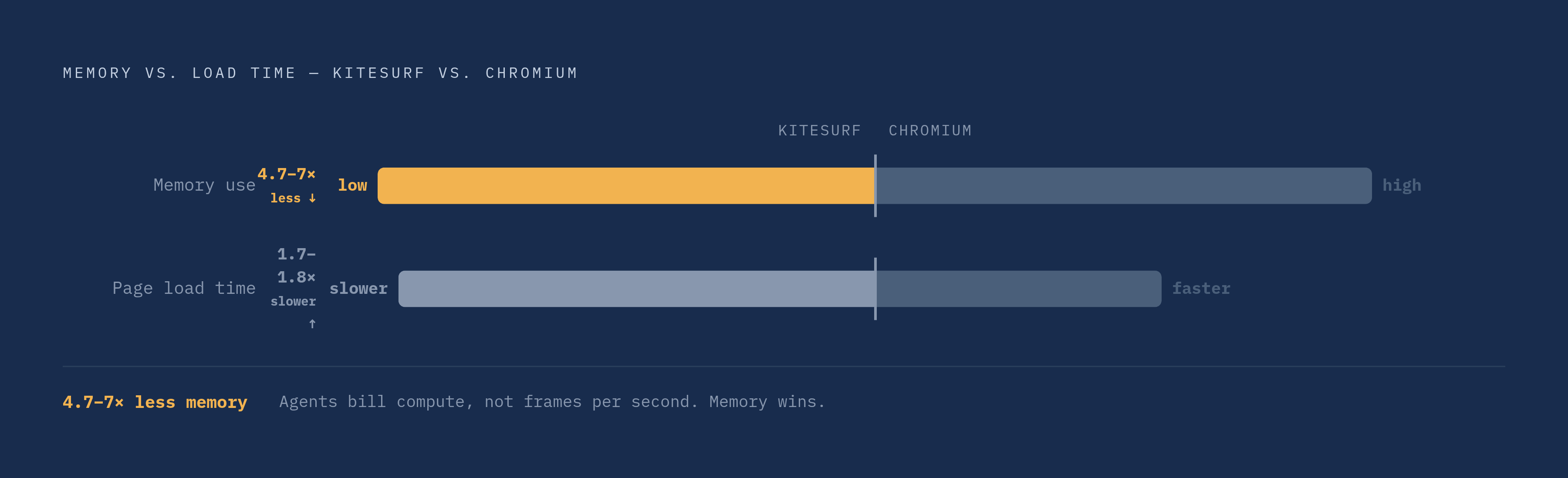
On web platform fidelity, Kitesurf passes hundreds of thousands of subtests from the Web Platform Tests suite, covering DOM, HTML, SVG, and network requests. That's enough ground covered to handle the structured extraction and screenshot work most agents actually spend their day doing. The resource trade-off is the interesting part: it uses 4.7 to 7 times less memory than Chromium but takes 1.7 to 1.8 times longer to load a page. That gap tells you exactly who this is built for. Agents count tokens and compute bills, not frames per second, so a slower page load that costs a fraction of the memory suits most agent workloads fine, even though the same trade would be a bad deal for a human sitting there waiting on a page to paint.
It speaks Chrome DevTools Protocol, so existing Puppeteer, Playwright, and chrome-remote-interface code connects without a rewrite. It's free during beta through Browser Run.
Now, the limits, and there are real ones. Kitesurf can't play video, can't render WebGL, and doesn't negotiate real TLS fingerprints, so any site running a bot-challenge handshake just won't open for it. Strong fit for data extraction, structured content, screenshots, form interaction. Poor fit the moment a target site's anti-bot stack demands the agent look like a real, fingerprint-matching browser session.
How Kitesurf fits into a broader platform rather than standing alone as a browser product
Kitesurf sits alongside Browserbase and Steel as an option, but it's better understood as the browser access surface of a Workers-native agent platform, and that's a bigger deal than it sounds at first. It's the same move Cloudflare made earlier with KV storage, Durable Objects, and D1: take a capability that used to need its own separate service and fold it into Workers as a native primitive with its own binding.
What that buys in practice is real. Browser sessions sit right next to the Workers-based agent logic, so there's no network hop between the agent's reasoning step and the browser tool it just called. Output from the browser, markdown, structured JSON, screenshots, flows straight into Workers AI inference or Vectorize without leaving the platform boundary. AI Gateway sits over every model call the agent makes during a browser-assisted task, giving one control plane for rate limits, caching, observability. Agents SDK and Workflows handle scheduling and orchestration, including human-in-the-loop approval steps, with the browser treated as one tool among several rather than the center the whole system revolves around.
So here's the actual decision a builder faces. If browser access is just one capability among several an agent needs, a platform that keeps browser, inference, storage, and orchestration on one network cuts latency, kills cross-service auth overhead, and produces one bill instead of four. But if a team's agent stack already runs on a different orchestration layer, migrating unrelated infrastructure just to get a better browser tool is its own tax, and a standalone API like Browserbase, Steel, or Browserless sidesteps that migration entirely.
What to evaluate when choosing a cloud browser rendering API for agents
Start with the session model. Stateless, one-shot fetches are cheap and work fine for public, unauthenticated pages, but the moment a task involves login, multi-step navigation, or context that needs to carry across agent turns, stateless stops working and durable sessions stop being optional.
Concurrency economics matter more than most teams expect going in. Per-session pricing, per-request pricing, and consumption-based pricing behave very differently once you're running hundreds of concurrent agents instead of five. Idle-time billing is a real structural risk for bursty agent workloads specifically, since agent traffic tends to spike and go quiet rather than run at a steady rate. Consumption-based pricing keeps cost tied to actual use rather than time a session merely sat open doing nothing.
Then there's fidelity. Lightweight rendering in the Kitesurf class is plenty for structured extraction, screenshots, and markdown generation. Full Chromium is the right call when a target site needs WebGL, video playback, or runs a TLS fingerprint check sharp enough to block anything that isn't a real browser handshake. Some platforms, Steel and Browserbase among them, offer stealth configurations and CAPTCHA handling for exactly this situation. Kitesurf does not.
Observability is the piece teams tend to undervalue until an agent fails silently in production at 2 AM. Session recording and replay, the kind Browser Run offers, shows the exact state of the page the moment things went sideways, valuable in a way a log file rarely matches. Live View earns its keep during development too, letting a team watch a new agent workflow before trusting it unsupervised.
Take a hard look at the integration surface. Nearly every major platform speaks CDP, so Playwright and Puppeteer code moves across vendors without much friction. The real lock-in risk sits at the platform level, proprietary SDKs and proprietary session formats, rather than at the protocol level. Native bindings into inference, storage, and orchestration cut latency and shrink the amount of infrastructure a team has to run, while a standalone API keeps the freedom to swap pieces of the stack independently later.
Compliance posture is worth asking about directly. Does the vendor mark itself as automated traffic, or disguise itself as a human browsing session? That's a growing legal and policy question as scraping litigation piles up, and for an enterprise agent operating inside systems the company is actually authorized to touch, compliant identification should be the default, not something bolted on after the fact.
Weigh control against convenience, honestly. Steel's open-source model gives full visibility into the infrastructure at the cost of running it yourself, on-call rotations and all, while managed platforms trade that visibility for operational simplicity. Which one is right depends on the team's DevOps bandwidth and how sensitive the data moving through these sessions actually is.
Building browser-using agents that hold up in production
Design the orchestration layer to be stateless even though the browser sessions underneath it are stateful. The agent's reasoning and its task queue should survive a browser session crashing without losing the progress made so far. A system where a single browser failure takes down the whole task was built backward from the start.
Keep orchestration and execution as separate jobs. The queue or scheduler deciding what the agent does next is a different concern from the browser session carrying out one step of that plan. Bolt them together as one tightly coupled unit and horizontal scaling turns painful down the road. Keep them apart early, and scaling up concurrent agents becomes a matter of adding sessions rather than tearing apart the whole pipeline six months later.
The tools covered here, Browserbase, Steel, Browserless, Firecrawl, Browserbeam, Browser Run, Kitesurf, exist because enough teams hit the same wall at the same time. Headless Chrome works until it doesn't, and the infrastructure tax of running it yourself grows faster than most teams expect going in. Picking the right one means being honest about what the target sites actually demand, what the agent's workload looks like once it's running at real scale, and how much of the surrounding infrastructure a team genuinely wants to own versus hand off to somebody else.